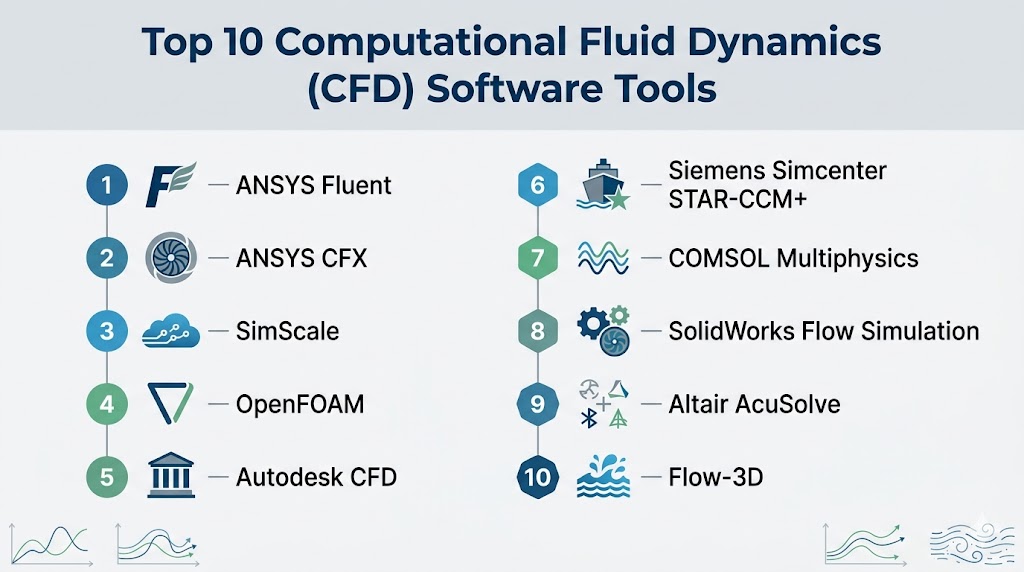
Introduction
Computational Fluid Dynamics (CFD) software is used to simulate and analyze how fluids (liquids and gases) behave under different conditions. In simple terms, it helps engineers predict airflow, heat transfer, pressure, turbulence, and fluid interaction with surfaces—without needing expensive physical testing.
In modern engineering, CFD has become essential across industries like aerospace, automotive, energy, and manufacturing. With the rise of AI-assisted simulation, cloud computing, and digital twins, CFD tools are now faster, more accessible, and capable of handling extremely complex real-world scenarios. This shift allows teams to optimize designs earlier, reduce costs, and improve performance before production.
Real-World Use Cases
- Aerodynamic design (cars, aircraft, drones)
- HVAC and building airflow analysis
- Thermal management in electronics
- Fluid flow in pipelines and industrial systems
- Renewable energy optimization (wind, hydro)
What Buyers Should Evaluate
- Solver accuracy and physics coverage
- Meshing capabilities and automation
- Ease of use vs simulation depth
- Hardware requirements (CPU/GPU/cloud)
- Integration with CAD/CAE workflows
- Scalability for large simulations
- Support for multiphysics modeling
- Post-processing and visualization tools
- Licensing and cost structure
- Learning curve and training resources
Best for: engineers, simulation specialists, R&D teams, and organizations working on fluid dynamics, heat transfer, and physical system optimization.
Not ideal for: users needing simple CAD modeling or visualization—CFD tools are specialized and require domain knowledge.
Key Trends in Computational Fluid Dynamics (CFD) Software
- AI-driven simulation acceleration reducing computation time
- Cloud-based CFD platforms enabling scalable computing
- GPU acceleration for faster simulations
- Automated meshing and setup workflows
- Digital twin integration for real-time monitoring
- Multiphysics simulation combining CFD with structural and thermal analysis
- Low-code simulation interfaces improving accessibility
- Open-source CFD adoption increasing flexibility
- Real-time simulation feedback loops in design workflows
- Integration with CAD tools for seamless engineering pipelines
How We Selected These Tools (Methodology)
- Evaluated industry adoption across engineering sectors
- Assessed solver accuracy and physics capabilities
- Reviewed meshing, simulation, and post-processing features
- Considered ease of use vs technical depth
- Analyzed integration with CAD and CAE ecosystems
- Evaluated performance and scalability
- Considered community and enterprise support
- Included commercial, open-source, and cloud-based tools
- Focused on tools solving real engineering challenges
- Balanced cost vs capability across segments
Top 10 Computational Fluid Dynamics (CFD) Software Tools
#1 — ANSYS Fluent
Short description: One of the most widely used CFD solvers, known for high accuracy and advanced physics modeling.
Key Features
- Advanced turbulence modeling
- Multiphase flow simulation
- Heat transfer analysis
- Combustion modeling
- Automated meshing
- High-performance computing support
- Customizable workflows
Pros
- Industry-leading accuracy
- Extensive physics coverage
Cons
- Expensive
- Steep learning curve
Platforms / Deployment
Windows / Linux / HPC
Security & Compliance
Not publicly stated
Integrations & Ecosystem
Strong integration with ANSYS ecosystem and CAD tools.
- ANSYS Workbench
- CAD integrations
- HPC environments
Support & Community
Enterprise-grade support and large user base.
#2 — ANSYS CFX
Short description: High-performance CFD solver optimized for turbomachinery and rotating systems.
Key Features
- Rotating machinery simulation
- High-speed flow analysis
- Multiphase modeling
- Coupled solver
- Thermal analysis
Pros
- Excellent for turbomachinery
- High numerical stability
Cons
- Specialized use cases
- Expensive
Platforms / Deployment
Windows / Linux
Security & Compliance
Not publicly stated
Integrations & Ecosystem
Works within ANSYS suite.
- Workbench integration
- CAD compatibility
Support & Community
Strong enterprise support.
#3 — SimScale
Short description: Cloud-based CFD platform that eliminates the need for local hardware.
Key Features
- Cloud-native simulation
- No installation required
- Automated meshing
- Collaboration tools
- Multiphysics support
Pros
- Easy to access
- Scalable computing
Cons
- Internet dependency
- Limited offline control
Platforms / Deployment
Web / Cloud
Security & Compliance
Not publicly stated
Integrations & Ecosystem
Cloud-focused workflows.
- Browser-based interface
- API support
Support & Community
Growing community and support.
#4 — OpenFOAM
Short description: Open-source CFD toolbox widely used in academia and industry for custom simulations.
Key Features
- Fully customizable solvers
- Open-source flexibility
- Wide physics support
- Parallel computing
- Extensive libraries
Pros
- Free
- Highly customizable
Cons
- Requires expertise
- Limited GUI
Platforms / Deployment
Linux / Windows
Security & Compliance
Not publicly stated
Integrations & Ecosystem
Strong open-source ecosystem.
- Custom scripting
- HPC integration
Support & Community
Very active research community.
#5 — Autodesk CFD
Short description: User-friendly CFD software integrated with design workflows.
Key Features
- Thermal and flow simulation
- Design optimization
- CAD integration
- Visualization tools
- Automated setup
Pros
- Easy to use
- Strong CAD integration
Cons
- Less advanced than high-end tools
- Limited physics depth
Platforms / Deployment
Windows
Security & Compliance
Not publicly stated
Integrations & Ecosystem
Autodesk ecosystem integration.
- CAD tools
- Cloud services
Support & Community
Good documentation.
#6 — Siemens Simcenter STAR-CCM+
Short description: Advanced CFD platform for multiphysics and large-scale simulations.
Key Features
- Multiphysics simulation
- Automated meshing
- Design exploration
- HPC support
- Visualization tools
Pros
- Very powerful
- Scalable
Cons
- Expensive
- Complex
Platforms / Deployment
Windows / Linux
Security & Compliance
Not publicly stated
Integrations & Ecosystem
Siemens ecosystem.
- PLM integration
- CAD compatibility
Support & Community
Enterprise-level support.
#7 — COMSOL Multiphysics
Short description: Flexible simulation platform combining CFD with other physics domains.
Key Features
- Multiphysics modeling
- Custom equations
- Visualization tools
- Simulation apps
- CAD integration
Pros
- Highly flexible
- Strong multiphysics
Cons
- Expensive
- Learning curve
Platforms / Deployment
Windows / macOS / Linux
Security & Compliance
Not publicly stated
Integrations & Ecosystem
Broad simulation ecosystem.
- CAD tools
- APIs
Support & Community
Strong academic and enterprise support.
#8 — SolidWorks Flow Simulation
Short description: CFD solution integrated within SolidWorks CAD environment.
Key Features
- Embedded simulation
- Thermal analysis
- Flow visualization
- Design optimization
- Easy setup
Pros
- Seamless CAD integration
- Easy to learn
Cons
- Limited advanced features
- Requires SolidWorks
Platforms / Deployment
Windows
Security & Compliance
Not publicly stated
Integrations & Ecosystem
SolidWorks ecosystem.
- CAD integration
- Design workflows
Support & Community
Strong community.
#9 — Altair AcuSolve
Short description: High-performance CFD solver designed for scalability and accuracy.
Key Features
- HPC optimization
- Multiphysics simulation
- Automated workflows
- Large-scale simulations
- GPU acceleration
Pros
- Scalable performance
- Advanced simulation
Cons
- Complex
- Expensive
Platforms / Deployment
Windows / Linux
Security & Compliance
Not publicly stated
Integrations & Ecosystem
Altair ecosystem.
- CAE tools
- HPC integration
Support & Community
Enterprise support.
#10 — Flow-3D
Short description: Specialized CFD software for free-surface flow simulation.
Key Features
- Free-surface modeling
- Hydrodynamics simulation
- Accurate flow tracking
- Industrial applications
- Visualization tools
Pros
- Specialized accuracy
- Industry-specific use
Cons
- Narrow use cases
- Expensive
Platforms / Deployment
Windows / Linux
Security & Compliance
Not publicly stated
Integrations & Ecosystem
Focused ecosystem.
- Industry workflows
- Simulation tools
Support & Community
Professional support.
Comparison Table (Top 10)
| Tool Name | Best For | Platforms | Deployment | Standout Feature | Public Rating |
|---|---|---|---|---|---|
| ANSYS Fluent | General CFD | Win/Linux | Local | Accuracy | N/A |
| ANSYS CFX | Turbomachinery | Win/Linux | Local | Stability | N/A |
| SimScale | Cloud users | Web | Cloud | No hardware | N/A |
| OpenFOAM | Research | Linux | Local | Open-source | N/A |
| Autodesk CFD | Designers | Windows | Local | Ease | N/A |
| STAR-CCM+ | Enterprise | Win/Linux | Local | Multiphysics | N/A |
| COMSOL | Multiphysics | All | Local | Flexibility | N/A |
| SolidWorks Flow | CAD users | Windows | Local | Integration | N/A |
| AcuSolve | HPC | Win/Linux | Local | Performance | N/A |
| Flow-3D | Hydrodynamics | Win/Linux | Local | Free-surface | N/A |
Evaluation & Scoring of CFD Software
| Tool | Core | Ease | Integrations | Security | Performance | Support | Value | Total |
|---|---|---|---|---|---|---|---|---|
| Fluent | 10 | 6 | 9 | 7 | 10 | 9 | 5 | 8.4 |
| CFX | 9 | 6 | 8 | 7 | 9 | 9 | 5 | 8.0 |
| SimScale | 8 | 9 | 8 | 6 | 8 | 7 | 8 | 8.1 |
| OpenFOAM | 9 | 5 | 7 | 5 | 9 | 8 | 10 | 7.9 |
| Autodesk CFD | 7 | 9 | 8 | 6 | 7 | 7 | 7 | 7.6 |
| STAR-CCM+ | 10 | 6 | 9 | 7 | 10 | 9 | 5 | 8.4 |
| COMSOL | 9 | 7 | 8 | 7 | 9 | 8 | 6 | 8.0 |
| SolidWorks Flow | 7 | 9 | 8 | 6 | 7 | 8 | 7 | 7.7 |
| AcuSolve | 9 | 6 | 8 | 7 | 9 | 8 | 6 | 8.0 |
| Flow-3D | 8 | 6 | 7 | 6 | 9 | 8 | 5 | 7.5 |
How to interpret:
Higher scores indicate balanced performance. Enterprise tools score high on power, while open-source tools score higher on value.
Which CFD Software Tool Is Right for You?
Solo / Freelancer
SimScale, OpenFOAM
SMB
Autodesk CFD, SolidWorks Flow
Mid-Market
COMSOL, AcuSolve
Enterprise
Fluent, STAR-CCM+
Budget vs Premium
- Budget: OpenFOAM
- Premium: Fluent
Feature Depth vs Ease of Use
- Depth: Fluent, STAR-CCM+
- Easy: SimScale
Integrations & Scalability
- Best: ANSYS, Siemens
- Scalable: AcuSolve
Security & Compliance Needs
Enterprise tools better; others: Not publicly stated
Frequently Asked Questions (FAQs)
1. What is CFD software?
It simulates fluid flow and heat transfer digitally.
2. Is CFD difficult?
Yes, it requires engineering knowledge.
3. Best beginner tool?
SimScale or Autodesk CFD.
4. Free option?
OpenFOAM.
5. Cloud vs desktop?
Cloud is easier; desktop is more powerful.
6. Industries using CFD?
Aerospace, automotive, energy.
7. Hardware requirements?
High for large simulations.
8. Can CFD replace physical testing?
Partially, but validation is still needed.
9. Common mistake?
Ignoring mesh quality.
10. Future trend?
AI + cloud simulation.
Conclusion
CFD software is no longer just a specialized engineering tool—it’s becoming a core part of modern product design and innovation. Whether you’re using OpenFOAM for flexibility, SimScale for cloud simplicity, or ANSYS Fluent for high-end simulations, the right choice depends on your complexity and scale. Enterprise tools deliver unmatched accuracy, while newer cloud platforms are making CFD more accessible than ever. Instead of chasing the most powerful option, focus on usability, scalability, and integration with your workflow. Start small, validate results, and scale your simulation capabilities as your projects grow.

Find Trusted Cardiac Hospitals
Compare heart hospitals by city and services — all in one place.
Explore Hospitals