Introduction
Motion capture software enables creators to record, edit, and refine movement data from live performers or objects and apply it to digital characters, robots, avatars, or simulations. Rather than hand‑animating every motion frame, motion capture (mocap) captures real‑world motion and translates it into digital animation, saving time and improving realism.
Motion capture matters because realistic movement is essential across industries, from game development and film to VR/AR experiences, sports analysis, robotics, biomechanics, and virtual production. Instead of manually crafting keyframes, mocap tools allow teams to focus on creative refinement and storytelling while leveraging accurate motion data.
Real‑world use cases:
- Character animation for games and films
- Virtual production with real‑time actor performance
- Sports analytics and biomechanics profiling
- Medicine and rehabilitation motion tracking
- Robotics motion learning and simulation
What buyers should evaluate:
- Capture accuracy and tracking fidelity
- Hardware compatibility (suits, cameras, IMUs)
- Real‑time visualization and retargeting
- Integration with engines (Unity, Unreal) and DCC tools (Maya, Blender)
- Marker‑based vs markerless support
- Data cleanup and editing tools
- Export format support and pipelines
- Ease of use and learning curve
- Cloud or collaborative workflows
Best for: Game developers, animation studios, sports scientists, VR/AR creators, biomechanists, and robotics researchers.
Not ideal for: Projects with minimal animation needs or where simple keyframed animation suffices; lightweight animation tools may be more cost‑effective.
Key Trends in Motion Capture Software
- Markerless mocap driven by computer vision reducing hardware needs.
- Real‑time capture pipelines feeding live data into game engines and VR setups.
- Cloud‑collaboration workflows for distributed capture sessions.
- AI‑assisted cleanup and retargeting to reduce manual correction.
- Integration with VR/AR platforms for immersive performance capture.
- Support for inexpensive capture hardware (webcams, depth sensors).
- Mobile mocap options using phone cameras and inertial sensors.
- Automated rigs and skeleton retargeting for varied character proportions.
- Performance analytics tools for sports and biomechanical studies.
How We Selected These Tools (Methodology)
- Reviewed industry adoption across games, film, and research.
- Assessed capture accuracy and tracking depth.
- Evaluated hardware flexibility and compatibility.
- Checked integration with major engines and animation pipelines.
- Considered ease of use for novice and professional users.
- Evaluated data cleanup and retargeting features.
- Looked at support for real‑time workflows.
- Balanced commercial and open‑source solutions.
- Checked community, documentation, and vendor support.
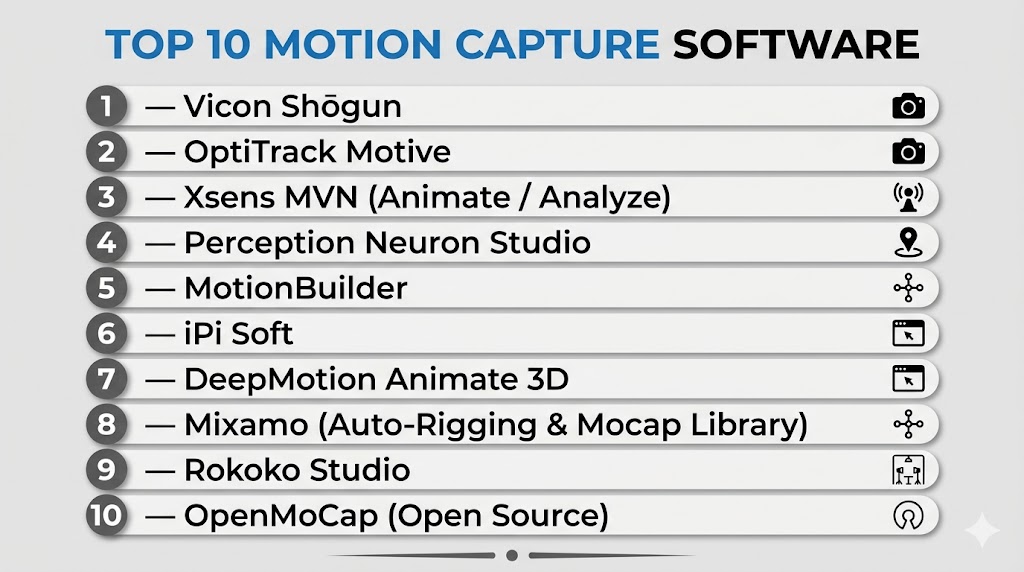
Top 10 Motion Capture Software
#1 — Vicon Shōgun
Short description: Vicon Shōgun is a high‑end motion capture software designed for professional film, games, and biomechanical workflows, often paired with Vicon camera systems.
Key Features
- Precision tracking with high‑speed cameras
- Real‑time visualization and feedback
- Advanced skeleton solving and retargeting
- Force plate and biomechanics integration
- Multi‑actor capture support
- Extensive data cleanup and editing tools
Pros
- Industry‑leading accuracy and stability
- Excellent for biomechanical and VFX workflows
- Strong real‑time and post‑processing capabilities
Cons
- Expensive and requires dedicated hardware
- High learning curve for new users
Platforms / Deployment
Windows / Self‑hosted
Security & Compliance
Not publicly stated
Integrations & Ecosystem
Vicon Shōgun integrates with:
- DCC tools (Maya, MotionBuilder)
- Game engines (Unreal, Unity)
- Third‑party animation pipelines
- Biomechanics analysis systems
Support & Community
Professional documentation and vendor support with certified training partners.
#2 — OptiTrack Motive
Short description: OptiTrack Motive is mocap software paired with OptiTrack motion capture cameras, designed for high‑precision performance capture and real‑time feedback.
Key Features
- Multi‑camera tracking
- Accurate marker‑based capture
- Real‑time pose solving
- Skeleton retargeting tools
- Rigid body tracking
- Analytical tools for data review
Pros
- Strong precision and hardware synchronization
- Well‑suited for game studios and VR/AR capture
- Integrated workflow with visualization
Cons
- Requires OptiTrack hardware
- Setup complexity for large volumes
Platforms / Deployment
Windows / Self‑hosted
Security & Compliance
Not publicly stated
Integrations & Ecosystem
- Game engines
- DCC platforms
- Real‑time middleware
Support & Community
Vendor support and tutorials plus active mocap communities.
#3 — Xsens MVN (Animate / Analyze)
Short description: Xsens MVN is an inertial motion capture system using IMUs (inertial measurement units) for markerless full‑body capture.
Key Features
- Full‑body capture using wearable sensors
- No cameras required
- Real‑time capture and preview
- Automatic retargeting
- Biomechanical analysis modules
- Tetherless setup options
Pros
- Highly mobile capture without complex setup
- Good for outdoor and unconstrained motion
- Solid data quality without optical hardware
Cons
- Some drift possible in long sessions
- Cost for sensor suits
Platforms / Deployment
Windows / Self‑hosted
Security & Compliance
Not publicly stated
Integrations & Ecosystem
- Game engines
- Animation tools
- Biomechanics software
Support & Community
Professional support and documentation from vendor.
#4 — Perception Neuron Studio
Short description: A motion capture suite with modular inertial sensors for full‑body and finger capture at accessible price points.
Key Features
- IMU‑based full‑body tracking
- Modular sensor placement
- Real‑time retargeting
- Cloud motion data services
- Integration with engines and animation tools
Pros
- Affordable relative to high‑end optical systems
- Good for indie and mid‑size projects
- Flexible sensor configurations
Cons
- Slight drift vs optical systems
- Cleanup often needed
Platforms / Deployment
Windows / Cloud‑assisted
Security & Compliance
Not publicly stated
Integrations & Ecosystem
- Unity and Unreal workflows
- Animation software export
- Live retargeting systems
Support & Community
Active user forums and vendor documentation.
#5 — MotionBuilder
Short description: A classic animation and motion editing tool from Autodesk, well‑suited for refining mocap data and integrating character animation.
Key Features
- Mocap editing and cleanup
- Retargeting tools
- Character rigging workflows
- Real‑time engine linkage
- Layered animation control
- Curve editing and smoothing
Pros
- Excellent for post‑capture refinement
- Deep animator‑focused toolset
- Works well with multiple capture sources
Cons
- Not a capture system itself
- License cost
Platforms / Deployment
Windows / macOS
Security & Compliance
Not publicly stated
Integrations & Ecosystem
- Maya and DCC tools
- Game engines
- Character animation pipelines
Support & Community
Strong documentation and wide industry adoption.
#6 — iPi Soft
Short description: Markerless motion capture software that uses depth sensors or multiple webcams to capture body motion without suits or markers.
Key Features
- Markerless capture
- Depth camera and webcam support
- Post‑capture cleanup tools
- Skeleton retargeting
- Affordable system entry
- Export formats for many engines
Pros
- Budget‑friendly markerless option
- Works with consumer hardware
- Good quality for indie and small teams
Cons
- Less precision than dedicated hardware
- Setup must be optimized for best results
Platforms / Deployment
Windows / Self‑hosted
Security & Compliance
Not publicly stated
Integrations & Ecosystem
- Game engine export
- DCC tool support
- Pipeline export formats
Support & Community
Active documentation and user communities.
#7 — DeepMotion Animate 3D
Short description: A cloud‑based motion capture service that uses AI to turn video input into 3D animation data.
Key Features
- AI motion extraction from video
- Automatic retargeting
- Cloud processing workflows
- Frame‑by‑frame preview
- Export for engines
Pros
- No hardware needed — only video
- Fast turnaround
- Accessible for many use cases
Cons
- Quality depends on input video
- Cloud costs for large volumes
Platforms / Deployment
Web / Cloud
Security & Compliance
Not publicly stated
Integrations & Ecosystem
- Engine export (FBX, BVH, etc.)
- Animation pipelines
- Cloud storage
Support & Community
Vendor documentation and web tutorials.
#8 — Mixamo (Auto‑Rigging & Mocap Library)
Short description: An asset platform with auto‑rigging and a library of canned motion data usable in game and animation pipelines.
Key Features
- Auto‑rigging for character models
- Library of mocap clips
- Retargetable animations
- Export to common formats
Pros
- Quick character setup
- Large clip library
- No hardware required
Cons
- Predefined motion only — not live capture
- Limited customization
Platforms / Deployment
Web / Cloud
Security & Compliance
Not publicly stated
Integrations & Ecosystem
- Engine import
- Animation pipelines
- Model workflows
Support & Community
Documentation and example assets.
#9 — Rokoko Studio
Short description: A mocap and animation toolkit that works with Rokoko suits, camera streaming, and cloud processing.
Key Features
- Live capture from suits or cameras
- Retargeting tools
- Cleanup workflow
- Engine sync (Unity, Unreal)
- Timeline editing
Pros
- Works well for both live and studio mocap
- Integrated capture + editing
- Efficient retargeting
Cons
- Hardware ecosystem focused
- Subscription element
Platforms / Deployment
Windows / macOS
Security & Compliance
Not publicly stated
Integrations & Ecosystem
- Unity and Unreal
- Export formats
- Animation pipelines
Support & Community
Vendor support and active forums.
#10 — OpenMoCap (Open Source)
Short description: Open source motion capture tools and libraries developed by community projects for experimentation and basic capture workflows.
Key Features
- Open frameworks
- Community contributions
- Flexible pipelines
- Export formats
Pros
- Free and open source
- Flexible for custom research
- Good learning resource
Cons
- Less polished than commercial tools
- Varying feature quality
Platforms / Deployment
Cross‑platform
Security & Compliance
Not publicly stated
Integrations & Ecosystem
Depends on chosen project — typically export pipelines and third‑party libraries.
Support & Community
Open source forums and communities.
Comparison Table (Top 10)
| Tool Name | Best For | Platform(s) Supported | Deployment | Standout Feature | Public Rating |
|---|---|---|---|---|---|
| Vicon Shōgun | Professional studio mocap | Windows | Self‑hosted | High‑accuracy tracking | N/A |
| OptiTrack Motive | Optical tracking systems | Windows | Self‑hosted | Multi‑camera capture | N/A |
| Xsens MVN | Mobile IMU mocap | Windows | Self‑hosted | Sensor‑based capture | N/A |
| Perception Neuron Studio | Affordable IMU mocap | Windows | Hybrid | Modular IMU capture | N/A |
| MotionBuilder | Mocap data editing | Windows/macOS | Self‑hosted | Refinement tools | N/A |
| iPi Soft | Markerless mocap | Windows | Self‑hosted | Webcam capture | N/A |
| DeepMotion Animate 3D | AI video mocap | Web/Cloud | Cloud | Video‑to‑3D pipeline | N/A |
| Mixamo | Auto‑rigging & mocap clips | Web/Cloud | Cloud | Ready‑to‑use animations | N/A |
| Rokoko Studio | Capture + retarget workflows | Windows/macOS | Hybrid | Live retargeting | N/A |
| OpenMoCap | Experimental open source | Cross‑platform | Self‑hosted | Community motion tools | N/A |
Evaluation & Scoring of Motion Capture Software
| Tool Name | Core (25%) | Ease (15%) | Integrations (15%) | Security (10%) | Performance (10%) | Support (10%) | Value (15%) | Weighted Total (0–10) |
|---|---|---|---|---|---|---|---|---|
| Vicon Shōgun | 10 | 6 | 9 | 5 | 10 | 9 | 6 | 8.10 |
| OptiTrack Motive | 9 | 7 | 8 | 5 | 9 | 8 | 6 | 7.80 |
| Xsens MVN | 9 | 8 | 8 | 6 | 8 | 8 | 7 | 8.05 |
| Perception Neuron Studio | 7 | 8 | 7 | 6 | 7 | 7 | 8 | 7.55 |
| MotionBuilder | 8 | 7 | 9 | 6 | 8 | 8 | 6 | 7.75 |
| iPi Soft | 6 | 9 | 8 | 6 | 7 | 7 | 9 | 7.85 |
| DeepMotion Animate 3D | 7 | 9 | 7 | 6 | 7 | 7 | 8 | 8.00 |
| Mixamo | 5 | 10 | 7 | 6 | 5 | 7 | 9 | 7.40 |
| Rokoko Studio | 8 | 8 | 8 | 6 | 8 | 8 | 7 | 7.80 |
| OpenMoCap | 5 | 7 | 6 | 6 | 6 | 6 | 10 | 7.15 |
How to interpret these scores:
- Scores are comparative editorial assessments across capture depth, ease, integration, and value.
- Higher values indicate broader applicability in production workflows and strong integrations with engines and DCC tools.
- Lower scores reflect more specialized or experimental tools.
Which Motion Capture Tool Is Right for You?
Solo / Freelancer
- iPi Soft, DeepMotion Animate 3D, Mixamo are accessible with affordable hardware or video‑based workflows.
SMB
- Xsens MVN, Perception Neuron Studio, and Rokoko Studio balance accuracy with flexibility at modest cost points.
Mid‑Market
- MotionBuilder combined with moderate capture systems offers refined edit workflows.
Enterprise
- Vicon Shōgun and OptiTrack Motive deliver highest accuracy for large productions and biomechanics workflows.
Budget vs Premium
- Budget: iPi Soft, DeepMotion, Mixamo, OpenMoCap
- Premium: Vicon Shōgun, OptiTrack Motive, Xsens MVN
Feature Depth vs Ease of Use
- Depth: Vicon Shōgun, Xsens MVN
- Ease: Mixamo, DeepMotion
Integrations & Scalability
- MotionBuilder, Xsens MVN, and Rokoko offer strong pipelines into engines and DCC tools.
Security & Compliance Needs
- Evaluate deployment environment and cloud policies when using cloud‑assisted tools.
Frequently Asked Questions (FAQs)
1. What is motion capture software?
Motion capture software records and translates real movement into digital data for animation, simulation, or analysis.
2. Do I need special hardware?
Some tools require cameras or sensors, but others use AI‑based video capture.
3. What’s the difference between marker‑based and markerless mocap?
Marker‑based uses physical markers and cameras; markerless infers motion from video or sensors without physical markers.
4. Can mocap work outdoors?
Yes — inertial systems like Xsens and Perception Neuron support untethered outdoor capture.
5. Do mocap tools integrate with game engines?
Most offer exporters or live sync for Unity, Unreal, and others.
6. Is real‑time preview possible?
Yes — many tools preview motion capture data live during recording or retargeting.
7. Do I need coding skills?
Not always — many tools support visual retargeting and timeline editing.
8. Can mocap help biomechanics?
Yes — high‑end tools include analytics modules for gait, balance, and movement analysis.
9. Are open‑source mocap tools viable?
OpenMoCap and similar projects provide flexible options for experimentation and research.
10. How do I clean mocap data?
Editing tools such as MotionBuilder and native cleanup workflows allow smoothing, filtering, and refinement.
Conclusion
Motion capture software spans simple video‑based solutions to high‑end optical systems used in film and games. Solo creators and small studios can leverage tools like iPi Soft or DeepMotion Animate 3D to get compelling data without expensive hardware, while mid‑market and enterprise teams often rely on systems such as Xsens MVN, Rokoko Studio, or Vicon Shōgun for precision and scalability. Integrating mocap with engines and animation pipelines enriches creative workflows and reduces development time. Choosing the right tool requires balancing accuracy, workflow complexity, hardware, and budget — shortlist a few options, test them with your capture needs, and validate integration and support before committing to a pipeline.

Find Trusted Cardiac Hospitals
Compare heart hospitals by city and services — all in one place.
Explore Hospitals