Introduction
Game Engines are comprehensive software frameworks used to develop and deploy video games across multiple platforms. They provide tools for graphics rendering, physics simulation, input handling, audio, networking, and scripting, allowing developers to focus on gameplay and content creation rather than low-level programming.0 the rise of AI-assisted development, cross-platform deployment, and real-time rendering has made game engines a critical tool for studios, indie developers, and hobbyists alike.
Real-world use cases include creating AAA games with complex physics and AI, developing mobile or browser-based games, building VR/AR experiences, prototyping interactive simulations, and powering cinematic storytelling. Buyers should evaluate engines based on rendering capabilities, performance, ease of use, scripting flexibility, platform support, community ecosystem, licensing model, AI-assisted development features, integration with third-party tools, and security/compliance for multiplayer or cloud-connected games.
Best for: game studios, indie developers, educational institutions, AR/VR content creators, and enterprises building interactive experiences.
Not ideal for: small hobby projects with minimal graphics or simple 2D games that may be better suited to lightweight frameworks.
Key Trends in Game Engines
- AI-assisted content generation for assets, animations, and level design.
- Real-time ray tracing and photorealistic rendering becoming mainstream.
- Cross-platform development, including consoles, mobile, web, and cloud streaming.
- Integration with cloud gaming and multiplayer backends.
- Modular engines with plugin ecosystems for custom functionality.
- Increased use of physics and procedural generation for immersive experiences.
- VR/AR support with high-performance rendering pipelines.
- Emphasis on low-code or visual scripting options for rapid prototyping.
- Subscription or revenue-share licensing models gaining popularity.
- Community-driven marketplaces and open-source contributions expanding capabilities.
How We Selected These Tools (Methodology)
- Analyzed market adoption and developer mindshare.
- Reviewed feature completeness for rendering, physics, AI, networking, and scripting.
- Evaluated reliability and performance benchmarks in real-world scenarios.
- Considered security posture for multiplayer and cloud-connected games.
- Assessed integrations with popular IDEs, asset stores, and third-party tools.
- Examined community support, tutorials, and documentation quality.
- Balanced enterprise-grade engines with indie-friendly platforms.
- Reviewed flexibility for cross-platform deployment.
- Considered licensing costs and scalability for various studio sizes.
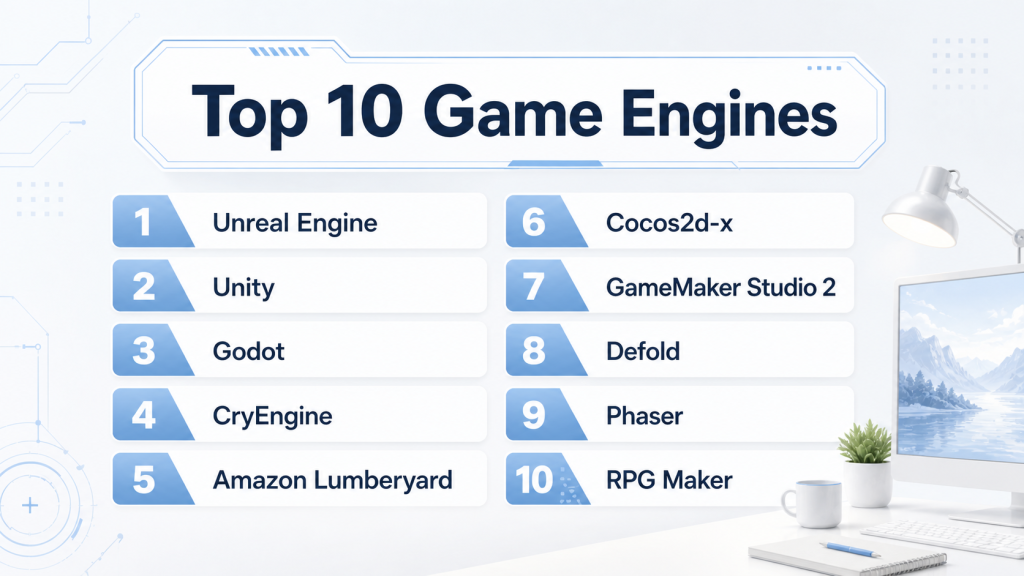
Top 10 Game Engines Tools
1 — Unreal Engine
Short description Unreal Engine is a high-performance engine suitable for AAA games, cinematic experiences, and VR/AR development. It is widely used by studios for photorealistic graphics and complex simulations.
Key Features
- Real-time ray tracing and advanced lighting.
- Blueprint visual scripting system.
- Native VR/AR support.
- High-fidelity physics and animation tools.
- Multi-platform deployment (PC, console, mobile, cloud).
- Integrated AI and machine learning tools.
Pros
- Cutting-edge graphics capabilities.
- Strong community and marketplace.
- Robust multiplayer networking support.
Cons
- Steep learning curve for beginners.
- Large project file sizes.
- Requires powerful hardware for optimal performance.
Platforms / Deployment
- Windows / macOS / Linux / iOS / Android / Consoles
- Cloud / Self-hosted / Hybrid
Security & Compliance
- Not publicly stated
Integrations & Ecosystem
Supports various asset stores, middleware, and plugins.
- Integration with Visual Studio and Maya/Blender
- Third-party physics and AI plugins
- Marketplace for assets and tools
- Cloud build systems
Support & Community
Extensive documentation, forums, tutorials, and active developer community.
2 — Unity
Short description : Unity is a versatile engine for 2D, 3D, and AR/VR games, popular among indie developers and large studios for mobile and cross-platform projects.
Key Features
- C# scripting and visual scripting tools.
- Extensive asset store with ready-made content.
- Real-time lighting and post-processing.
- VR/AR integration via XR toolkit.
- Lightweight render pipeline for mobile optimization.
- Cloud build and collaboration tools.
Pros
- Beginner-friendly with strong documentation.
- Efficient cross-platform deployment.
- Active asset and plugin ecosystem.
Cons
- Less photorealistic than Unreal out of the box.
- Advanced physics require additional plugins.
- Some features require paid subscription.
Platforms / Deployment
- Windows / macOS / Linux / iOS / Android / Web / Consoles
- Cloud / Self-hosted / Hybrid
Security & Compliance
- Not publicly stated
Integrations & Ecosystem
Supports integrations with external IDEs, analytics, ads, and cloud services.
- Visual Studio / Rider integration
- Asset store plugins
- Analytics and monetization tools
- Cloud collaboration platforms
Support & Community
Large global community, extensive tutorials, and developer forums.
3 — Godot
Short description : Godot is an open-source engine for 2D and 3D games, known for flexibility, lightweight performance, and a growing community of indie developers.
Key Features
- Node-based architecture for modular development.
- GDScript, C#, and visual scripting.
- Cross-platform export templates.
- 2D engine optimized for performance.
- Integrated animation and physics systems.
- Open-source extensibility.
Pros
- Free and open-source.
- Lightweight and fast.
- Highly flexible architecture.
Cons
- Smaller ecosystem than Unity/Unreal.
- Limited AAA-level 3D graphics tools.
- Fewer learning resources for advanced topics.
Platforms / Deployment
- Windows / macOS / Linux / iOS / Android / Web
- Self-hosted
Security & Compliance
- Not publicly stated
Integrations & Ecosystem
Supports plugin and module extensions.
- IDE plugins
- Asset and script sharing community
- Version control integration
Support & Community
Growing open-source community and active forums; documentation improving.
4 — CryEngine
Short description : CryEngine offers high-end graphics rendering and realistic physics, suitable for AAA titles and simulation-heavy projects.
Key Features
- Real-time global illumination and particle systems.
- Advanced physics and AI.
- VR/AR support.
- Sandbox editor for world-building.
- Multi-platform deployment.
- Cinematic-quality rendering pipeline.
Pros
- Exceptional graphics fidelity.
- Strong physics engine.
- Powerful AI tools.
Cons
- Steep learning curve.
- Smaller community than Unity/Unreal.
- Limited documentation for some advanced features.
Platforms / Deployment
- Windows / Linux / Consoles
- Self-hosted / Hybrid
Security & Compliance
- Not publicly stated
Integrations & Ecosystem
Supports various middleware and asset import.
- Visual Studio integration
- Maya/3DS Max support
- Plugin modules for AI and physics
Support & Community
Moderate community support, official documentation and forums available.
5 — Amazon Lumberyard
Short description : Lumberyard is a game engine deeply integrated with AWS, ideal for multiplayer and cloud-connected game development.
Key Features
- Cloud-native multiplayer integration.
- Real-time graphics and physics.
- Lua and C++ scripting support.
- VR/AR capabilities.
- Twitch and social integration.
- Cross-platform deployment.
Pros
- Seamless AWS integration.
- Optimized for online multiplayer.
- Free to use with AWS services.
Cons
- Smaller developer community.
- Learning curve for cloud services.
- Limited 2D development tools.
Platforms / Deployment
- Windows / Linux / Consoles
- Cloud / Hybrid
Security & Compliance
- Not publicly stated
Integrations & Ecosystem
Supports AWS services and third-party plugins.
- Asset import pipelines
- Cloud build tools
- Multiplayer frameworks
Support & Community
Official forums, documentation, and AWS support channels.
6 — Cocos2d-x
Short description : Cocos2d-x is a lightweight open-source engine focused on 2D mobile and web games, popular among indie developers.
Key Features
- Optimized 2D rendering engine.
- C++, Lua, and JavaScript support.
- Physics and particle systems.
- Cross-platform deployment templates.
- Scene and animation management.
- Lightweight memory footprint.
Pros
- Free and open-source.
- Excellent for 2D mobile games.
- Lightweight and performant.
Cons
- Limited 3D capabilities.
- Smaller community.
- Requires coding experience.
Platforms / Deployment
- Windows / macOS / Linux / iOS / Android / Web
- Self-hosted
Security & Compliance
- Not publicly stated
Integrations & Ecosystem
Supports extensions for analytics, ads, and plugins.
- External IDE support
- Asset libraries
- Version control integration
Support & Community
Moderate community support and growing documentation.
7 — GameMaker Studio 2
Short description : GameMaker Studio 2 is a user-friendly engine for 2D games, ideal for indie developers and rapid prototyping.
Key Features
- Drag-and-drop visual scripting.
- GML scripting for advanced logic.
- Cross-platform export.
- Integrated physics engine.
- Sprite and animation editor.
- Marketplace for assets.
Pros
- Beginner-friendly.
- Fast prototyping.
- Strong 2D workflow.
Cons
- Limited 3D support.
- Some features behind paid license.
- Smaller community than Unity.
Platforms / Deployment
- Windows / macOS / iOS / Android / Web
- Self-hosted / Hybrid
Security & Compliance
- Not publicly stated
Integrations & Ecosystem
Supports asset import/export and marketplace assets.
- IDE integration
- Asset store
- Plugin support
Support & Community
Good tutorials and active user forums.
8 — Defold
Short description (2–3 lines): Defold is a cross-platform 2D/3D engine focused on lightweight, efficient game development and collaboration.
Key Features
- Lua scripting support.
- Built-in physics engine.
- Scene graph and animation system.
- Cross-platform deployment.
- Collaborative editor for teams.
- Efficient build system.
Pros
- Free and lightweight.
- Efficient for small teams.
- Active developer support.
Cons
- Limited 3D rendering.
- Smaller asset ecosystem.
- Requires coding familiarity.
Platforms / Deployment
- Windows / macOS / Linux / iOS / Android / Web
- Cloud / Self-hosted
Security & Compliance
- Not publicly stated
Integrations & Ecosystem
Supports extensions and third-party integrations.
- Cloud build
- Analytics plugins
- IDE support
Support & Community
Growing community, documentation, and tutorials.
9 — Phaser
Short description: Phaser is an open-source HTML5 engine designed for 2D browser games and educational projects.
Key Features
- JavaScript/TypeScript development.
- Lightweight 2D engine.
- Integrated physics and input handling.
- Asset and tilemap support.
- Optimized for web performance.
- Free and extensible.
Pros
- Free and open-source.
- Excellent for web games.
- Lightweight and fast.
Cons
- Limited 3D support.
- Smaller community.
- Browser-focused only.
Platforms / Deployment
- Web
- Self-hosted
Security & Compliance
- Not publicly stated
Integrations & Ecosystem
Supports plugins and web frameworks.
- JavaScript libraries
- Asset packs
- Analytics integrations
Support & Community
Active forums, GitHub community, and tutorials.
10 — RPG Maker
Short description : RPG Maker is a beginner-friendly engine for creating 2D role-playing games with minimal coding.
Key Features
- Visual map and event editors.
- Built-in tile sets and assets.
- Scripting with Ruby or JavaScript.
- Cross-platform deployment.
- Database management for game logic.
- Audio and animation support.
Pros
- Extremely beginner-friendly.
- Rapid RPG prototyping.
- Strong 2D workflow.
Cons
- Limited 3D support.
- Restricted gameplay mechanics without scripting.
- Smaller community for advanced features.
Platforms / Deployment
- Windows / macOS / Web
- Self-hosted / Hybrid
Security & Compliance
- Not publicly stated
Integrations & Ecosystem
Supports plugin import and asset libraries.
- Marketplace assets
- Plugin support
- External scripts
Support & Community
Active forums, tutorials, and documentation.
Comparison Table (Top 10)
| Tool Name | Best For | Platform(s) Supported | Deployment | Standout Feature | Public Rating |
|---|---|---|---|---|---|
| Unreal Engine | AAA / VR / AR | Windows / macOS / Linux / iOS / Android / Consoles | Cloud / Self-hosted / Hybrid | Photorealistic rendering | N/A |
| Unity | Indie / Mobile / Cross-platform | Windows / macOS / Linux / iOS / Android / Web / Consoles | Cloud / Self-hosted / Hybrid | Cross-platform versatility | N/A |
| Godot | Indie / 2D / 3D | Windows / macOS / Linux / iOS / Android / Web | Self-hosted | Open-source flexibility | N/A |
| CryEngine | AAA / Simulation | Windows / Linux / Consoles | Self-hosted / Hybrid | High-end graphics & physics | N/A |
| Amazon Lumberyard | Cloud multiplayer | Windows / Linux / Consoles | Cloud / Hybrid | AWS integration | N/A |
| Cocos2d-x | 2D mobile / Web | Windows / macOS / Linux / iOS / Android / Web | Self-hosted | Lightweight 2D engine | N/A |
| GameMaker Studio 2 | Indie / 2D prototyping | Windows / macOS / iOS / Android / Web | Self-hosted / Hybrid | Drag-and-drop scripting | N/A |
| Defold | Small teams / 2D / 3D | Windows / macOS / Linux / iOS / Android / Web | Cloud / Self-hosted | Lightweight and efficient | N/A |
| Phaser | Web / HTML5 games | Web | Self-hosted | Browser-optimized 2D engine | N/A |
| RPG Maker | 2D RPG / Beginners | Windows / macOS / Web | Self-hosted / Hybrid | Visual map & event editors | N/A |
Evaluation & Scoring of Game Engines
| Tool Name | Core (25%) | Ease (15%) | Integrations (15%) | Security (10%) | Performance (10%) | Support (10%) | Value (15%) | Weighted Total (0–10) |
|---|---|---|---|---|---|---|---|---|
| Unreal Engine | 10 | 7 | 9 | 8 | 10 | 9 | 8 | 9.0 |
| Unity | 9 | 9 | 8 | 7 | 9 | 8 | 9 | 8.5 |
| Godot | 8 | 8 | 7 | 7 | 8 | 7 | 10 | 8.0 |
| CryEngine | 9 | 6 | 7 | 7 | 9 | 6 | 7 | 7.5 |
| Amazon Lumberyard | 8 | 7 | 8 | 7 | 8 | 7 | 8 | 7.8 |
| Cocos2d-x | 7 | 8 | 6 | 7 | 7 | 6 | 10 | 7.5 |
| GameMaker Studio 2 | 7 | 9 | 6 | 6 | 7 | 6 | 8 | 7.3 |
| Defold | 7 | 8 | 7 | 6 | 7 | 6 | 9 | 7.5 |
| Phaser | 6 | 8 | 6 | 6 | 6 | 5 | 10 | 6.9 |
| RPG Maker | 6 | 9 | 5 | 6 | 6 | 5 | 8 | 6.8 |
Interpretation: Scores reflect a comparative evaluation across core features, ease of use, integrations, security, performance, support, and value. Weighted totals help guide decision-making based on priorities.
Which Game Engine Tool Is Right for You?
Solo / Freelancer
Unity, Godot, or RPG Maker provide fast prototyping, strong tutorials, and low-cost access. Ideal for small projects or personal games.
SMB
Unity or GameMaker Studio 2 balance ease-of-use and deployment, allowing small studios to ship on multiple platforms efficiently.
Mid-Market
Unreal Engine or Defold provide robust features, scalable architectures, and support for more ambitious projects.
Enterprise
Unreal Engine, CryEngine, or Amazon Lumberyard offer high-fidelity graphics, cloud integration, and enterprise-level support.
Budget vs Premium
Budget-conscious developers may choose Godot, Cocos2d-x, or Phaser. Premium options like Unreal or Unity Pro offer advanced graphics, AI tools, and scalability.
Feature Depth vs Ease of Use
AAA-grade projects prioritize feature depth (Unreal, CryEngine). Indie or smaller teams benefit from ease-of-use (Unity, GameMaker, RPG Maker).
Integrations & Scalability
Cloud-connected engines (Lumberyard, Unity Cloud Build) facilitate scaling and multiplayer experiences, while open-source engines allow deep customizations.
Security & Compliance Needs
Multiplayer and cloud games require engines with auditability, RBAC, and secure deployment practices. Evaluate engine support for SSO/MFA if needed.
Frequently Asked Questions (FAQs)
1. What is the difference between Unity and Unreal Engine?
Unity focuses on flexibility and ease-of-use for 2D/3D cross-platform games, while Unreal provides AAA-grade graphics and photorealism for high-end projects.
2. Are these game engines suitable for VR/AR development?
Yes, most top engines like Unity, Unreal, and Godot have integrated
3. Can I use open-source engines for commercial games?
Yes, engines like Godot and Cocos2d-x are open-source and free for commercial use. Ensure compliance with their respective licenses, but there are generally no royalties or fees for deployment.
4. How steep is the learning curve for AAA engines?
Engines like Unreal and CryEngine have steeper learning curves due to advanced features, high-end graphics, and complex scripting requirements. Beginner-friendly engines like Unity or RPG Maker are easier for new developers.
5. Are these engines suitable for mobile game development?
Yes, engines such as Unity, Cocos2d-x, GameMaker, and Godot provide optimized pipelines for iOS, Android, and even web-based mobile deployment.
6. Can I integrate AI into my games using these engines?
Yes, modern engines support AI integration, either via built-in tools (Unreal AI, Unity ML Agents) or through third-party plugins for NPC behavior, procedural content generation, or adaptive gameplay.
7. Do I need powerful hardware to use AAA engines?
High-end engines like Unreal or CryEngine require more powerful GPUs and memory, especially for real-time rendering and large projects. Lightweight engines like Godot, Defold, or Phaser run efficiently on modest hardware.
8. How do I handle multiplayer or cloud-based games?
Engines like Amazon Lumberyard and Unity offer integrated cloud services for multiplayer, matchmaking, and server hosting. For other engines, third-party backends or custom servers may be necessary.
9. What about cross-platform deployment?
Most engines support multiple platforms: PC, mobile, consoles, web, and VR/AR devices. Verify export templates and platform-specific limitations before starting development.
10. Can I use these engines for educational purposes?
Yes, engines like Unity, Unreal, and Godot are widely used in schools, universities, and coding bootcamps to teach programming, game design, and simulation development.
11. Are visual scripting options available?
Yes, Unreal has Blueprint, Unity has Bolt, and Godot supports visual scripting. These enable non-programmers to create game logic using drag-and-drop interfaces.
12. How important is the community and marketplace?
A strong community and marketplace provide tutorials, assets, plugins, and support, which can significantly reduce development time and help solve technical challenges.
13. Can I switch engines mid-development?
Switching engines mid-project is complex due to asset formats, scripting differences, and engine architecture. It’s recommended to choose your engine carefully before major development begins.
Conclusion
Choosing the right game engine depends on project scope, team size, target platforms, and desired graphics fidelity. AAA projects benefit from Unreal Engine or CryEngine, while indie developers may prefer Unity, Godot, or GameMaker for ease of use and cross-platform flexibility. Open-source engines provide cost-effective solutions, and cloud-connected engines like Lumberyard facilitate multiplayer experiences. Evaluate licensing, integrations, performance, and support carefully, and start by shortlisting 2–3 engines, running small pilots, and validating asset pipelines and security before full-scale development.

Find Trusted Cardiac Hospitals
Compare heart hospitals by city and services — all in one place.
Explore Hospitals
Game engines are explained in a clear way, and the comparison helps in understanding how different tools support game development, graphics, and performance across projects