Introduction
3D CAD Software is used to create precise digital models of physical objects in three dimensions. These tools allow engineers, designers, and architects to visualize, test, and refine ideas before manufacturing or construction begins. From mechanical components to entire buildings, CAD platforms enable accuracy, efficiency, and collaboration across teams.
Today, CAD software has evolved far beyond basic drafting. It now includes AI-assisted modeling, real-time collaboration, simulation, and cloud-based workflows, making it a core part of modern product development and digital engineering pipelines.
Real-world use cases
- Designing mechanical parts and assemblies
- Creating architectural layouts and structures
- Product prototyping and manufacturing workflows
- Simulation and stress testing before production
- Preparing models for 3D printing and CNC machining
What buyers should evaluate
- Modeling approach (parametric vs direct vs hybrid)
- Simulation and analysis capabilities
- Performance with large assemblies
- Collaboration and version control features
- Integration with PLM, CAM, and ERP systems
- Cloud vs desktop flexibility
- Ease of learning and usability
- Security features (SSO, RBAC, audit logs)
- Cost structure and licensing flexibility
Best for: Mechanical engineers, product designers, architects, manufacturing teams, and enterprises handling complex design workflows.
Not ideal for: Users needing simple 2D drafting, hobby-level sketching, or lightweight visualization without engineering precision.
Key Trends in 3D CAD Software
- AI-driven generative design enabling automated optimization of structures
- Cloud-native CAD platforms supporting remote and distributed teams
- Real-time collaboration and version control similar to software development workflows
- Integration with digital twin ecosystems for lifecycle management
- Simulation-first design approaches reducing physical prototyping costs
- Support for additive manufacturing and hybrid workflows
- Cross-device accessibility including browser-based modeling
- Stronger integration with PLM, MES, and ERP systems
- Subscription-based pricing models replacing perpetual licenses
How We Selected These Tools (Methodology)
- Evaluated tools with strong industry adoption and market presence
- Prioritized platforms offering full 3D modeling and engineering capabilities
- Assessed performance with complex designs and large assemblies
- Considered availability of cloud, desktop, and hybrid deployment models
- Reviewed integration ecosystems with enterprise systems
- Examined security features like access control and data protection
- Included tools suitable for different business sizes and industries
- Considered vendor support, training, and community strength
- Balanced enterprise-grade and accessible solutions
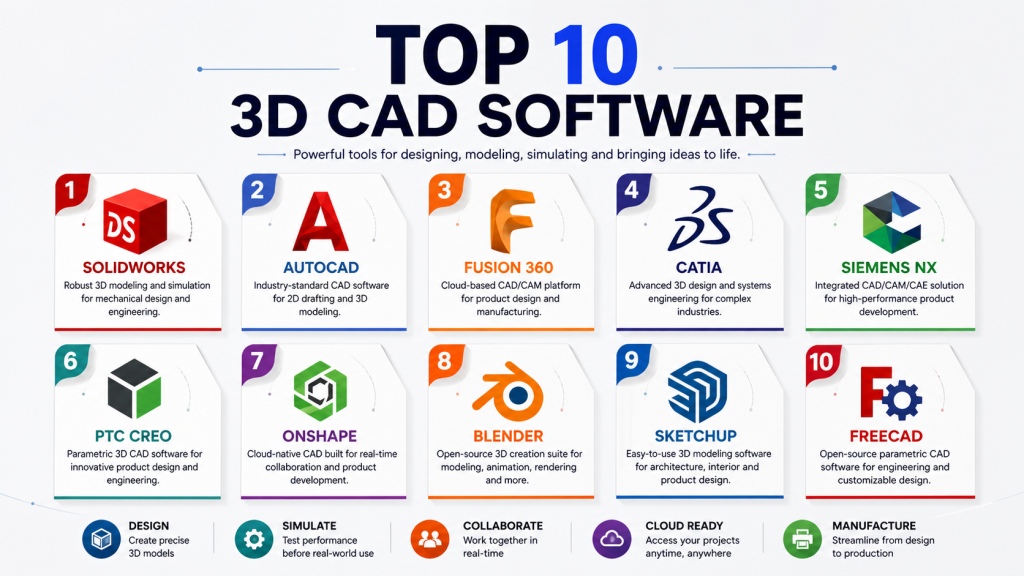
Top 10 3D CAD Software Tools
1 — SolidWorks
Short description: A leading mechanical CAD platform known for parametric modeling and strong simulation tools, widely used in manufacturing and engineering.
Key Features
- Parametric and feature-based modeling
- Assembly design and management
- Integrated simulation and stress analysis
- Sheet metal and surface modeling
- Rendering and visualization tools
- Design validation and testing
Pros
- Industry-standard for mechanical design
- Strong simulation capabilities
- Extensive plugin ecosystem
Cons
- High licensing cost
- Requires powerful hardware
- Limited to Windows
Platforms / Deployment
Windows / Desktop
Security & Compliance
Role-based access, file-level controls; Not publicly stated
Integrations & Ecosystem
SolidWorks integrates with manufacturing, simulation, and enterprise systems, making it suitable for end-to-end product workflows.
- PLM systems
- CAM tools
- Simulation software
- Third-party plugins
Support & Community
Large global community, strong documentation, and training ecosystem.
2 — AutoCAD
Short description: A versatile CAD tool supporting both 2D drafting and 3D modeling across industries like architecture and engineering.
Key Features
- 2D drafting and 3D modeling
- Custom scripting and automation
- Wide file format compatibility
- Cloud storage and sharing
- Customizable interface
Pros
- Widely recognized standard
- Flexible across industries
- Strong compatibility
Cons
- Complex interface for beginners
- Expensive subscription
- Limited advanced 3D engineering features
Platforms / Deployment
Windows / macOS / Cloud
Security & Compliance
SSO, encryption features; Not publicly stated
Integrations & Ecosystem
Part of a larger ecosystem, AutoCAD connects with multiple design and cloud tools.
- BIM tools
- Cloud storage
- APIs and automation scripts
Support & Community
Extensive documentation and large user base.
3 — Fusion 360
Short description: A cloud-based CAD/CAM tool offering integrated design, simulation, and manufacturing workflows.
Key Features
- Cloud-based modeling and collaboration
- CAM and simulation tools
- Generative design capabilities
- Version control
- Product lifecycle integration
Pros
- All-in-one platform
- Affordable for small teams
- Strong collaboration features
Cons
- Internet dependency
- Performance issues for large assemblies
- Limited offline capabilities
Platforms / Deployment
Windows / macOS / Cloud
Security & Compliance
Encryption, role-based access; Not publicly stated
Integrations & Ecosystem
Fusion 360 integrates tightly with manufacturing and cloud tools for streamlined workflows.
- CAM integrations
- Cloud collaboration tools
- APIs
Support & Community
Active community and extensive tutorials.
4 — CATIA
Short description: A high-end CAD solution used in aerospace and automotive industries for complex surface and system design.
Key Features
- Advanced surface modeling
- Large assembly management
- Digital twin capabilities
- Systems engineering tools
- Simulation integration
Pros
- Extremely powerful
- Industry-leading capabilities
- Scalable for enterprises
Cons
- Very expensive
- Steep learning curve
- Requires specialized training
Platforms / Deployment
Windows / Cloud / Hybrid
Security & Compliance
Enterprise-grade controls; Not publicly stated
Integrations & Ecosystem
CATIA is part of a comprehensive engineering ecosystem with deep integration capabilities.
- PLM systems
- Simulation platforms
- Manufacturing tools
Support & Community
Enterprise-level support and structured training programs.
5 — Siemens NX
Short description: An advanced CAD/CAM/CAE platform designed for complex engineering and product lifecycle management.
Key Features
- Integrated CAD, CAM, and CAE
- High-performance modeling
- Simulation-driven design
- Digital twin integration
- Complex assembly handling
Pros
- End-to-end engineering platform
- High scalability
- Advanced simulation tools
Cons
- Expensive
- Complex interface
- Requires expertise
Platforms / Deployment
Windows / Cloud / Hybrid
Security & Compliance
Enterprise security features; Not publicly stated
Integrations & Ecosystem
NX integrates deeply with enterprise engineering and lifecycle systems.
- Teamcenter
- Simulation tools
- Manufacturing systems
Support & Community
Strong enterprise support and training ecosystem.
6 — PTC Creo
Short description: A powerful parametric CAD solution focused on product design, innovation, and advanced modeling.
Key Features
- Parametric and direct modeling
- Simulation and analysis tools
- Augmented reality integration
- Additive manufacturing support
- Design automation
Pros
- Strong modeling capabilities
- Advanced features
- Scalable for enterprises
Cons
- Complex interface
- High cost
- Requires training
Platforms / Deployment
Windows
Security & Compliance
Access controls and enterprise features; Not publicly stated
Integrations & Ecosystem
Creo integrates with IoT and lifecycle systems to support connected product design.
- PLM tools
- IoT platforms
- Simulation systems
Support & Community
Comprehensive support and documentation.
7 — Onshape
Short description: A fully cloud-based CAD platform designed for real-time collaboration and modern engineering teams.
Key Features
- Browser-based modeling
- Real-time collaboration
- Built-in version control
- Mobile accessibility
- Cloud storage
Pros
- No installation required
- Excellent collaboration
- Automatic updates
Cons
- Requires internet connection
- Subscription-based pricing
- Limited offline support
Platforms / Deployment
Web / Cloud
Security & Compliance
SSO, encryption, access control
Integrations & Ecosystem
Onshape supports integrations with cloud tools and enterprise systems.
- PLM tools
- APIs
- Third-party applications
Support & Community
Growing community with solid documentation.
8 — Blender
Short description: An open-source 3D modeling and rendering tool used for visualization, animation, and creative workflows.
Key Features
- 3D modeling and sculpting
- Rendering and animation
- Physics simulation
- Open-source extensibility
- Plugin ecosystem
Pros
- Free and open-source
- Highly customizable
- Strong community
Cons
- Not ideal for engineering CAD
- Steep learning curve
- Limited precision tools
Platforms / Deployment
Windows / macOS / Linux
Security & Compliance
Not publicly stated
Integrations & Ecosystem
Blender supports a wide range of extensions and integrations for creative workflows.
- Rendering engines
- Plugins
- Community tools
Support & Community
Large global open-source community.
9 — SketchUp
Short description: A user-friendly CAD tool widely used in architecture and interior design for quick modeling.
Key Features
- Easy-to-use modeling tools
- 3D visualization
- Plugin library
- Cloud sharing
- Layout tools
Pros
- Beginner-friendly
- Fast modeling
- Affordable
Cons
- Limited engineering capabilities
- Performance constraints
- Not suitable for complex simulations
Platforms / Deployment
Web / Windows / macOS
Security & Compliance
Not publicly stated
Integrations & Ecosystem
SketchUp integrates with visualization and design tools for architectural workflows.
- Plugin marketplace
- Rendering tools
- Cloud storage
Support & Community
Strong community and learning resources.
10 — FreeCAD
Short description: An open-source parametric CAD tool suitable for engineering and customizable design workflows.
Key Features
- Parametric modeling
- Modular architecture
- Python scripting
- Custom extensions
- Open-source flexibility
Pros
- Free to use
- Highly flexible
- Community-driven
Cons
- Less polished UI
- Limited enterprise support
- Performance limitations
Platforms / Deployment
Windows / macOS / Linux
Security & Compliance
Not publicly stated
Integrations & Ecosystem
FreeCAD allows customization through scripting and extensions.
- Python scripting
- Community modules
Support & Community
Community-based support with active forums.
Comparison Table (Top 10)
| Tool Name | Best For | Platform(s) Supported | Deployment | Standout Feature | Public Rating |
|---|---|---|---|---|---|
| SolidWorks | Mechanical design | Windows | Desktop | Simulation tools | N/A |
| AutoCAD | General CAD | Win/macOS | Hybrid | 2D + 3D support | N/A |
| Fusion 360 | SMB product design | Win/macOS | Cloud | Generative design | N/A |
| CATIA | Aerospace | Windows | Hybrid | Surface modeling | N/A |
| Siemens NX | Advanced engineering | Windows | Hybrid | CAD+CAM+CAE | N/A |
| PTC Creo | Product design | Windows | Desktop | Parametric modeling | N/A |
| Onshape | Collaboration | Web | Cloud | Real-time editing | N/A |
| Blender | Visualization | Cross-platform | Desktop | Open-source rendering | N/A |
| SketchUp | Architecture | Web/Desktop | Cloud | Ease of use | N/A |
| FreeCAD | Open-source CAD | Cross-platform | Desktop | Parametric design | N/A |
Evaluation & Scoring of 3D CAD Software
| Tool Name | Core | Ease | Integrations | Security | Performance | Support | Value | Weighted Total |
|---|---|---|---|---|---|---|---|---|
| SolidWorks | 9 | 7 | 8 | 7 | 9 | 8 | 7 | 8.0 |
| AutoCAD | 8 | 7 | 8 | 7 | 8 | 8 | 7 | 7.8 |
| Fusion 360 | 8 | 8 | 8 | 7 | 7 | 8 | 9 | 8.0 |
| CATIA | 10 | 6 | 9 | 8 | 9 | 9 | 6 | 8.4 |
| Siemens NX | 10 | 6 | 9 | 8 | 9 | 9 | 6 | 8.4 |
| PTC Creo | 9 | 6 | 8 | 7 | 8 | 8 | 7 | 7.8 |
| Onshape | 8 | 9 | 8 | 8 | 7 | 8 | 8 | 8.1 |
| Blender | 7 | 6 | 7 | 6 | 7 | 8 | 10 | 7.5 |
| SketchUp | 7 | 9 | 7 | 6 | 7 | 7 | 8 | 7.6 |
| FreeCAD | 7 | 6 | 6 | 6 | 6 | 7 | 10 | 7.1 |
How to interpret scores:
These scores are comparative and reflect relative strengths across tools. Enterprise platforms typically score higher in core capabilities but may rank lower in value. Open-source tools often provide high value but may lack performance or support depth. Choose based on your workflow priorities rather than total score alone.
Which 3D CAD Software Tool Is Right for You?
Solo / Freelancer
SketchUp, Blender, and Fusion 360 are strong choices due to affordability and ease of use.
SMB
Fusion 360 and Onshape offer strong collaboration and cost efficiency.
Mid-Market
SolidWorks and PTC Creo provide balanced performance and scalability.
Enterprise
CATIA and Siemens NX are ideal for large-scale engineering and complex systems.
Budget vs Premium
- Budget: FreeCAD, Blender
- Premium: CATIA, Siemens NX
Feature Depth vs Ease of Use
- Advanced features: CATIA, NX
- Ease of use: SketchUp, Onshape
Integrations & Scalability
- Enterprise ecosystems: Siemens NX, CATIA
- Flexible APIs: Fusion 360, Onshape
Security & Compliance Needs
- Enterprise-grade: CATIA, Siemens NX
- Basic requirements: SketchUp, Blender
Frequently Asked Questions (FAQs)
What is 3D CAD software used for?
It is used to design, model, and simulate physical objects in digital form for engineering, architecture, and manufacturing.
Is cloud CAD better than desktop CAD?
Cloud CAD improves collaboration, while desktop CAD often delivers better performance for complex designs.
Which CAD tool is best for beginners?
SketchUp and Fusion 360 are beginner-friendly options.
Are open-source CAD tools reliable?
They are reliable for basic to moderate use but may lack enterprise features.
How much does CAD software cost?
Costs vary widely depending on features, licensing, and deployment models.
Can CAD tools integrate with manufacturing systems?
Yes, many tools integrate with CAM and PLM systems for production workflows.
What hardware is needed for CAD?
High-performance CPUs, GPUs, and sufficient RAM are recommended.
Are CAD tools secure?
Most offer encryption and access control, with enterprise tools providing advanced security.
Can I switch between CAD tools easily?
Switching can be challenging due to file compatibility and learning curves.
What industries use CAD software?
Manufacturing, automotive, aerospace, architecture, and engineering are major users.
Conclusion
3D CAD software is a foundational component of modern design and engineering workflows, enabling teams to move from concept to production with precision and efficiency. The market offers a wide range of tools, from beginner-friendly platforms to enterprise-grade systems with advanced simulation and lifecycle capabilities.
The right choice depends on your specific needs, whether it is ease of use, advanced modeling, or deep integration with enterprise systems. Start by shortlisting a few tools that align with your requirements, test them through pilot projects, and ensure they integrate well with your existing workflows before making a long-term decision.

Find Trusted Cardiac Hospitals
Compare heart hospitals by city and services — all in one place.
Explore Hospitals
CAD projects may need to be opened and edited years later, even after software versions or tools change. Teams should check export formats, backward compatibility, and how easily designs can be moved to another CAD system. This can reduce vendor lock-in and make long-term project management easier.