Introduction
Mechanical design software is a class of tools that enables engineers, product designers, and manufacturing teams to create, simulate, and refine mechanical parts and systems. These platforms facilitate 3D modeling, assembly management, simulation, and documentation, helping teams reduce errors and accelerate product development cycles. Modern tools also integrate AI-assisted design, cloud collaboration, and real-time simulation to streamline workflows.
Real-world use cases include:
- Designing automotive and aerospace components with precise tolerances.
- Developing consumer electronics with complex mechanical assemblies.
- Simulating stress, thermal, and motion behaviors before physical prototyping.
- Producing industrial machinery and robotics components.
- Generating manufacturing-ready CAD and CAM data for production.
Evaluation Criteria for Buyers:
- CAD modeling flexibility (parametric, direct, hybrid)
- Simulation and analysis capabilities (FEA, CFD, motion)
- Collaboration features, including cloud-based access
- Integration with PLM, CAM, and other engineering platforms
- User-friendliness and learning curve
- Deployment flexibility (desktop, cloud, hybrid)
- Security and compliance features
- Vendor support and active community
- Cost-effectiveness and licensing options
- Extensibility and APIs for custom workflows
Best for: Mechanical engineers, product designers, industrial teams, OEMs, and enterprises handling complex assemblies.
Not ideal for: Solo users or small teams with minimal 3D modeling needs, or those needing only basic 2D drafting.
Key Trends in Mechanical Design Software for the Future
- AI-assisted generative design is creating optimized, lightweight components automatically.
- Cloud-native collaboration allows distributed teams to work on the same design in real time.
- Simulation-driven development reduces the need for physical prototypes.
- Integration with PLM, CAM, and ERP is increasingly expected for end-to-end lifecycle management.
- Hybrid parametric and direct modeling offers flexibility for design iterations.
- Cross-platform accessibility on Windows, macOS, and web browsers is becoming standard.
- Subscription-based licensing is replacing perpetual licenses for many users.
- Advanced security and compliance measures, including RBAC, encryption, and audit logs.
- Extensible ecosystems and APIs enable customization and workflow automation.
- Immersive design reviews with AR/VR are emerging for complex assemblies.
How We Selected These Tools (Methodology)
- Assessed market adoption, user base, and mindshare.
- Evaluated feature completeness, including modeling, simulation, and documentation.
- Reviewed performance and reliability for complex assemblies.
- Considered security posture and compliance features.
- Checked integration capabilities with PLM, CAM, and ERP systems.
- Determined suitability across team sizes and organizational types.
- Evaluated vendor support, documentation, and learning resources.
- Reviewed pricing models, flexibility, and subscription options.
- Considered innovation and AI-enhanced capabilities.
- Verified update frequency and vendor reputation.
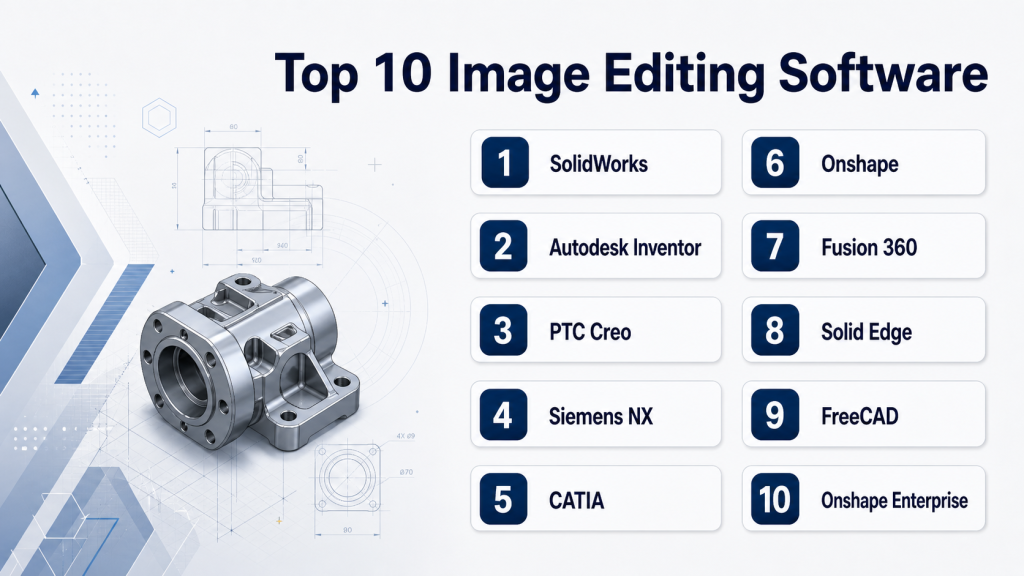
Top 10 Mechanical Design Software Tools
1 — SolidWorks
Short description: SolidWorks offers a comprehensive CAD environment for parametric 3D modeling, assembly design, and simulation, widely used in engineering and industrial design.
Key Features
- Parametric and direct 3D modeling
- Stress, thermal, and motion simulation
- Integrated rendering and CAM tools
- 3DEXPERIENCE cloud collaboration
- Extensive component libraries
Pros
- Mature ecosystem with strong support
- Large user community and training resources
- Efficient CAD-to-CAM workflow
Cons
- Expensive for small teams
- High system requirements for large assemblies
- Advanced cloud features require subscription
Platforms / Deployment
- Windows, Cloud
- Hybrid
Security & Compliance
- SSO, MFA, encryption, RBAC
- SOC 2; other certifications: Not publicly stated
Integrations & Ecosystem
Supports major PLM and CAM systems with API extensions.
- CAMWorks, HSMWorks
- Simulia for advanced simulation
- 3DEXPERIENCE cloud platform
Support & Community
- Vendor support tiers, extensive documentation, active forums
2 — Autodesk Inventor
Short description: Inventor combines parametric and direct modeling, simulation, and visualization tools for mechanical design teams.
Key Features
- Parametric 3D and assembly modeling
- Dynamic stress and motion simulation
- Integrated rendering and visualization
- BIM and CAD interoperability
- Data management with Autodesk Vault
Pros
- Strong integration with Autodesk ecosystem
- Flexible modeling workflows
- Comprehensive simulation tools
Cons
- Steep learning curve for new users
- Performance may lag on very large assemblies
- Limited cloud collaboration compared to competitors
Platforms / Deployment
- Windows, Cloud
- Hybrid
Security & Compliance
- Encryption and access control
- SOC 2 / ISO: Not publicly stated
Integrations & Ecosystem
- Autodesk PLM, Fusion 360, CAMWorks
- APIs for scripting and automation
Support & Community
- Vendor support, documentation, active online forums
3 — PTC Creo
Short description: Creo provides hybrid parametric and direct modeling with advanced simulation and generative design capabilities.
Key Features
- Parametric and direct modeling
- FEA, CFD, and motion simulation
- Generative design and optimization
- Product data management integration
- AR visualization
Pros
- Advanced simulation and generative design
- Strong PLM integration
- Collaboration for enterprise-scale projects
Cons
- Interface complexity for beginners
- Higher licensing cost
- Requires dedicated training for advanced modules
Platforms / Deployment
- Windows, Cloud
- Hybrid
Security & Compliance
- RBAC, encryption, audit logs
- Other certifications: Not publicly stated
Integrations & Ecosystem
- Windchill PLM, Ansys, Simulink
- API for automation
Support & Community
- Vendor certification programs, active forums
4 — Siemens NX
Short description: NX is a high-end solution combining CAD, CAM, and CAE for complex product development.
Key Features
- Advanced parametric and surface modeling
- Integrated FEA, CFD, and motion simulation
- Generative design and topology optimization
- Full CAM support
- PLM integration with Teamcenter
Pros
- Ideal for large assemblies and industrial products
- Strong simulation capabilities
- Enterprise-ready collaboration
Cons
- High cost and complexity
- Steep learning curve
- Hardware-intensive
Platforms / Deployment
- Windows, Cloud
- Hybrid
Security & Compliance
- Encryption, RBAC
- SOC 2 / ISO: Not publicly stated
Integrations & Ecosystem
- Teamcenter PLM, CAMWorks
- Open APIs for custom workflows
Support & Community
- Extensive vendor support and documentation
- Active professional user forums
5 — CATIA
Short description: CATIA offers multi-disciplinary CAD for aerospace, automotive, and industrial design.
Key Features
- Parametric and surface modeling
- Multi-physics simulation
- Collaborative multi-domain design
- PLM and manufacturing integration
- Advanced assembly management
Pros
- Industry-standard in aerospace and automotive
- Excellent surface modeling
- Supports multi-disciplinary teams
Cons
- Expensive licenses
- High system requirements
- Requires skilled users
Platforms / Deployment
- Windows, Cloud
- Hybrid
Security & Compliance
- Encryption and RBAC
- Other certifications: Not publicly stated
Integrations & Ecosystem
- 3DEXPERIENCE platform
- PLM and simulation integrations
- APIs for customization
Support & Community
- Vendor training and certification
- Active professional networks
6 — Onshape
Short description: Onshape is a cloud-native CAD platform with real-time collaboration for distributed teams.
Key Features
- Full-cloud parametric modeling
- Version control and branching
- Real-time multi-user collaboration
- Mobile-friendly
- BOM and analytics management
Pros
- Excellent for remote teams
- Easy version control
- Cross-platform access
Cons
- Cloud-dependent
- Limited advanced simulation
- May not scale for very complex assemblies
Platforms / Deployment
- Web, Windows, macOS, iOS, Android
- Cloud
Security & Compliance
- Encryption, SSO, RBAC
- SOC 2 / ISO: Not publicly stated
Integrations & Ecosystem
- PLM and CAM integration
- API and App Store extensions
Support & Community
- Vendor support, active documentation
7 — Fusion 360
Short description: Fusion 360 is an integrated CAD, CAM, and CAE solution suitable for small to mid-sized teams.
Key Features
- Parametric and direct modeling
- Stress, thermal, and motion simulation
- CAM and additive manufacturing support
- Cloud collaboration
- Version control
Pros
- Accessible for startups and small teams
- Strong cloud collaboration
- Affordable subscription
Cons
- Cloud connectivity required
- Limited advanced surface modeling
- Performance lags on large assemblies
Platforms / Deployment
- Windows, macOS, Web
- Cloud
Security & Compliance
- Encryption, RBAC, SSO
- SOC 2 / ISO: Not publicly stated
Integrations & Ecosystem
- Autodesk ecosystem, CAMWorks
- APIs for plugins
Support & Community
- Tutorials, online forums, vendor support
8 — Solid Edge
Short description: Solid Edge provides synchronous technology for rapid design iterations alongside parametric modeling.
Key Features
- Synchronous + parametric modeling
- Assembly management
- Stress and motion simulation
- Manufacturing and CAM integration
- Cloud collaboration
Pros
- Flexible modeling approaches
- Integration with Siemens PLM
- Strong mid-sized team performance
Cons
- Smaller ecosystem
- Advanced modules require licenses
- Hybrid modeling learning curve
Platforms / Deployment
- Windows, Cloud
- Hybrid
Security & Compliance
- Encryption, RBAC
- SOC 2 / ISO: Not publicly stated
Integrations & Ecosystem
- Teamcenter PLM, CAM software
- API access for automation
Support & Community
- Vendor documentation and training resources
9 — FreeCAD
Short description: FreeCAD is an open-source mechanical CAD platform ideal for hobbyists, startups, and academics.
Key Features
- Parametric modeling and assemblies
- Basic FEA simulation
- Python API for scripting
- Community-driven extensions
- 2D drawing generation
Pros
- Free and open-source
- Flexible scripting
- Active community support
Cons
- Limited advanced simulation
- Less polished UI
- Not ideal for enterprise projects
Platforms / Deployment
- Windows, macOS, Linux
- Self-hosted
Security & Compliance
- Not publicly stated
Integrations & Ecosystem
- Python scripts, community modules
Support & Community
- Community forums and tutorials
10 — Onshape Enterprise
Short description: Onshape Enterprise adds enterprise-grade collaboration, security, and lifecycle management to cloud CAD.
Key Features
- Cloud CAD with real-time collaboration
- Security and compliance controls
- PLM integration
- Version control and branching
- Workflow analytics
Pros
- Scales for large teams
- Strong security features
- Easy cloud deployment
Cons
- Subscription cost higher for small teams
- Internet connectivity required
- Advanced modeling may be limited
Platforms / Deployment
- Web, Windows, macOS, iOS, Android
- Cloud
Security & Compliance
- Encryption, SSO, RBAC
- SOC 2 / ISO: Not publicly stated
Integrations & Ecosystem
- PLM and CAM integration
- APIs for analytics and automation
Support & Community
- Vendor support, enterprise forums
Comparison Table (Top 10)
| Tool Name | Best For | Platform(s) Supported | Deployment | Standout Feature | Public Rating |
|---|---|---|---|---|---|
| SolidWorks | Enterprise teams | Windows, Cloud | Hybrid | Mature parametric CAD | N/A |
| Autodesk Inventor | Industrial design | Windows, Cloud | Hybrid | Autodesk ecosystem | N/A |
| PTC Creo | Complex assemblies | Windows, Cloud | Hybrid | Generative design | N/A |
| Siemens NX | Large-scale product engineering | Windows, Cloud | Hybrid | Integrated CAD/CAM/CAE | N/A |
| CATIA | Aerospace/automotive | Windows, Cloud | Hybrid | Multi-disciplinary design | N/A |
| Onshape | Remote collaboration | Web, Windows, macOS, iOS, Android | Cloud | Real-time collaboration | N/A |
| Fusion 360 | SMB & startups | Windows, macOS, Web | Cloud | Integrated CAD/CAM/CAE | N/A |
| Solid Edge | Mid-sized teams | Windows, Cloud | Hybrid | Synchronous modeling | N/A |
| FreeCAD | Hobbyists & academia | Windows, macOS, Linux | Self-hosted | Open-source & scriptable | N/A |
| Onshape Enterprise | Large distributed teams | Web, Windows, macOS, iOS, Android | Cloud | Enterprise cloud CAD | N/A |
Evaluation & Scoring of Mechanical Design Software
| Tool Name | Core | Ease | Integrations | Security | Performance | Support | Value | Weighted Total |
|---|---|---|---|---|---|---|---|---|
| SolidWorks | 9 | 8 | 9 | 8 | 9 | 8 | 7 | 8.5 |
| Autodesk Inventor | 8 | 7 | 8 | 7 | 8 | 7 | 8 | 7.7 |
| PTC Creo | 9 | 6 | 8 | 7 | 9 | 7 | 6 | 7.6 |
| Siemens NX | 9 | 6 | 8 | 7 | 9 | 7 | 6 | 7.6 |
| CATIA | 9 | 5 | 8 | 7 | 9 | 6 | 5 | 7.1 |
| Onshape | 7 | 8 | 7 | 8 | 7 | 7 | 7 | 7.3 |
| Fusion 360 | 8 | 8 | 7 | 7 | 7 | 7 | 8 | 7.5 |
| Solid Edge | 8 | 7 | 7 | 7 | 8 | 7 | 7 | 7.4 |
| FreeCAD | 6 | 6 | 6 | 6 | 6 | 6 | 10 | 6.4 |
| Onshape Enterprise | 8 | 7 | 8 | 8 | 7 | 8 | 7 | 7.7 |
Interpretation: Weighted totals show comparative strength across features, usability, integration, security, and value. Higher scores indicate better overall balance.
Which Mechanical Design Software Tool Is Right for You?
Solo / Freelancer
- FreeCAD or Fusion 360 for low-cost, flexible modeling.
- Onshape for cloud-based mobility.
SMB
- Fusion 360 or Solid Edge for balanced modeling and collaboration.
- Autodesk Inventor for integration with other Autodesk tools.
Mid-Market
- PTC Creo or Onshape Enterprise for complex assemblies and collaboration.
- Siemens NX or SolidWorks if advanced simulation is critical.
Enterprise
- CATIA or Siemens NX for aerospace, automotive, and multi-disciplinary workflows.
- Onshape Enterprise for large-scale cloud collaboration.
Budget vs Premium
- FreeCAD and Fusion 360 for cost-sensitive teams.
- SolidWorks, CATIA, Siemens NX for enterprise-scale operations.
Feature Depth vs Ease of Use
- Fusion 360 balances usability and features.
- CATIA, NX, and Creo offer deep capabilities with steeper learning curves.
Integrations & Scalability
- Enterprise workflows benefit from PLM-connected systems like Siemens NX and CATIA.
- Cloud-first teams benefit from Onshape Enterprise or Fusion 360.
Security & Compliance Needs
- Enterprise-grade access control and audit logging: SolidWorks, Onshape Enterprise, Siemens NX.
- SMB and freelancers: basic encryption and RBAC in Fusion 360 or Onshape.
Frequently Asked Questions (FAQs)
1. Which mechanical design software is best for beginners?
Fusion 360 and FreeCAD provide approachable learning curves, tutorials, and community support for new users.
2. Can these tools simulate real-world physics?
Most commercial CAD platforms support FEA, CFD, and motion simulation to validate designs virtually.
3. Do I need high-end hardware to run these tools?
High-end CAD like NX, CATIA, and SolidWorks require robust workstations; cloud tools reduce local requirements.
4. Are there free options available?
FreeCAD is fully open-source; Fusion 360 offers free licenses for students, startups, and hobbyists.
5. Can these tools integrate with PLM or CAM software?
Yes, nearly all commercial tools integrate with PLM, CAM, and ERP systems for end-to-end workflows.
6. Is cloud collaboration reliable for large assemblies?
Cloud-native tools like Onshape and Fusion 360 support collaborative editing with version control, suitable for distributed teams.
7. How steep is the learning curve?
Tools like CATIA, Siemens NX, and PTC Creo require training, while Fusion 360 and FreeCAD are easier for beginners.
8. Can these tools generate manufacturing-ready data?
Yes, most include CAM exports, CNC-ready files, and additive manufacturing support.
9. Are APIs available for custom workflows?
Yes, commercial tools offer APIs and scripting for automation, custom features, and integration.
10. How do I choose the right tool for my team?
Consider team size, workflow complexity, budget, cloud collaboration needs, and integration requirements.
Conclusion
Mechanical design software empowers engineers and designers to innovate faster, simulate accurately, and collaborate efficiently. The best tool depends on team size, complexity of designs, and workflow integration needs. Freelancers and SMBs can benefit from Fusion 360 or FreeCAD, while mid-market and enterprise teams may require Siemens NX, CATIA, or SolidWorks for advanced simulation and multi-disciplinary projects. The optimal approach is to shortlist 2–3 tools, run pilot projects, and validate integration, collaboration, and security before scaling usage across teams.

Find Trusted Cardiac Hospitals
Compare heart hospitals by city and services — all in one place.
Explore Hospitals
Mechanical design software tools are explained clearly, and the comparison helps in understanding how modeling, simulation, and product design work together in real-world engineering.