Introduction
Capacity planning tools are specialized software solutions designed to help IT organizations predict, manage, and optimize the resources required to support their digital services. These tools analyze historical utilization data and performance metrics to forecast future resource needs across CPU, memory, storage, and network bandwidth. By providing a clear view of current capacity and projected growth, these platforms ensure that infrastructure can scale effectively without over-provisioning or risking service outages due to resource exhaustion.
In the modern enterprise landscape, the importance of capacity planning has shifted from simple hardware procurement to complex cloud cost optimization and workload placement. With the rise of hybrid and multi-cloud architectures, manual spreadsheets are no longer sufficient to track the ephemeral nature of containers and virtual machines. Modern platforms leverage machine learning to provide “what-if” analysis, allowing managers to simulate the impact of new projects or hardware failures on the existing environment. This proactive approach prevents performance bottlenecks and ensures that IT spending aligns strictly with business demand.
Real-world use cases for these tools include:
- Data Center Consolidation: Determining how many physical servers can be decommissioned by increasing the density of virtual machines.
- Cloud Migration Planning: Estimating the exact instance sizes and costs required before moving on-premises workloads to the public cloud.
- Seasonal Peak Preparation: Forecasting resource requirements for high-traffic events like major sales or end-of-year financial processing.
- Budget Forecasting: Providing data-backed justification for infrastructure investments based on projected growth trends.
- Disaster Recovery Simulation: Testing whether backup environments have sufficient capacity to handle primary workloads during a failover.
When evaluating a platform, buyers should prioritize the following criteria:
- Forecasting Accuracy: The ability of the ML models to account for seasonality and growth trends.
- Cross-Platform Visibility: Support for both legacy on-premises hardware and modern cloud-native environments.
- What-if Analysis: The robustness of the simulation engine for various failure or growth scenarios.
- Right-sizing Recommendations: Actionable insights that tell you exactly which resources to scale up or down.
- Integration Depth: How well the tool connects with hypervisors, cloud APIs, and ITSM systems.
- Real-time Monitoring: The frequency of data collection and its impact on infrastructure performance.
- Cloud Cost Correlation: Linking resource utilization to actual dollars spent in public cloud environments.
- Automated Reporting: The ability to generate executive-ready reports showing capacity runways and risks.
Best for: IT infrastructure managers, cloud architects, capacity planners, and FinOps teams managing complex, high-growth digital environments.
Not ideal for: Small businesses with static, low-complexity infrastructure or teams looking for basic uptime monitoring without predictive analytics.
Key Trends in Capacity Planning Tools
- Predictive AI Integration: Platforms are increasingly using neural networks to move beyond linear growth projections, accounting for complex, non-linear patterns in application behavior.
- FinOps Alignment: Capacity planning is converging with cloud financial management, ensuring that “right-sizing” is driven by both performance needs and budget constraints.
- Sustainability Tracking: Modern tools are beginning to report on the carbon footprint and energy consumption of infrastructure, linking resource capacity to ESG goals.
- Serverless and Container Focus: A shift toward managing the capacity of microservices and ephemeral workloads rather than just physical or virtual servers.
- Automated Right-sizing: Moving from “recommendations” to “autonomous actions,” where the software automatically resizes cloud instances or migrates workloads to optimize capacity.
- Hybrid-Cloud Unified View: The emergence of “single-pane-of-glass” views that normalize capacity metrics across different cloud providers and local data centers.
- Workload Placement Optimization: Using AI to determine the most cost-effective and performant location for a specific workload (e.g., Public Cloud vs. Private Cloud).
- Shift-Left Capacity Testing: Integrating capacity simulations into the development pipeline to predict resource needs before code is even deployed.
How We Selected These Tools (Methodology)
To determine the top platforms for the current market, we applied a rigorous evaluation framework:
- Market Adoption: We prioritized tools that are widely used in enterprise environments and recognized by major industry analysts.
- Feature Maturity: Evaluation of the depth of predictive modeling and “what-if” simulation capabilities.
- Interoperability: Assessment of the breadth of integrations with hypervisors (VMware, Nutanix) and cloud providers (AWS, Azure, GCP).
- Reliability Signals: Analysis of the software’s ability to handle massive datasets from thousands of nodes without performance degradation.
- Customer Fit: Ensuring the list includes a balance of enterprise-grade suites, cloud-native platforms, and open-source options.
- Security Posture: Consideration of features like RBAC, SSO support, and data encryption for sensitive infrastructure metadata.
- Innovation Velocity: Weighting given to platforms that have recently introduced advanced ML-driven forecasting and FinOps features.
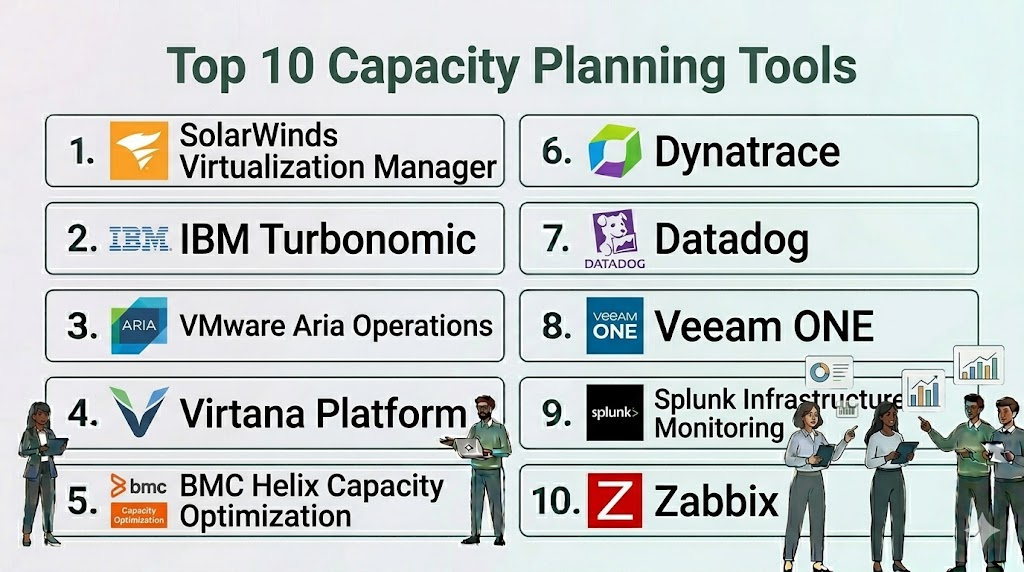
Top 10 Capacity Planning Tools
1. SolarWinds Virtualization Manager
SolarWinds Virtualization Manager (VMAN) is a comprehensive tool designed to optimize and plan capacity for virtualized environments. It provides deep visibility into the performance, capacity, and health of VMware vSphere and Microsoft Hyper-V environments.
Key Features
- Capacity Planning Wizard: Allows users to run “what-if” scenarios to predict when resources will run out based on historical trends.
- Right-sizing Recommendations: Identifies over-provisioned and under-provisioned VMs to optimize resource allocation.
- Sprawl Dashboard: Highlights “zombie” VMs and orphaned files that are wasting valuable storage and memory capacity.
- VM Analytics: Provides a visual map of the relationship between VMs, hosts, and storage to pinpoint bottlenecks.
- Historical Trending: Retains long-term performance data to identify seasonal patterns and long-term growth.
Pros
- Extremely user-friendly interface with guided wizards for capacity simulations.
- Strongest performance in traditional data center virtualization management.
Cons
- Focused primarily on virtualization; lacks the same depth for pure cloud-native or serverless stacks.
- Can be resource-intensive to run in very large, fragmented environments.
Platforms / Deployment
- Windows / Web
- Self-hosted / Hybrid
Security & Compliance
- SSO/SAML, RBAC, Encryption
- SOC 2 compliant
Integrations & Ecosystem
SolarWinds VMAN is part of the broader Orion platform, allowing for deep integration with network and storage monitoring tools.
- VMware vSphere
- Microsoft Hyper-V
- ServiceNow
- SolarWinds Storage Resource Monitor
Support & Community
Extensive support through the SolarWinds Success Center, a massive community forum (Thwack), and 24/7 technical support for active subscribers.
2. IBM Turbonomic
IBM Turbonomic is an AI-powered platform that focuses on “Application Resource Management” (ARM). It treats capacity planning as a real-time, continuous optimization problem rather than a static reporting task.
Key Features
- AI-Driven Automation: Automatically adjusts resource allocations to ensure application performance while minimizing cost.
- Full-Stack Visibility: Maps application dependencies from the business transaction down to the underlying hardware or cloud instance.
- Cloud Migration Planning: Provides precise recommendations for moving workloads to the cloud based on actual utilization rather than allocated limits.
- Dynamic Scaling: Scales cloud and container resources up or down in real-time based on fluctuating demand.
- Policy-Driven Governance: Allows users to set constraints on where workloads can run for compliance or performance reasons.
Pros
- Moves beyond reporting into autonomous action, reducing the manual burden on IT teams.
- Excellent for hybrid-cloud environments where workloads are frequently moved.
Cons
- High cost of ownership, making it more suitable for large enterprises.
- The automation engine requires a high level of trust and initial tuning to be effective.
Platforms / Deployment
- Linux / Web
- Cloud / Self-hosted / Hybrid
Security & Compliance
- SSO, SAML 2.0, RBAC
- ISO 27001, SOC 2 compliant
Integrations & Ecosystem
IBM Turbonomic features an extensive integration list across the modern IT stack.
- Kubernetes / OpenShift
- AWS / Azure / GCP
- VMware
- AppDynamics / Dynatrace
Support & Community
Professional enterprise support backed by IBM’s global infrastructure and a dedicated customer success program.
3. VMware Aria Operations
Formerly known as vRealize Operations, VMware Aria Operations is the primary tool for managing capacity and performance within the VMware ecosystem and beyond.
Key Features
- Predictive Capacity Analytics: Uses an advanced ML engine to forecast capacity shortfalls and provide “time remaining” metrics.
- What-if Analysis: Simulates adding new workloads, migrating to the cloud, or hardware decommissioning.
- Automated Workload Placement: Optimizes VM placement across clusters to balance resource utilization.
- Cloud Cost Transparency: Provides detailed cost reporting for on-premises private clouds and public cloud environments.
- Right-sizing Engine: Automatically identifies and reclaims unused resources to improve efficiency.
Pros
- Deepest possible integration with the VMware SDDC stack.
- Highly mature forecasting engine with high accuracy for virtualized workloads.
Cons
- Can be complex to configure and manage for teams not fully standardized on VMware.
- Licensing can be expensive when bundled with the full Aria suite.
Platforms / Deployment
- Linux / Web
- Cloud (SaaS) / Self-hosted / Hybrid
Security & Compliance
- SSO/SAML, RBAC, Data encryption
- SOC 2, HIPAA, FedRAMP compliant
Integrations & Ecosystem
Designed as the centerpiece of VMware management but supports external platforms.
- VMware Cloud Foundation
- AWS / Azure / GCP
- ServiceNow
- Management Packs for third-party hardware
Support & Community
Robust enterprise support, extensive global training, and a massive ecosystem of certified professionals.
4. Virtana Platform
The Virtana Platform specializes in high-fidelity capacity planning and cost optimization for hybrid-cloud environments, with a strong focus on storage and cloud migration.
Key Features
- Precision Data Collection: Captures high-resolution metrics to identify micro-bursts that other tools might miss.
- Cloud Physics: A specialized engine that maps on-premises workloads to the optimal cloud configuration.
- Cost Management: Provides detailed visibility into cloud bills with actionable recommendations to reduce spend.
- Workload Simulation: Replays actual production workloads against a simulated cloud environment to predict performance.
- Hybrid Visibility: Unified view of capacity across local data centers and multiple public clouds.
Pros
- Exceptional at identifying hidden performance bottlenecks in storage and network layers.
- Strong focus on “performance-based” capacity planning rather than just utilization.
Cons
- Smaller community compared to giants like VMware or IBM.
- Setup can be more technical, requiring a deep understanding of infrastructure metrics.
Platforms / Deployment
- Web
- Cloud-native (SaaS)
Security & Compliance
- SSO, RBAC, Encryption
- SOC 2 Type II compliant
Integrations & Ecosystem
Focuses on the core infrastructure and cloud layers.
- VMware / Nutanix
- AWS / Azure / GCP
- Pure Storage / NetApp
- Dell / HPE
Support & Community
Dedicated enterprise support and professional services for complex migration and optimization projects.
5. BMC Helix Capacity Optimization
BMC Helix is an enterprise-grade AIOps and capacity management platform that provides a unified view of IT resources across the entire business.
Key Features
- Service-Aware Capacity: Links IT resources to specific business services, showing how a lack of capacity affects business outcomes.
- Forward-Looking Trends: Uses ML to predict future capacity needs based on historical business cycles.
- What-if Simulations: Models the impact of hardware upgrades, cloud migrations, or application growth.
- Container Optimization: Specialized tools for managing the capacity of Kubernetes and Docker environments.
- Executive Dashboards: High-level views of capacity risk and efficiency for management reporting.
Pros
- Excellent for large organizations that need to map technical capacity to business services.
- Powerful reporting capabilities for long-term strategic planning.
Cons
- Can have a higher learning curve due to the breadth of the platform.
- Installation and initial configuration often require professional services.
Platforms / Deployment
- Linux / Web
- Cloud (SaaS) / Hybrid
Security & Compliance
- SSO, SAML, RBAC, Encryption
- ISO 27001, SOC 2, HIPAA compliant
Integrations & Ecosystem
Integrates deeply with the BMC Helix ITSM and Discovery suites.
- ServiceNow
- Kubernetes
- Mainframe / Distributed Systems
- AWS / Azure / GCP
Support & Community
Global enterprise support, a robust customer portal, and an active user community (BMC Communities).
6. Dynatrace
While primarily an observability tool, Dynatrace provides powerful predictive capacity planning features within its unified AI platform.
Key Features
- Davis AI Engine: Automatically detects capacity anomalies and predicts future resource exhaustion.
- Full-Stack Dependency Mapping: Shows how capacity issues at the infrastructure level affect application performance.
- Cloud Instance Optimization: Recommends the best cloud instance sizes based on actual application demand.
- Disk Capacity Forecasting: Uses ML to predict exactly when storage volumes will reach capacity.
- Kubernetes Capacity Views: Provides granular visibility into pod and node capacity within clusters.
Pros
- Requires zero manual configuration for capacity insights thanks to its “OneAgent.”
- Links capacity directly to user experience and application health.
Cons
- Primarily focused on “short-to-medium” term capacity rather than multi-year hardware planning.
- Premium pricing model based on host units or data volume.
Platforms / Deployment
- Windows / macOS / Linux / Web
- Cloud / Managed (On-prem/Hybrid)
Security & Compliance
- SSO/SAML, RBAC, End-to-end encryption
- SOC 2, ISO 27001, FedRAMP, GDPR compliant
Integrations & Ecosystem
One of the most integrated platforms in the modern DevOps world.
- AWS / Azure / GCP
- Kubernetes / OpenShift
- ServiceNow / Jira
- Slack / PagerDuty
Support & Community
Offers a premium support model (Dynatrace ONE) and a highly active developer and user community.
7. Datadog
Datadog is a cloud-scale monitoring platform that includes robust capacity planning and forecasting features as part of its infrastructure monitoring suite.
Key Features
- Forecast Monitors: Uses ML to predict when a metric (like disk space) will reach a critical threshold.
- Anomaly Detection: Identifies when resource utilization deviates from normal historical patterns.
- Cloud Cost Management: Correlates capacity metrics with cloud spending to identify optimization opportunities.
- Infrastructure Inventory: Provides a real-time view of all assets across multi-cloud environments.
- Notebooks: Collaborative documents that allow teams to analyze capacity trends and share insights.
Pros
- Incredibly easy to set up with hundreds of pre-built integrations.
- Unified view of metrics, logs, and capacity in a single interface.
Cons
- Costs can grow quickly as you scale the number of monitored hosts and metrics.
- Less focus on traditional “physical server” lifecycle planning compared to BMC or SolarWinds.
Platforms / Deployment
- Windows / macOS / Linux / Web
- Cloud-native (SaaS)
Security & Compliance
- SSO/SAML, RBAC, Data masking
- SOC 2, HIPAA, PCI DSS compliant
Integrations & Ecosystem
Boasts one of the largest integration libraries in the SaaS monitoring space.
- 600+ Integrations
- AWS / Azure / GCP
- Kubernetes
- Terraform / Ansible
Support & Community
Strong online support, extensive documentation, and a global presence in the DevOps community.
8. Veeam ONE
Veeam ONE is a monitoring and reporting tool specifically designed to provide capacity planning for backup and virtualized environments.
Key Features
- Backup Capacity Planning: Predicts when backup storage will be full and identifies unprotected VMs.
- What-if Analysis for Backups: Simulates the impact of changing backup retention policies or adding new servers.
- Virtualization Forecasting: Provides “time remaining” and “capacity remaining” metrics for hosts and clusters.
- Over-provisioning Reports: Identifies VMs with excessive resources to reclaim capacity.
- Automated Remediation: Can trigger scripts to fix common capacity issues automatically.
Pros
- The best tool for planning the capacity of data protection and backup infrastructure.
- Very intuitive for teams already using Veeam Backup & Replication.
Cons
- Limited scope; primarily focused on backup and virtualization rather than full-stack cloud.
- Requires a Veeam environment to provide maximum value.
Platforms / Deployment
- Windows / Web
- Self-hosted / Hybrid
Security & Compliance
- RBAC, Encryption
- FIPS 140-2 compliant
Integrations & Ecosystem
Deeply integrated with the Veeam and VMware/Microsoft ecosystem.
- Veeam Backup & Replication
- VMware vSphere
- Microsoft Hyper-V
- Microsoft Azure / AWS (Backup focus)
Support & Community
Professional support, a strong user forum, and extensive technical documentation.
9. Splunk Infrastructure Monitoring
Formerly known as SignalFx, Splunk Infrastructure Monitoring provides real-time capacity analytics for cloud-scale environments.
Key Features
- Predictive Analytics: Real-time forecasting for any metric using built-in ML functions.
- High-Resolution Monitoring: Collects data at second-level granularity to identify transient capacity spikes.
- Auto-detect: Automatically finds new resources and starts forecasting their utilization.
- Unified Dashboarding: Combines capacity metrics with application and log data.
- Cost Visualization: Maps infrastructure utilization to cloud billing data for real-time cost control.
Pros
- Best-in-class for real-time monitoring and alerting on high-cardinality data.
- Highly flexible; can create custom capacity models using its advanced analytics language.
Cons
- Can be complex for users who aren’t familiar with Splunk’s data-centric approach.
- Focused more on “real-time operations” than long-term “procurement planning.”
Platforms / Deployment
- Linux / Web
- Cloud (SaaS)
Security & Compliance
- SSO/SAML, RBAC, Encryption
- SOC 2, ISO 27001, HIPAA, FedRAMP compliant
Integrations & Ecosystem
Integrates with the broader Splunk and observability ecosystem.
- Apache Kafka
- Kubernetes / Docker
- AWS / Azure / GCP
- ServiceNow
Support & Community
Premium support through Cisco/Splunk and a large, highly technical user community.
10. Zabbix
Zabbix is an enterprise-class, open-source monitoring solution that provides robust capacity planning through historical data analysis and forecasting.
Key Features
- Trend Prediction: Built-in functions like
forecastandtimeleftto predict when thresholds will be met. - Historical Data Storage: Highly efficient storage of long-term metrics for multi-year trend analysis.
- Customizable Dashboards: Create executive views of capacity runways and resource health.
- Agentless & Agent-based Monitoring: Flexibility to collect data from any infrastructure type.
- Automated Discovery: Automatically detects and adds new network devices and servers for monitoring.
Pros
- Completely free with no licensing costs, offering incredible value.
- Highly customizable; can be tailored to monitor virtually anything with an IP address.
Cons
- Requires significant manual effort to set up and configure compared to SaaS tools.
- Lacks the advanced AI-driven autonomous optimization features found in IBM or Dynatrace.
Platforms / Deployment
- Linux / Web
- Self-hosted / Cloud (IaaS)
Security & Compliance
- RBAC, Encryption, Audit logging
- Not publicly stated
Integrations & Ecosystem
Strong open-source ecosystem with thousands of community templates.
- SNMP / IPMI
- VMware
- MySQL / PostgreSQL
- Grafana
Support & Community
Professional support available through Zabbix partners and a very active global open-source community.
Comparison Table
| Tool Name | Best For | Platform(s) Supported | Deployment | Standout Feature | Public Rating |
| SolarWinds Virtualization Manager | Data Center Virtualization | Win / Web | Self-hosted | Capacity Planning Wizard | N/A |
| IBM Turbonomic | Autonomous Optimization | Linux / Web | Hybrid | AI-Driven ARM Engine | N/A |
| VMware Aria Operations | VMware Ecosystem | Linux / Web | Hybrid | Time Remaining Metrics | N/A |
| Virtana Platform | Hybrid Migration | Web | SaaS | High-Fidelity Simulations | N/A |
| BMC Helix Capacity Optimization | Service-Aware Capacity | Linux / Web | SaaS/Hybrid | Business Service Mapping | N/A |
| Dynatrace | Observability-Driven Capacity | Win / Mac / Linux | Hybrid | Davis AI Prediction | N/A |
| Datadog | Cloud-Scale Infrastructure | Win / Mac / Linux | SaaS | Forecast Monitors | N/A |
| Veeam ONE | Backup Capacity | Win / Web | Self-hosted | Backup Storage Forecasting | N/A |
| Splunk Infrastructure Monitoring | Real-time Operations | Linux / Web | SaaS | Real-time ML Forecasting | N/A |
| Zabbix | Open Source Monitoring | Linux / Web | Self-hosted | Forecast & Timeleft Functions | N/A |
Evaluation & Scoring of Capacity Planning Tools
The table below provides a weighted scoring model for each platform based on enterprise requirements.
| Tool Name | Core (25%) | Ease (15%) | Integrations (15%) | Security (10%) | Performance (10%) | Support (10%) | Value (15%) | Weighted Total |
| SolarWinds VMAN | 8 | 8 | 8 | 9 | 7 | 8 | 8 | 7.9 |
| IBM Turbonomic | 10 | 6 | 9 | 9 | 10 | 9 | 6 | 8.4 |
| VMware Aria Ops | 10 | 6 | 9 | 10 | 9 | 9 | 7 | 8.5 |
| Virtana Platform | 9 | 7 | 8 | 8 | 9 | 8 | 8 | 8.1 |
| BMC Helix | 9 | 5 | 9 | 10 | 8 | 9 | 7 | 8.0 |
| Dynatrace | 8 | 9 | 10 | 10 | 10 | 9 | 7 | 8.9 |
| Datadog | 8 | 10 | 10 | 9 | 9 | 9 | 8 | 8.8 |
| Veeam ONE | 7 | 9 | 7 | 8 | 8 | 8 | 9 | 7.7 |
| Splunk | 9 | 7 | 9 | 10 | 10 | 9 | 7 | 8.4 |
| Zabbix | 7 | 5 | 8 | 7 | 9 | 6 | 10 | 7.4 |
How to interpret the scores
- Scale: Each category is scored out of 10. The Weighted Total is the final score based on the priority percentages.
- Core Performance: Tools like IBM and VMware lead in deep technical capacity modeling.
- Value Leaders: Zabbix and Blender (free) provide high value relative to cost, while SaaS tools lead in “Ease of Use.”
Which Capacity Planning Tool Is Right for You?
Solo / Freelancer
For an individual consultant or solo developer, Zabbix is the best choice if you have the technical skill to manage it, as it is free. If you prefer a managed experience, Datadog offers a low-cost entry point for small infrastructures.
SMB
Small-to-medium businesses should prioritize ease of use and all-in-one visibility. SolarWinds Virtualization Manager or Datadog provide quick time-to-value without requiring a dedicated capacity planning team.
Mid-Market
Mid-market organizations standardized on VMware should stick with VMware Aria Operations. Those looking for a more “modern” SaaS feel across diverse infrastructure will find Dynatrace or Virtana more suitable for their growth.
Enterprise
For large-scale enterprises with hybrid environments and strict compliance, IBM Turbonomic or BMC Helix Capacity Optimization provide the required depth. These tools handle complex multi-cloud and mainframe environments while mapping them to business outcomes.
Budget vs Premium
If budget is the primary driver, Zabbix is the only logical choice. On the premium end, Dynatrace and IBM Turbonomic offer the highest level of AI-driven automation, which saves money in the long run through precise resource optimization.
Feature Depth vs Ease of Use
Datadog and Dynatrace represent the peak of ease of use. For deep, technical feature sets that allow for granular hardware-level planning, VMware Aria Operations and BMC Helix are the preferred choices.
Integrations & Scalability
Splunk and Datadog are the winners for massive-scale ingestion and multi-platform integration. Their ability to pull in data from thousands of different sources makes them the most scalable for “connected” environments.
Security & Compliance Needs
Organizations in highly regulated industries (Finance, Healthcare, Defense) should prioritize VMware Aria Operations, BMC Helix, or SolarWinds, as they have long histories of supporting complex air-gapped or highly secure environments.
Frequently Asked Questions (FAQs)
1. What is the difference between infrastructure monitoring and capacity planning?
Infrastructure monitoring focuses on the “now”—identifying current outages and performance issues. Capacity planning focuses on the “future”—predicting when resources will run out based on historical trends.
2. How far into the future can these tools predict?
Most modern tools can provide accurate forecasts for 3 to 6 months. Multi-year projections are possible but become less accurate as business requirements and technology stacks change over time.
3. Do I need an agent on every server to use these tools?
Many modern tools (like VMware Aria or BigQuery) are “agentless,” using APIs to collect data. Others, like Datadog or Dynatrace, use a lightweight agent for deeper visibility into application performance.
4. Can capacity planning tools help reduce cloud bills?
Yes. Most of these tools include “right-sizing” features that identify oversized instances and “zombie” resources, often leading to immediate cloud cost savings of 20% to 30%.
5. What is “what-if” analysis in capacity planning?
It is a simulation feature that allows you to see the impact of a change before it happens. For example, “What if I add 500 new users?” or “What if I lose two physical servers in my cluster?”
6. Is capacity planning still relevant with “infinite” cloud resources?
Yes. While cloud resources are physically infinite, your budget is not. Capacity planning ensures you only pay for what you actually need and prevents performance bottlenecks caused by cloud service limits.
7. How does AI improve capacity planning?
AI can identify seasonal patterns (like Black Friday) and non-linear growth that simple linear calculations might miss. It also powers autonomous optimization, where the system fixes capacity issues itself.
8. What is the biggest mistake in capacity planning?
The most common mistake is planning based on “allocated” resources rather than “actual” utilization. This leads to massive over-provisioning and wasted budget.
9. Can these tools manage Kubernetes capacity?
Yes, most top tools now have specialized views for Kubernetes, helping you balance pods across nodes and optimize the capacity of the underlying cluster infrastructure.
10. How often should capacity reports be reviewed?
For highly dynamic cloud environments, capacity should be reviewed weekly. For traditional hardware data centers, a monthly or quarterly review is usually sufficient for procurement planning.
Conclusion
Capacity planning is no longer a luxury for large enterprises; it is a critical operational requirement in the age of cloud and hybrid infrastructure. Whether you choose the AI-driven autonomy of IBM Turbonomic, the deep VMware integration of Aria Operations, or the open-source flexibility of Zabbix, the goal remains the same: ensuring your infrastructure is exactly the right size for your business.Your next step should be to run a capacity audit on your most expensive or mission-critical environment. Shortlist 2-3 tools from this list and use their “right-sizing” recommendations to see how much immediate waste you can reclaim. Start with a 30-day trial to validate the accuracy of their forecasting before committing to a long-term investment.

Find Trusted Cardiac Hospitals
Compare heart hospitals by city and services — all in one place.
Explore Hospitals
Capacity planning tools are explained in a clear way, and the comparison helps in understanding forecasting, resource usage, and cost optimization easily.