Introduction
Spatial Computing Toolkits are software platforms that enable developers to create immersive, location-aware, and interactive experiences in 3D or mixed reality environments. They provide APIs, libraries, and frameworks to manage spatial data, integrate sensors, track objects, and build applications that respond to real-world positioning. These toolkits have become increasingly important as augmented reality (AR), virtual reality (VR), and mixed reality experiences expand across industries.
spatial computing is central to training simulations, collaborative remote work, digital twin creation, gaming, and architectural visualization. Toolkits streamline development by providing prebuilt modules for object recognition, physics simulations, gesture tracking, and spatial mapping, helping developers focus on experience rather than low-level infrastructure.
Real-world use cases:
- Creating immersive AR/VR training for healthcare professionals and industrial technicians.
- Designing interactive retail experiences that combine physical and digital spaces.
- Developing location-based games and entertainment apps with rich spatial interactions.
- Implementing digital twins for smart cities and building management.
- Enabling remote collaboration in design, engineering, and architecture through shared 3D environments.
Evaluation Criteria for Buyers:
- Ease of integration with existing development workflows.
- Support for multiple devices and platforms.
- Accuracy and performance of spatial tracking and mapping.
- Availability of prebuilt modules for common spatial interactions.
- Scalability and performance for large-scale environments.
- Security and privacy features for sensitive spatial data.
- Community support, documentation, and developer resources.
- Cost structure and licensing flexibility.
- AI/ML support for gesture recognition or predictive spatial behaviors.
- Interoperability with third-party AR/VR/IoT ecosystems.
Best for: developers, AR/VR studios, enterprise innovation labs, and companies creating interactive simulations or digital twins.
Not ideal for: small projects without spatial requirements, or teams relying on general-purpose 3D engines without advanced spatial features.
Key Trends in Spatial Computing Toolkits
- AI-powered spatial mapping and gesture recognition for faster development.
- Cross-platform support across AR headsets, VR devices, mobile, and desktop.
- Integration with digital twins and IoT devices for real-world simulation.
- Cloud-based spatial computation to offload processing from devices.
- Modular SDKs with prebuilt physics, rendering, and interaction engines.
- Increased focus on enterprise-ready security and compliance for sensitive spatial data.
- Real-time collaboration and multi-user experiences in spatial environments.
- Standardization of spatial APIs to reduce fragmentation across devices.
- Cost-effective subscription models for small studios and indie developers.
- Enhanced analytics and telemetry for tracking user interactions and engagement.
How We Selected These Tools (Methodology)
- Market adoption and developer mindshare analysis.
- Feature completeness for spatial mapping, tracking, and interactivity.
- Performance and reliability in high-fidelity environments.
- Security posture and support for enterprise deployment.
- Ecosystem integrations including AR/VR devices, cloud platforms, and IoT sensors.
- Flexibility for different developer skill levels and team sizes.
- Scalability for small-scale apps to enterprise-grade spatial systems.
- Documentation quality, sample projects, and community engagement.
- AI/ML capabilities for gesture recognition and predictive spatial behaviors.
- Cost and licensing flexibility for multiple project sizes.
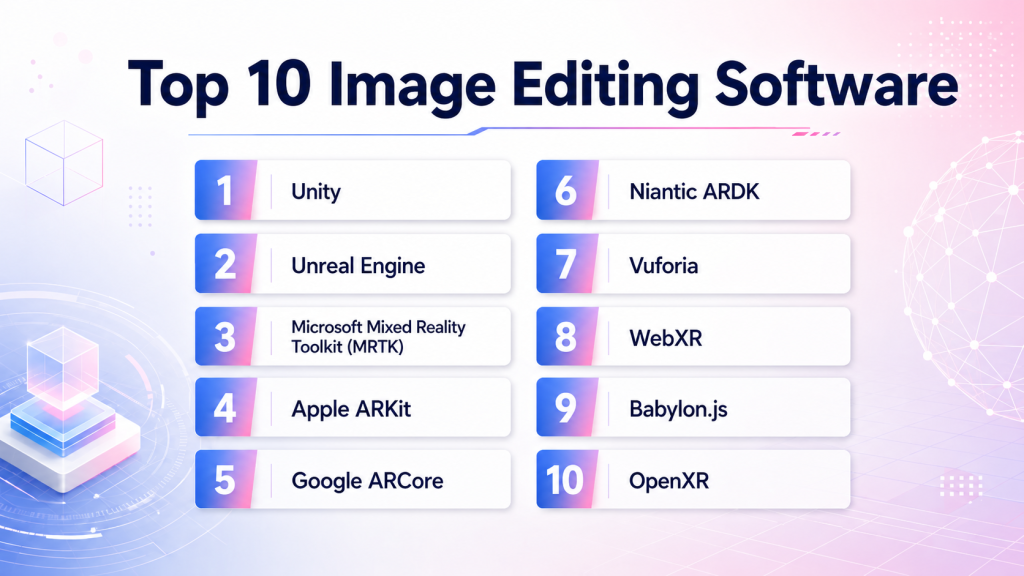
Top 10 Spatial Computing Toolkits
1 — Unity
Short description: Unity is a leading real-time 3D development platform that supports AR, VR, and spatial computing applications for developers across industries.
Key Features
- Multi-platform deployment (mobile, desktop, VR/AR headsets).
- Rich asset store with 3D models and plugins.
- Real-time rendering and physics engine.
- AR Foundation for spatial computing features.
- Integration with machine learning and AI toolkits.
- Extensive community and support network.
Pros
- Highly versatile for both games and enterprise applications.
- Strong developer ecosystem and extensive documentation.
- Frequent updates with advanced graphics and XR support.
Cons
- Can be resource-intensive on lower-end devices.
- Licensing costs can add up for large teams.
- Requires familiarity with C# programming.
Platforms / Deployment
- Windows, macOS, Linux, iOS, Android, VR/AR headsets
- Cloud / Self-hosted / Hybrid (Varies per project)
Security & Compliance
- Not publicly stated
Integrations & Ecosystem
Supports cloud, AR/VR devices, analytics, and IoT sensors.
- AR Foundation
- ML-Agents
- Azure Spatial Anchors
- Oculus SDK
- OpenXR
Support & Community
Extensive tutorials, active forums, professional support tiers, and global developer meetups.
2 — Unreal Engine
Short description: Unreal Engine provides a high-fidelity 3D engine optimized for interactive experiences, spatial computing, and enterprise simulations.
Key Features
- Real-time photorealistic rendering.
- Blueprint visual scripting for non-programmers.
- Full VR and AR device support.
- Nanite and Lumen for next-gen graphics.
- Multiplayer and collaboration features.
Pros
- Exceptional graphics and spatial realism.
- Strong for enterprise and training simulations.
- Visual scripting lowers development barriers.
Cons
- Steep learning curve for beginners.
- Larger builds and performance requirements.
- Royalty model can increase costs at scale.
Platforms / Deployment
- Windows, macOS, Linux, iOS, Android, VR/AR headsets
- Cloud / Self-hosted / Hybrid
Security & Compliance
- Not publicly stated
Integrations & Ecosystem
Supports ARKit, ARCore, OpenXR, Azure Digital Twins, and IoT integration.
- Mixed Reality Toolkit
- Meta/Oculus SDK
- Niantic ARDK
- Azure Spatial Anchors
Support & Community
Robust documentation, active forums, marketplace assets, and professional enterprise support.
3 — Microsoft Mixed Reality Toolkit (MRTK)
Short description: MRTK is a toolkit for building cross-platform mixed reality applications targeting HoloLens, Windows Mixed Reality, and other AR/VR devices.
Key Features
- Hand tracking and gesture support.
- Spatial mesh awareness and environmental understanding.
- Cross-platform input system.
- UX components for mixed reality.
- Integration with Unity and Unreal Engine.
Pros
- Accelerates MR application development.
- Provides tested UX patterns for enterprise apps.
- Strong integration with Microsoft ecosystem.
Cons
- Limited to supported MR devices.
- Steeper setup for custom devices.
- Some features dependent on Unity/Unreal version.
Platforms / Deployment
- Windows Mixed Reality, HoloLens, Unity-compatible AR/VR
- Cloud / Hybrid
Security & Compliance
- Not publicly stated
Integrations & Ecosystem
Azure services, Unity, Unreal, IoT sensors, cloud anchors.
- Azure Spatial Anchors
- Dynamics 365 integration
- Cognitive Services
- OpenXR
Support & Community
Active GitHub community, official Microsoft documentation, sample projects, and enterprise support options.
4 — Apple ARKit
Short description: ARKit enables iOS developers to create AR experiences using device cameras, LiDAR, and motion tracking in spatial environments.
Key Features
- Motion tracking and plane detection.
- Scene reconstruction and LiDAR support.
- Realistic lighting and occlusion.
- Integration with RealityKit for object rendering.
- AI-powered object recognition.
Pros
- Optimized for iOS hardware.
- High-fidelity spatial tracking and rendering.
- Easy integration with Apple ecosystem apps.
Cons
- iOS-only limitation.
- Hardware-dependent performance.
- Limited flexibility for non-Apple devices.
Platforms / Deployment
- iOS, iPadOS
- Cloud / Device-local
Security & Compliance
- Not publicly stated
Integrations & Ecosystem
Supports RealityKit, CoreML, Unity, Unreal, cloud anchors.
- RealityKit
- CoreML
- AR Foundation
- OpenXR
Support & Community
Official Apple documentation, developer forums, sample projects, and Swift/Objective-C support.
5 — Google ARCore
Short description: ARCore is Google’s platform for building AR and spatial computing apps on Android and cross-platform devices.
Key Features
- Motion tracking and environmental understanding.
- Light estimation and occlusion.
- Cloud Anchors for multi-user AR.
- Integration with Unity and Unreal.
- Augmented images and object recognition.
Pros
- Strong Android ecosystem support.
- Multi-user AR capabilities.
- Continuous Google updates and improvements.
Cons
- Limited iOS capabilities (cross-platform only).
- Hardware-dependent accuracy.
- Requires ongoing updates for device compatibility.
Platforms / Deployment
- Android, Unity, Unreal, Cloud
- Cloud / Device-local
Security & Compliance
- Not publicly stated
Integrations & Ecosystem
Unity, Unreal, cloud anchors, Firebase, OpenXR.
- Firebase
- AR Foundation
- Unity AR SDK
- OpenXR
Support & Community
Official docs, community forums, Unity/Unreal tutorials, and developer guides.
6 — Niantic ARDK
Short description: Niantic ARDK is a developer toolkit for building AR games and location-based spatial applications with advanced real-world mapping.
Key Features
- Persistent AR experiences.
- Global-scale geo-mapping and localization.
- Multiplayer and social AR interactions.
- Cloud anchors and environmental occlusion.
- ARKit and ARCore cross-compatibility.
Pros
- Excellent for location-based AR games.
- Scalable global mapping.
- Supports multiplayer interactions.
Cons
- Focused on gaming and location AR.
- Limited non-gaming templates.
- Requires understanding of Niantic platform.
Platforms / Deployment
- iOS, Android, Unity
- Cloud / Device-local
Security & Compliance
- Not publicly stated
Integrations & Ecosystem
Unity, ARKit, ARCore, cloud anchors, analytics.
- Unity AR SDK
- Cloud Anchors
- OpenXR
Support & Community
Documentation, Niantic developer forums, sample projects, and dedicated SDK support.
7 — Vuforia
Short description: Vuforia is an AR platform that enables object recognition, image tracking, and spatial AR experiences across mobile and head-mounted devices.
Key Features
- Image and object tracking.
- Model targets for 3D objects.
- VuMarks for custom AR markers.
- Cloud recognition support.
- Unity integration and cross-platform deployment.
Pros
- Strong object recognition capabilities.
- Cross-platform AR development.
- Extensive enterprise adoption.
Cons
- Licensing can be expensive.
- Limited AR interactions without Unity.
- Learning curve for advanced features.
Platforms / Deployment
- iOS, Android, Windows, Unity
- Cloud / Device-local
Security & Compliance
- Not publicly stated
Integrations & Ecosystem
Unity, Unreal, cloud services, analytics.
- Cloud Recognition
- AR Foundation
- Unity Asset Store
Support & Community
Official documentation, developer forums, sample projects, and enterprise support tiers.
8 — WebXR
Short description: WebXR enables immersive AR/VR experiences directly in web browsers without requiring dedicated apps.
Key Features
- Cross-device web-based AR/VR experiences.
- Access to device sensors (position, orientation).
- Hand tracking and gesture support.
- Integration with 3D rendering engines.
- Open standard and community-driven.
Pros
- No app installation needed.
- Platform-agnostic deployment.
- Open standard encourages innovation.
Cons
- Performance limited by browser capabilities.
- Fewer advanced rendering features compared to native engines.
- Fragmentation across browser support.
Platforms / Deployment
- Web, Windows, macOS, iOS, Android
- Cloud / Device-local
Security & Compliance
- Not publicly stated
Integrations & Ecosystem
Three.js, Babylon.js, Unity WebGL, APIs for device sensors.
- Three.js
- Babylon.js
- Unity WebGL
Support & Community
Active open-source community, documentation, and sample demos.
9 — Babylon.js
Short description: Babylon.js is a powerful open-source 3D engine for building immersive AR/VR applications directly in the browser.
Key Features
- WebGL-powered real-time rendering.
- AR/VR support via WebXR.
- Physics and collision detection.
- Animation and particle systems.
- Extensive developer documentation.
Pros
- Open-source with strong community support.
- Lightweight browser-based deployment.
- Flexible for 3D visualization and AR/VR.
Cons
- Browser performance dependent.
- Advanced features may require JavaScript expertise.
- Limited enterprise-focused prebuilt modules.
Platforms / Deployment
- Web, Windows, macOS, iOS, Android
- Cloud / Device-local
Security & Compliance
- Not publicly stated
Integrations & Ecosystem
WebXR, WebGL, Three.js, APIs for IoT and cloud anchors.
- WebXR
- WebGL
- IoT API Integration
Support & Community
Active GitHub community, examples, and detailed documentation.
10 — OpenXR
Short description: OpenXR is an open standard for cross-platform AR/VR development, providing interoperability across devices and engines.
Key Features
- Unified API for multiple AR/VR devices.
- Supports spatial tracking and gestures.
- Cross-engine compatibility.
- Open standard for long-term stability.
- Integrates with Unity, Unreal, and custom engines.
Pros
- Reduces fragmentation across devices.
- Future-proof open standard.
- Strong industry backing.
Cons
- Requires developer familiarity with API.
- Limited prebuilt modules for rapid prototyping.
- Some features vary by device support.
Platforms / Deployment
- Windows, Linux, Android, iOS, VR/AR headsets
- Cloud / Device-local
Security & Compliance
- Not publicly stated
Integrations & Ecosystem
Unity, Unreal, WebXR, AR/VR devices, cloud anchors.
- Unity/Unreal
- WebXR
- Device APIs
Support & Community
Industry-backed forums, GitHub repositories, sample apps, and documentation.
Comparison Table (Top 10)
| Tool Name | Best For | Platform(s) Supported | Deployment | Standout Feature | Public Rating |
|---|---|---|---|---|---|
| Unity | Cross-industry 3D/AR/VR dev | Win, Mac, Linux, iOS, Android | Cloud / Self-hosted / Hybrid | Rich asset ecosystem & multi-platform | N/A |
| Unreal Engine | High-fidelity simulations | Win, Mac, Linux, iOS, Android | Cloud / Self-hosted / Hybrid | Photorealistic rendering & blueprint scripting | N/A |
| MRTK | Mixed reality apps | Windows MR, HoloLens, Unity | Cloud / Hybrid | UX patterns & cross-platform input | N/A |
| ARKit | iOS AR dev | iOS, iPadOS | Cloud / Device-local | LiDAR & AR Foundation support | N/A |
| ARCore | Android AR dev | Android, Unity, Unreal | Cloud / Device-local | Cloud Anchors & multi-user AR | N/A |
| Niantic ARDK | Location-based AR apps | iOS, Android, Unity | Cloud / Device-local | Global-scale mapping | N/A |
| Vuforia | Enterprise AR | iOS, Android, Windows, Unity | Cloud / Device-local | Object & image recognition | N/A |
| WebXR | Web AR/VR | Web, Win, Mac, iOS, Android | Cloud / Device-local | Browser-based immersive experiences | N/A |
| Babylon.js | Open-source 3D web apps | Web, Win, Mac, iOS, Android | Cloud / Device-local | Lightweight browser deployment | N/A |
| OpenXR | Cross-platform standard | Win, Linux, Android, iOS | Cloud / Device-local | Device interoperability | N/A |
Evaluation & Scoring of Spatial Computing Toolkits
| Tool Name | Core (25%) | Ease (15%) | Integrations (15%) | Security (10%) | Performance (10%) | Support (10%) | Value (15%) | Weighted Total |
|---|---|---|---|---|---|---|---|---|
| Unity | 9 | 8 | 9 | 7 | 8 | 8 | 8 | 8.3 |
| Unreal Engine | 9 | 7 | 8 | 7 | 9 | 8 | 7 | 8.0 |
| MRTK | 8 | 7 | 8 | 7 | 7 | 7 | 8 | 7.5 |
| ARKit | 8 | 8 | 7 | 7 | 8 | 7 | 7 | 7.5 |
| ARCore | 8 | 7 | 7 | 7 | 8 | 7 | 7 | 7.4 |
| Niantic ARDK | 7 | 7 | 7 | 6 | 7 | 7 | 7 | 7.0 |
| Vuforia | 7 | 7 | 7 | 6 | 7 | 7 | 6 | 6.8 |
| WebXR | 7 | 7 | 6 | 6 | 6 | 6 | 7 | 6.5 |
| Babylon.js | 7 | 7 | 6 | 6 | 6 | 6 | 7 | 6.5 |
| OpenXR | 7 | 6 | 7 | 6 | 6 | 6 | 7 | 6.5 |
Interpretation: Scores are comparative. A higher total indicates better alignment across core features, usability, integrations, performance, and value for diverse developers.
Which Spatial Computing Toolkit Is Right for You?
Solo / Freelancer
Unity or Babylon.js for quick prototyping and web AR/VR projects.
SMB
ARCore or ARKit for mobile-first applications with limited device targets.
Mid-Market
MRTK or Niantic ARDK for enterprise collaboration and location-based experiences.
Enterprise
Unity or Unreal Engine with cloud integrations for large-scale simulations and digital twins.
Budget vs Premium
Open-source options like Babylon.js and WebXR for low-cost deployment; premium platforms like Unreal Engine or Unity Pro for high-end graphics and multi-platform support.
Feature Depth vs Ease of Use
Blueprint visual scripting in Unreal Engine for deep functionality without extensive coding. Unity balances ease of use with rich features. ARKit and ARCore prioritize rapid mobile deployment.
Integrations & Scalability
Unity, Unreal, and MRTK offer extensive integrations with IoT, cloud, and AR/VR ecosystems. OpenXR ensures interoperability across devices.
Security & Compliance Needs
For sensitive enterprise applications, choose platforms with documented security features, audit capabilities, and enterprise support.
Frequently Asked Questions (FAQs)
1. What platforms do these toolkits support?
Most support Windows, macOS, Linux, iOS, Android, and major VR/AR devices, though device-specific features may vary.
2. Can I use these toolkits for both games and enterprise applications?
Yes, platforms like Unity and Unreal are versatile for gaming, simulations, and industrial use cases.
3. Do these toolkits support AI-powered spatial interactions?
Some, like Unity with ML-Agents and ARKit/ARCore, integrate AI for gesture recognition and predictive behaviors.
4. What is the typical learning curve?
It ranges from moderate for Unity/ARKit to steep for Unreal Engine, depending on programming skills and prior 3D experience.
5. Are these toolkits cross-platform?
Many are, but some device-specific toolkits like ARKit or MRTK are optimized for certain ecosystems.
6. How do pricing models vary?
Open-source options like Babylon.js are free; Unity and Unreal have free tiers and paid licenses; Niantic ARDK has usage-based pricing.
7. Can I build multi-user AR experiences?
Yes, platforms supporting cloud anchors (ARCore, ARKit, Niantic ARDK) allow synchronized multi-user sessions.
8. How scalable are these toolkits?
Enterprise-grade engines like Unity and Unreal handle large-scale environments, while WebXR and Babylon.js are suitable for web-based experiences.
9. What security measures are available?
Not publicly stated for all; sensitive deployments may require secure network setups, RBAC, and cloud security policies.
10. Can I integrate these with IoT devices?
Yes, Unity, Unreal, MRTK, and OpenXR support IoT sensor integration for spatial mapping and real-time data.
11. Do these toolkits require specialized hardware?
Some features require AR/VR headsets or LiDAR-enabled devices; basic prototyping can often use standard devices.
12. What support resources are available?
Documentation, forums, sample projects, and enterprise support vary; Unity, Unreal, and ARDK have strong developer communities.
Conclusion
Spatial Computing Toolkits are essential for creating immersive, location-aware, and interactive experiences across AR, VR, and mixed reality applications. The choice depends on project scope, target devices, budget, and required depth of features. Unity and Unreal Engine offer broad capabilities for enterprises and high-fidelity simulations, while WebXR, Babylon.js, and ARKit/ARCore allow faster mobile or web-based deployment. Buyers should consider integrations, scalability, AI capabilities, and security when selecting a platform. The next steps are straightforward: shortlist 2–3 toolkits aligned with your use case, run a pilot to validate features and performance, and verify integration and security compliance before scaling development.

Find Trusted Cardiac Hospitals
Compare heart hospitals by city and services — all in one place.
Explore Hospitals
Spatial computing toolkits are explained clearly, and the comparison helps in understanding how AR, VR, and real-world interactions are built in modern applications.