Introduction
Network Configuration Management tools help IT teams automate, monitor, back up, standardize, and secure network device configurations across routers, switches, firewalls, wireless controllers, and other infrastructure components. These platforms reduce manual errors, improve network reliability, and simplify compliance management in increasingly complex enterprise environments. As organizations move toward hybrid infrastructure, multi-vendor networking, cloud-managed networking, and zero-trust architectures, network configuration management has become a critical operational requirement. Modern enterprises need centralized visibility, automated policy enforcement, rapid rollback capabilities, and audit-ready configuration tracking.
Real-world use cases include:
- Automated backup and restoration of network device configurations
- Configuration drift detection across large environments
- Compliance auditing and policy enforcement
- Multi-vendor network automation
- Rapid disaster recovery and rollback operations
Key evaluation criteria buyers should consider include:
- Multi-vendor compatibility
- Automation and scripting support
- Configuration backup and recovery
- Compliance and audit capabilities
- Role-based access control
- API and integration ecosystem
- Scalability for enterprise deployments
- Reporting and analytics
- Ease of deployment and administration
- Pricing flexibility and operational overhead
Best for: Enterprises, managed service providers, telecom operators, financial institutions, healthcare organizations, and IT teams managing medium-to-large network environments.
Not ideal for: Very small businesses with minimal networking infrastructure or organizations relying entirely on fully managed cloud networking services with limited customization requirements.
Key Trends in Network Configuration Management
- AI-assisted configuration validation and anomaly detection are becoming standard capabilities.
- Intent-based networking and policy-driven automation are reducing manual CLI operations.
- Multi-cloud and hybrid network management support is now a critical requirement.
- Infrastructure-as-Code workflows are increasingly integrated with network operations.
- Zero-trust security policies are influencing network configuration governance.
- Compliance automation for regulations and internal policies continues to expand.
- API-first platforms are replacing legacy manual configuration workflows.
- Real-time configuration drift monitoring is gaining adoption in regulated industries.
- Network automation platforms are integrating with DevOps and ITSM ecosystems.
- SaaS-based deployment models are growing alongside traditional self-hosted options.
How We Selected These Tools (Methodology)
The following tools were selected based on multiple practical evaluation factors:
- Market adoption and enterprise mindshare
- Strength of network automation capabilities
- Configuration backup and rollback reliability
- Multi-vendor device compatibility
- Security and access management capabilities
- API availability and integration flexibility
- Reporting, auditing, and compliance functionality
- Scalability across distributed environments
- Community support and ecosystem maturity
- Suitability across SMB, mid-market, and enterprise environments
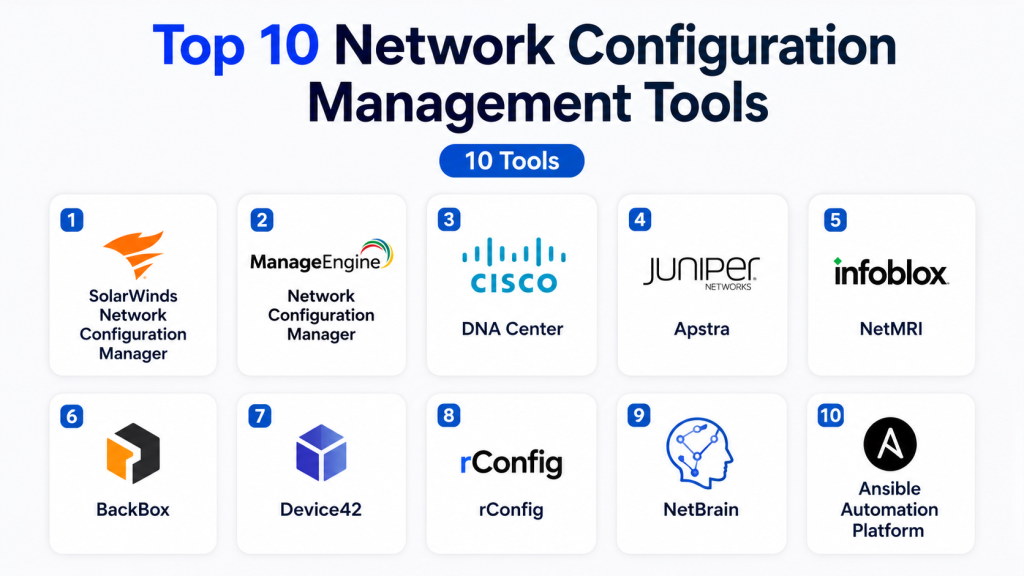
Top 10 Network Configuration Management Tools
1- SolarWinds Network Configuration Manager
Short description: SolarWinds Network Configuration Manager is a widely used enterprise-grade platform focused on configuration backup, compliance management, and automated network change control. It is designed for organizations managing complex multi-vendor network infrastructures.
Key Features
- Automated configuration backup and restore
- Configuration drift detection
- Firmware vulnerability monitoring
- Network compliance reporting
- Bulk configuration deployment
- Change management tracking
- Role-based administration
Pros
- Strong compliance auditing capabilities
- Broad vendor compatibility
- Mature enterprise reporting features
Cons
- Interface can feel dated
- Licensing may become expensive at scale
- Requires infrastructure planning for large deployments
Platforms / Deployment
- Windows
- Self-hosted
Security & Compliance
- RBAC
- Audit logging
- MFA support
- Encryption support
- Compliance reporting features
Integrations & Ecosystem
SolarWinds integrates with monitoring platforms, ITSM systems, and enterprise alerting tools. Its ecosystem supports automation workflows and centralized operations management.
- REST APIs
- Syslog integrations
- SNMP support
- Active Directory integration
- ITSM platform connectivity
Support & Community
SolarWinds has extensive enterprise documentation, training resources, and a large administrator community. Enterprise support tiers are available.
2- ManageEngine Network Configuration Manager
Short description: ManageEngine Network Configuration Manager provides centralized configuration management, compliance tracking, and network automation for SMBs and enterprises seeking cost-effective operations management.
Key Features
- Automated configuration backup
- Real-time change detection
- Compliance management
- Workflow automation
- Multi-vendor support
- Configuration comparison tools
- Role-based access management
Pros
- Competitive pricing
- User-friendly interface
- Good balance of features and simplicity
Cons
- Advanced automation can require customization
- Reporting flexibility is somewhat limited
- Large-scale environments may need tuning
Platforms / Deployment
- Windows
- Linux
- Self-hosted
Security & Compliance
- RBAC
- Audit trails
- Encryption
- Compliance templates
- SSO support
Integrations & Ecosystem
The platform integrates well with the broader ManageEngine ecosystem and third-party infrastructure tools.
- REST APIs
- Active Directory
- SIEM integrations
- Syslog support
- ITSM integrations
Support & Community
ManageEngine provides strong documentation, active support channels, and broad SMB-to-enterprise adoption.
3- Cisco DNA Center
Short description: Cisco DNA Center is Cisco’s centralized network automation and assurance platform built for enterprise campus and branch network environments using Cisco infrastructure.
Key Features
- Intent-based networking
- Policy-driven automation
- Configuration management
- AI-powered assurance analytics
- Software-defined access management
- Centralized provisioning
- Network segmentation controls
Pros
- Deep Cisco ecosystem integration
- Strong automation capabilities
- Advanced analytics and visibility
Cons
- Best suited primarily for Cisco environments
- Higher infrastructure costs
- Learning curve for advanced workflows
Platforms / Deployment
- Appliance-based
- Hybrid
Security & Compliance
- RBAC
- MFA
- Encryption
- Audit logging
- Policy enforcement controls
Integrations & Ecosystem
Cisco DNA Center integrates tightly with Cisco security, wireless, and automation platforms.
- Cisco ISE
- Cisco Meraki
- APIs
- SD-WAN integrations
- Security analytics platforms
Support & Community
Cisco provides enterprise-grade support, certifications, and extensive technical learning resources.
4- Juniper Apstra
Short description: Juniper Apstra delivers intent-based networking and data center automation with strong configuration validation and operational consistency capabilities.
Key Features
- Intent-based automation
- Configuration validation
- Multi-vendor fabric management
- Real-time telemetry analysis
- Automated provisioning
- Network blueprinting
- Drift remediation
Pros
- Strong data center automation
- Excellent visibility and analytics
- Vendor-neutral architecture support
Cons
- Primarily optimized for data center use cases
- Enterprise-focused pricing
- Smaller community compared to older platforms
Platforms / Deployment
- Linux
- Cloud
- Self-hosted
Security & Compliance
- RBAC
- Audit logs
- Encryption
- Policy controls
Integrations & Ecosystem
Apstra supports automation frameworks and infrastructure orchestration ecosystems.
- REST APIs
- Ansible
- Terraform
- Telemetry platforms
- Monitoring integrations
Support & Community
Juniper offers enterprise support and growing automation-focused community adoption.
5- Infoblox NetMRI
Short description: Infoblox NetMRI focuses on automated network configuration management, policy enforcement, and operational analytics for enterprise networks.
Key Features
- Automated configuration analysis
- Policy enforcement
- Change management
- Network automation workflows
- Multi-vendor support
- Device discovery
- Compliance monitoring
Pros
- Strong automation capabilities
- Good network visibility
- Effective policy enforcement tools
Cons
- Premium enterprise pricing
- Interface modernization could improve
- Initial deployment may require expertise
Platforms / Deployment
- Appliance
- Virtual appliance
- Hybrid
Security & Compliance
- Audit logging
- RBAC
- Compliance monitoring
- Secure access controls
Integrations & Ecosystem
NetMRI integrates with broader network operations and automation systems.
- APIs
- ITSM tools
- Monitoring systems
- SIEM integrations
- Syslog support
Support & Community
Enterprise support quality is strong, though community resources are smaller than open-source ecosystems.
6- BackBox
Short description: BackBox is a network automation and backup platform designed to simplify configuration management, security policy automation, and operational workflows.
Key Features
- Automated backups
- Change detection
- Security automation
- Patch management workflows
- Compliance auditing
- Multi-vendor automation
- Task scheduling
Pros
- Strong security automation focus
- Simplified operational workflows
- Broad firewall vendor support
Cons
- Reporting depth varies
- Some advanced automation requires scripting
- Smaller ecosystem than larger vendors
Platforms / Deployment
- Linux
- Self-hosted
- Hybrid
Security & Compliance
- RBAC
- Audit trails
- Compliance support
- Secure credential management
Integrations & Ecosystem
BackBox supports automation integrations across networking and security operations environments.
- REST APIs
- Firewall integrations
- SIEM connectivity
- Monitoring integrations
- Ticketing systems
Support & Community
BackBox offers responsive enterprise support and implementation guidance.
7- Device42
Short description: Device42 combines IT asset discovery, infrastructure visibility, and configuration tracking for hybrid infrastructure operations teams.
Key Features
- Infrastructure discovery
- Configuration tracking
- Asset dependency mapping
- CMDB functionality
- Network visualization
- Audit reporting
- API-based integrations
Pros
- Excellent infrastructure visibility
- Strong asset management capabilities
- Hybrid environment support
Cons
- Not solely focused on network configuration management
- Advanced automation capabilities are limited
- UI complexity for new users
Platforms / Deployment
- Cloud
- Self-hosted
- Hybrid
Security & Compliance
- RBAC
- Audit logging
- SSO support
- Encryption capabilities
Integrations & Ecosystem
Device42 integrates with ITSM, CMDB, and infrastructure monitoring platforms.
- REST APIs
- VMware integrations
- Cloud platform integrations
- ServiceNow
- Monitoring systems
Support & Community
Documentation quality is strong, and enterprise onboarding assistance is available.
8- rConfig
Short description: rConfig is an open-source network configuration management platform focused on automated backups, compliance checks, and configuration tracking.
Key Features
- Automated configuration backups
- Device management
- Compliance checks
- Scheduled tasks
- Multi-vendor support
- Configuration comparison
- Reporting dashboards
Pros
- Open-source flexibility
- Lower operational costs
- Good SMB suitability
Cons
- Enterprise capabilities are limited
- Smaller ecosystem
- Advanced features may require customization
Platforms / Deployment
- Linux
- Self-hosted
Security & Compliance
- RBAC
- Audit logging
- Encryption support varies by deployment
Integrations & Ecosystem
rConfig supports integrations with network monitoring and automation workflows.
- APIs
- SNMP
- Syslog
- SSH-based automation
Support & Community
Community-driven support model with growing documentation resources.
9- NetBrain
Short description: NetBrain provides network automation, dynamic mapping, and troubleshooting automation for large enterprise environments.
Key Features
- Dynamic network mapping
- Automated troubleshooting
- Configuration automation
- Change analysis
- Intent-based operations
- Automation runbooks
- Dependency visualization
Pros
- Excellent troubleshooting automation
- Strong operational visibility
- Advanced network mapping
Cons
- Higher pricing for enterprise deployments
- Complex initial implementation
- Requires operational maturity for full value
Platforms / Deployment
- Windows
- Hybrid
Security & Compliance
- RBAC
- Audit trails
- Encryption
- Enterprise security controls
Integrations & Ecosystem
NetBrain integrates with network monitoring, ITSM, and automation ecosystems.
- APIs
- ServiceNow
- Monitoring platforms
- Ticketing systems
- Telemetry integrations
Support & Community
Strong enterprise support and implementation consulting capabilities.
10- Ansible Automation Platform
Short description: Ansible Automation Platform is a flexible infrastructure automation solution widely used for network configuration management through Infrastructure-as-Code workflows.
Key Features
- Agentless automation
- Infrastructure-as-Code workflows
- Multi-vendor network automation
- Playbook-based configuration
- CI/CD integration
- API-driven orchestration
- Automation scheduling
Pros
- Extremely flexible automation engine
- Strong DevOps ecosystem integration
- Large community support
Cons
- Requires scripting knowledge
- Steeper learning curve for beginners
- Native reporting is less comprehensive
Platforms / Deployment
- Linux
- Cloud
- Self-hosted
- Hybrid
Security & Compliance
- RBAC
- SSO/SAML
- Audit logging
- Encryption support
Integrations & Ecosystem
Ansible integrates deeply with enterprise infrastructure, cloud, and DevOps ecosystems.
- Terraform
- Jenkins
- Git platforms
- REST APIs
- Cloud providers
- Network vendors
Support & Community
Very large community ecosystem with extensive documentation and enterprise support options.
Comparison Table
| Tool Name | Best For | Platform(s) Supported | Deployment | Standout Feature | Public Rating |
|---|---|---|---|---|---|
| SolarWinds NCM | Enterprise compliance management | Windows | Self-hosted | Configuration compliance auditing | N/A |
| ManageEngine NCM | SMB and mid-market operations | Windows, Linux | Self-hosted | Cost-effective automation | N/A |
| Cisco DNA Center | Cisco enterprise environments | Appliance | Hybrid | Intent-based networking | N/A |
| Juniper Apstra | Data center automation | Linux | Cloud, Self-hosted | Intent-based validation | N/A |
| Infoblox NetMRI | Enterprise automation | Appliance | Hybrid | Policy-driven automation | N/A |
| BackBox | Security-focused automation | Linux | Self-hosted, Hybrid | Firewall automation workflows | N/A |
| Device42 | Hybrid infrastructure visibility | Web | Cloud, Hybrid | Dependency mapping | N/A |
| rConfig | Open-source network management | Linux | Self-hosted | Open-source flexibility | N/A |
| NetBrain | Troubleshooting automation | Windows | Hybrid | Dynamic network mapping | N/A |
| Ansible Automation Platform | Infrastructure-as-Code automation | Linux | Cloud, Hybrid | Agentless automation | N/A |
Evaluation & Scoring of Network Configuration Management Tools
| Tool Name | Core | Ease | Integrations | Security | Performance | Support | Value | Weighted Total |
|---|---|---|---|---|---|---|---|---|
| SolarWinds NCM | 9 | 7 | 8 | 8 | 8 | 8 | 7 | 8.0 |
| ManageEngine NCM | 8 | 8 | 7 | 7 | 7 | 8 | 9 | 7.9 |
| Cisco DNA Center | 9 | 7 | 9 | 9 | 9 | 8 | 6 | 8.2 |
| Juniper Apstra | 9 | 7 | 8 | 8 | 9 | 7 | 7 | 8.0 |
| Infoblox NetMRI | 8 | 7 | 8 | 8 | 8 | 7 | 6 | 7.5 |
| BackBox | 8 | 8 | 7 | 8 | 7 | 7 | 8 | 7.8 |
| Device42 | 7 | 7 | 8 | 8 | 7 | 7 | 7 | 7.3 |
| rConfig | 6 | 7 | 6 | 6 | 6 | 6 | 9 | 6.7 |
| NetBrain | 9 | 6 | 8 | 8 | 9 | 8 | 6 | 7.9 |
| Ansible Automation Platform | 9 | 6 | 10 | 8 | 9 | 9 | 8 | 8.5 |
These scores are comparative rather than absolute. Higher-scoring platforms generally offer stronger automation, scalability, and integration ecosystems. Organizations should prioritize criteria based on operational maturity, compliance needs, infrastructure complexity, and available engineering expertise. Open-source flexibility may outweigh polished interfaces for some teams, while enterprises may prioritize governance and support capabilities.
Which Network Configuration Management Tool Is Right for You?
Solo / Freelancer
Open-source and lightweight solutions such as rConfig can provide affordable configuration management without requiring significant infrastructure investment. Smaller environments often benefit from simplicity over advanced enterprise automation.
SMB
ManageEngine Network Configuration Manager and BackBox provide balanced automation, usability, and pricing for growing organizations. SMBs typically benefit from centralized visibility and simplified backup workflows.
Mid-Market
SolarWinds NCM and Device42 work well for organizations needing stronger reporting, governance, and infrastructure visibility without moving into highly specialized enterprise automation stacks.
Enterprise
Cisco DNA Center, Juniper Apstra, NetBrain, and Ansible Automation Platform are better suited for large-scale automation, compliance management, and hybrid infrastructure operations.
Budget vs Premium
Open-source tools and SMB-focused platforms reduce licensing costs but may require more internal expertise. Premium enterprise tools typically provide better scalability, governance, and support.
Feature Depth vs Ease of Use
Platforms with advanced automation often introduce greater complexity. Teams with strong network engineering capabilities can maximize value from highly customizable tools like Ansible and Apstra.
Integrations & Scalability
Large enterprises should prioritize API-first platforms with strong ITSM, DevOps, and security integrations to support future operational growth.
Security & Compliance Needs
Highly regulated industries should prioritize platforms with strong audit trails, RBAC, compliance reporting, and policy enforcement capabilities.
Frequently Asked Questions (FAQs)
1. What is network configuration management?
Network configuration management involves tracking, backing up, automating, and securing configurations across network devices such as routers, switches, and firewalls.
2. Why are configuration backups important?
Configuration backups help organizations quickly recover from hardware failures, human errors, security incidents, or accidental configuration changes.
3. Are these tools only for large enterprises?
No. Some platforms are designed specifically for SMBs, while others target large-scale enterprise operations with advanced automation capabilities.
4. Can network configuration management improve security?
Yes. These tools help enforce security policies, monitor unauthorized changes, and maintain compliance with internal and regulatory standards.
5. What is configuration drift?
Configuration drift occurs when devices deviate from approved configurations over time, often due to manual changes or inconsistent updates.
6. Do these platforms support multi-vendor environments?
Most modern network configuration management tools support multi-vendor infrastructures, though compatibility depth may vary between platforms.
7. Is automation difficult to implement?
Basic automation is usually straightforward, but advanced workflows may require scripting knowledge and operational planning.
8. How do AI features help in network management?
AI features can identify anomalies, predict configuration issues, recommend optimizations, and improve troubleshooting efficiency.
9. What deployment models are available?
Most tools support self-hosted, cloud, or hybrid deployment models depending on organizational requirements and security preferences.
10. How should organizations evaluate these tools?
Organizations should assess automation capabilities, scalability, security controls, vendor compatibility, integrations, operational complexity, and total cost of ownership.
Conclusion
Network Configuration Management platforms have evolved far beyond simple backup utilities. Modern solutions now deliver automation, compliance enforcement, AI-driven analytics, infrastructure visibility, and policy governance across increasingly complex hybrid environments. The right platform depends heavily on operational scale, infrastructure diversity, compliance obligations, and internal technical expertise. SMBs may prioritize usability and affordability, while enterprises often require advanced automation, integrations, and governance capabilities. Organizations should shortlist two or three platforms based on their environment size, vendor ecosystem, and automation maturity. Running a pilot deployment, validating integration workflows, and testing rollback and compliance capabilities before full adoption can significantly reduce operational risks and improve long-term ROI.

Find Trusted Cardiac Hospitals
Compare heart hospitals by city and services — all in one place.
Explore Hospitals
Network configuration management tools are most valuable when they help organizations centrally manage, standardize, monitor, and maintain network device configurations across complex IT environments. By providing automated configuration backups, change tracking, configuration templates, compliance checks, device discovery, policy enforcement, version control, automated deployment, drift detection, audit trails, reporting, and integration with network monitoring and IT management systems, these tools enable organizations to reduce configuration errors, improve network reliability, simplify troubleshooting, maintain compliance, and manage network infrastructure more efficiently.