Introduction
Multi-factor Authentication MFA tools help organizations verify user identity using more than one authentication factor before allowing access to applications, systems, cloud platforms, networks, and sensitive data. Instead of relying only on passwords, MFA adds extra verification through mobile push approvals, one-time passcodes, hardware security keys, biometrics, device trust, or risk-based checks. MFA matters now because password theft, phishing, credential stuffing, remote work risks, and identity-based attacks continue to affect organizations of all sizes. Modern MFA platforms help reduce account takeover risk, strengthen zero-trust access, support compliance, and protect both workforce and customer-facing applications.
Common Real-world use cases include:
- Securing employee access to SaaS applications
- Protecting VPN, cloud, and remote access systems
- Adding strong authentication to admin and privileged accounts
- Securing customer logins for apps and portals
- Enforcing adaptive authentication based on risk signals
Key Evaluation criteria buyers should consider include:
- Supported authentication methods
- Push, passkey, biometric, and hardware key support
- Adaptive and risk-based access controls
- SSO and IAM integration
- Device trust and endpoint visibility
- Admin usability and policy management
- API and developer integration options
- Compliance and audit reporting
- Scalability for distributed users
- Pricing and support quality
Best for: IT teams, security teams, SaaS companies, SMBs, enterprises, healthcare organizations, financial institutions, education providers, government teams, and any business that needs stronger login security for employees, contractors, partners, customers, or administrators.
Not ideal for: Very small teams with only a few low-risk accounts and no compliance or remote access requirements, although even small teams should still use basic MFA for important business accounts.
Key Trends in Multi-factor Authentication MFA
- Passwordless MFA is becoming a major priority as organizations reduce dependence on passwords and move toward passkeys and phishing-resistant authentication.
- Phishing-resistant authentication using security keys, FIDO2, WebAuthn, and device-bound credentials is gaining adoption in high-risk environments.
- Adaptive MFA is replacing static MFA policies by using context such as location, device health, login behavior, IP reputation, and session risk.
- Push fatigue protection is becoming important as attackers attempt to trick users into approving repeated MFA prompts.
- MFA and zero trust are becoming closely connected because identity verification is now a core control for every access decision.
- Customer MFA is growing as businesses need secure but low-friction login experiences for apps, marketplaces, fintech products, and portals.
- Device trust signals are becoming more important for deciding whether a login should be allowed, challenged, or blocked.
- MFA for privileged accounts is becoming a security baseline for administrators, developers, database owners, and cloud operators.
- Compliance-driven MFA adoption is increasing across regulated sectors that need audit logs, access evidence, and stronger identity assurance.
- API-first authentication is expanding as developers embed MFA into custom applications, customer journeys, and identity workflows.
How We Selected These Tools Methodology
The tools below were selected using practical identity security and enterprise access management criteria including:
- Market adoption and security industry recognition
- MFA method coverage and authentication flexibility
- Phishing-resistant and passwordless authentication support
- Adaptive and risk-based access capabilities
- Integration with SSO, IAM, directories, and cloud platforms
- Support for workforce, customer, and privileged access use cases
- Ease of deployment and administrator experience
- API, SDK, and developer ecosystem maturity
- Compliance reporting and audit visibility
- Suitability across SMB, mid-market, and enterprise environments
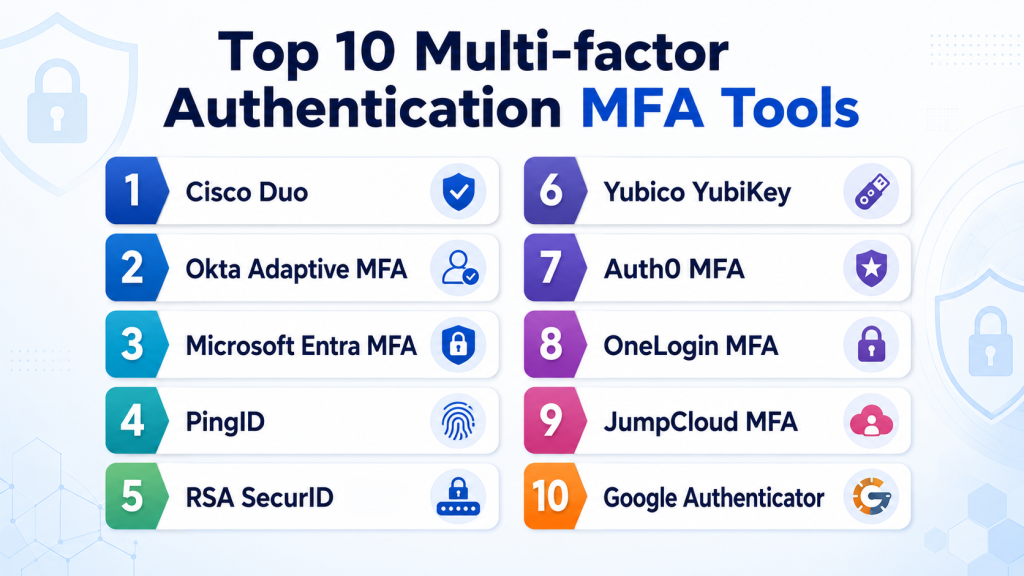
Top 10 Multi-factor Authentication MFA Tools
1- Cisco Duo
Short description: Cisco Duo is a widely used MFA and secure access platform focused on push authentication, device trust, adaptive access, and user-friendly security. It is popular across SMB, mid-market, and enterprise environments.
Key Features
- Push-based MFA
- Device trust checks
- Adaptive access policies
- Passwordless authentication support
- VPN and application protection
- SSO integration
- Admin reporting and access visibility
Pros
- Easy user experience
- Strong device trust capabilities
- Broad application and VPN integration support
Cons
- Advanced policy depth may require higher plans
- Best value often comes with Cisco ecosystem alignment
- Broader identity governance requires additional tools
Platforms / Deployment
- Web
- iOS
- Android
- Cloud
Security & Compliance
- MFA
- SSO/SAML
- RBAC
- Audit logs
- Encryption
- Device-based access controls
Integrations & Ecosystem
Cisco Duo integrates with business applications, VPNs, identity providers, cloud services, and security operations workflows. It is especially strong for organizations that need quick MFA rollout with strong user adoption.
- Microsoft 365
- Google Workspace
- VPN platforms
- Active Directory
- SSO providers
- Cisco security tools
Support & Community
Cisco Duo provides strong documentation, administrator guides, support resources, training content, and broad community adoption across IT and security teams.
2- Okta Adaptive MFA
Short description: Okta Adaptive MFA helps organizations secure workforce access with risk-based authentication, push approvals, security policies, and deep integration with Okta’s identity platform.
Key Features
- Adaptive MFA policies
- Push notifications
- Device and location context
- Risk-based authentication
- SSO integration
- Passwordless options
- Centralized admin controls
Pros
- Strong SaaS app ecosystem
- Good adaptive access controls
- Works well with Okta Workforce Identity
Cons
- Advanced MFA capabilities may increase cost
- Best value comes when using broader Okta identity tools
- Complex policies require careful configuration
Platforms / Deployment
- Web
- iOS
- Android
- Cloud
Security & Compliance
- MFA
- SSO/SAML
- RBAC
- Audit logs
- Encryption
- Adaptive access controls
Integrations & Ecosystem
Okta Adaptive MFA integrates with Okta’s application catalog, directory services, HR systems, security tools, and cloud applications. It is useful for SaaS-first organizations that want MFA tightly connected with identity lifecycle management.
- Microsoft 365
- Google Workspace
- Salesforce
- Workday
- ServiceNow
- SIEM tools
Support & Community
Okta provides extensive documentation, onboarding resources, administrator training, community support, and enterprise support options.
3- Microsoft Entra MFA
Short description: Microsoft Entra MFA is Microsoft’s multi-factor authentication capability built into the Microsoft identity ecosystem. It is especially useful for organizations using Microsoft 365, Azure, Windows, and Microsoft security tools.
Key Features
- Push notifications
- One-time passcodes
- Conditional access integration
- Passwordless authentication support
- Security key support
- Identity protection signals
- Microsoft Authenticator integration
Pros
- Excellent Microsoft ecosystem integration
- Strong conditional access capabilities
- Good value for Microsoft-centric organizations
Cons
- Best suited for Microsoft-heavy environments
- Advanced configuration can be complex
- Non-Microsoft workflows may need additional planning
Platforms / Deployment
- Web
- iOS
- Android
- Cloud
- Hybrid
Security & Compliance
- MFA
- SSO/SAML
- RBAC
- Audit logs
- Encryption
- Conditional access
Integrations & Ecosystem
Microsoft Entra MFA integrates deeply with Microsoft 365, Azure, Windows, endpoint security, and cloud applications. It is a strong option for organizations already standardized on Microsoft identity.
- Microsoft 365
- Azure
- Windows Server Active Directory
- Microsoft Defender
- Microsoft Sentinel
- SaaS applications
Support & Community
Microsoft provides enterprise support, detailed documentation, partner services, training resources, and a large administrator community.
4- PingID
Short description: PingID is Ping Identity’s MFA solution designed for enterprise authentication, adaptive access, and secure workforce login. It works well for organizations with complex hybrid identity environments.
Key Features
- Push-based authentication
- Adaptive MFA policies
- Device pairing
- Offline authentication options
- SSO and federation integration
- Risk-based access controls
- Enterprise policy management
Pros
- Strong enterprise identity integration
- Good fit for hybrid environments
- Flexible authentication workflows
Cons
- May require identity expertise
- More complex than simple MFA-only tools
- Best suited for organizations using broader Ping Identity architecture
Platforms / Deployment
- Web
- iOS
- Android
- Cloud
- Hybrid
Security & Compliance
- MFA
- SSO/SAML
- RBAC
- Audit logs
- Encryption
- Adaptive access controls
Integrations & Ecosystem
PingID integrates with Ping Identity products, enterprise directories, SaaS applications, VPNs, and federation environments. It is especially useful when MFA needs to work across modern and legacy systems.
- PingFederate
- Active Directory
- LDAP directories
- SaaS applications
- VPN platforms
- SIEM tools
Support & Community
Ping Identity provides enterprise support, implementation guidance, technical documentation, and professional services for complex identity environments.
5- RSA SecurID
Short description: RSA SecurID is a long-established MFA platform known for enterprise authentication, hardware tokens, software tokens, and risk-based access. It is often used in regulated, security-sensitive, and large enterprise environments.
Key Features
- Hardware token support
- Software token support
- Push authentication
- Risk-based authentication
- Offline authentication
- Access policy management
- Enterprise reporting
Pros
- Strong enterprise authentication heritage
- Good support for regulated environments
- Flexible token-based authentication options
Cons
- User experience may feel less modern than newer tools
- Deployment can require planning
- May be more than needed for small organizations
Platforms / Deployment
- Web
- iOS
- Android
- Cloud
- Self-hosted
- Hybrid
Security & Compliance
- MFA
- RBAC
- Audit logs
- Encryption
- Risk-based access controls
- Compliance reporting support
Integrations & Ecosystem
RSA SecurID integrates with enterprise applications, VPNs, IAM platforms, directories, and security operations workflows. It remains useful where strong token-based authentication is required.
- VPN platforms
- Active Directory
- Enterprise applications
- Cloud apps
- SIEM tools
- IAM systems
Support & Community
RSA provides enterprise support, technical documentation, implementation resources, and long-standing administrator familiarity in regulated industries.
6- Yubico YubiKey
Short description: Yubico YubiKey provides phishing-resistant hardware security keys used for strong MFA, passwordless login, and secure access to applications, devices, and cloud platforms.
Key Features
- Hardware security key authentication
- FIDO2 and WebAuthn support
- OTP support
- Smart card support
- Phishing-resistant login
- Passwordless authentication support
- Cross-platform compatibility
Pros
- Strong phishing-resistant security
- Works across many identity providers
- Useful for admins and high-risk users
Cons
- Requires physical key distribution and management
- Users may need training
- Lost keys require recovery planning
Platforms / Deployment
- Windows
- macOS
- Linux
- iOS
- Android
- Hybrid
Security & Compliance
- MFA
- FIDO2/WebAuthn support
- Hardware-backed authentication
- Encryption support
- Phishing-resistant access
Integrations & Ecosystem
YubiKey integrates with identity providers, cloud platforms, operating systems, password managers, and enterprise applications. It is especially valuable for privileged users and phishing-resistant MFA strategies.
- Microsoft Entra ID
- Okta
- Google Workspace
- GitHub
- Password managers
- Enterprise SSO platforms
Support & Community
Yubico provides documentation, deployment guidance, enterprise key management resources, and strong security community adoption.
7- Auth0 MFA
Short description: Auth0 MFA helps developers add multi-factor authentication to customer-facing applications, SaaS products, APIs, and custom login experiences. It is suited for engineering teams that need flexible authentication workflows.
Key Features
- MFA for custom applications
- Push and OTP support
- Adaptive authentication options
- Developer APIs and SDKs
- Social and enterprise login support
- Custom authentication flows
- Customer identity integration
Pros
- Developer-friendly implementation
- Strong for customer-facing applications
- Flexible authentication customization
Cons
- Requires developer involvement
- Pricing can grow with scale
- Workforce IAM depth may require additional tools
Platforms / Deployment
- Web
- Cloud
- iOS
- Android
Security & Compliance
- MFA
- SSO/SAML
- Encryption
- Audit logs
- RBAC support varies by use case
Integrations & Ecosystem
Auth0 MFA integrates with modern application frameworks, APIs, SaaS platforms, and customer identity workflows. It is useful for product teams building secure login experiences.
- Web applications
- Mobile applications
- APIs
- Developer SDKs
- Enterprise identity providers
- CI/CD workflows
Support & Community
Auth0 provides strong developer documentation, implementation examples, community resources, and enterprise support options.
8- OneLogin MFA
Short description: OneLogin MFA provides multi-factor authentication as part of OneLogin’s workforce identity and SSO platform. It is suitable for SMB and mid-market organizations needing practical MFA with centralized access management.
Key Features
- Push authentication
- OTP support
- SSO integration
- Adaptive authentication
- Directory integration
- User provisioning support
- Audit logs and reporting
Pros
- Easy to manage for common MFA needs
- Good fit for SMB and mid-market teams
- Works well with OneLogin SSO
Cons
- Advanced enterprise depth may be limited
- Best value comes with OneLogin identity suite
- Some advanced controls may require higher plans
Platforms / Deployment
- Web
- iOS
- Android
- Cloud
Security & Compliance
- MFA
- SSO/SAML
- RBAC
- Audit logs
- Encryption
Integrations & Ecosystem
OneLogin MFA integrates with SaaS applications, directories, HR platforms, and security tools. It is practical for organizations that need SSO and MFA together without heavy complexity.
- Microsoft 365
- Google Workspace
- Active Directory
- Workday
- Salesforce
- SaaS applications
Support & Community
OneLogin provides documentation, onboarding resources, customer support, and administrator guidance for common identity workflows.
9- JumpCloud MFA
Short description: JumpCloud MFA helps organizations protect user access across applications, devices, systems, and infrastructure through its cloud directory platform. It is useful for SMBs and distributed teams managing identity and devices together.
Key Features
- MFA for users and devices
- SSO integration
- Device-based access controls
- Cloud directory integration
- Conditional access
- Cross-platform support
- Admin reporting
Pros
- Strong fit for SMB IT teams
- Combines identity and device controls
- Good support for Windows, macOS, and Linux environments
Cons
- Enterprise governance depth may be limited
- Advanced MFA workflows may need integrations
- Not as broad as large enterprise IAM suites
Platforms / Deployment
- Web
- Windows
- macOS
- Linux
- iOS
- Android
- Cloud
Security & Compliance
- MFA
- SSO/SAML
- RBAC
- Audit logs
- Encryption
- Device-based access controls
Integrations & Ecosystem
JumpCloud MFA integrates with SaaS applications, endpoints, directory services, and IT administration workflows. It is especially useful where device trust and user access need to be managed together.
- Microsoft 365
- Google Workspace
- LDAP
- RADIUS
- MDM workflows
- SaaS applications
Support & Community
JumpCloud provides documentation, IT admin resources, community content, support options, and practical guidance for SMB and mid-market teams.
10- Google Authenticator
Short description: Google Authenticator is a simple mobile authenticator app that generates time-based one-time passcodes for MFA. It is widely used by individuals and smaller teams that need basic app-based second-factor authentication.
Key Features
- Time-based one-time passcodes
- Mobile authenticator support
- Offline code generation
- Simple setup with QR codes
- Works with many services
- Lightweight user experience
- No complex administration needed
Pros
- Free and simple to use
- Broad compatibility
- Good for basic MFA needs
Cons
- Limited enterprise administration
- No advanced adaptive access controls
- Recovery and device migration can require planning
Platforms / Deployment
- iOS
- Android
Security & Compliance
- MFA
- OTP-based authentication
- Enterprise compliance controls are limited
- Audit logging is not publicly stated
Integrations & Ecosystem
Google Authenticator works with many services that support time-based one-time passwords. It is best for simple MFA rather than centralized enterprise identity management.
- SaaS applications
- Cloud accounts
- Developer platforms
- Password managers
- Personal accounts
- Basic business accounts
Support & Community
Google Authenticator has broad user familiarity and simple help resources, but enterprise-grade support and centralized management features are limited.
Comparison Table
| Tool Name | Best For | Platform Supported | Deployment | Standout Feature | Public Rating |
|---|---|---|---|---|---|
| Cisco Duo | Workforce MFA and device trust | Web, iOS, Android | Cloud | User-friendly MFA and device trust | N/A |
| Okta Adaptive MFA | SaaS-first identity security | Web, iOS, Android | Cloud | Adaptive access with Okta ecosystem | N/A |
| Microsoft Entra MFA | Microsoft-centric organizations | Web, iOS, Android | Cloud, Hybrid | Conditional access integration | N/A |
| PingID | Enterprise hybrid identity | Web, iOS, Android | Cloud, Hybrid | Enterprise federation and adaptive MFA | N/A |
| RSA SecurID | Regulated enterprise authentication | Web, iOS, Android | Cloud, Self-hosted, Hybrid | Token-based authentication heritage | N/A |
| Yubico YubiKey | Phishing-resistant MFA | Windows, macOS, Linux, iOS, Android | Hybrid | Hardware security key authentication | N/A |
| Auth0 MFA | Developer and customer apps | Web, iOS, Android | Cloud | Developer-friendly MFA integration | N/A |
| OneLogin MFA | SMB and mid-market MFA | Web, iOS, Android | Cloud | Simple MFA with SSO | N/A |
| JumpCloud MFA | SMB identity and device access | Web, Windows, macOS, Linux, iOS, Android | Cloud | Identity plus device controls | N/A |
| Google Authenticator | Basic OTP authentication | iOS, Android | Mobile app | Simple one-time passcodes | N/A |
Evaluation & Scoring of Multi-factor Authentication MFA Tools
| Tool Name | Core | Ease | Integrations | Security | Performance | Support | Value | Weighted Total |
|---|---|---|---|---|---|---|---|---|
| Cisco Duo | 9 | 9 | 9 | 9 | 9 | 8 | 8 | 8.8 |
| Okta Adaptive MFA | 9 | 8 | 10 | 9 | 9 | 8 | 8 | 8.8 |
| Microsoft Entra MFA | 9 | 8 | 9 | 9 | 9 | 9 | 9 | 8.9 |
| PingID | 8 | 7 | 8 | 9 | 8 | 8 | 7 | 7.9 |
| RSA SecurID | 8 | 7 | 8 | 9 | 8 | 8 | 7 | 7.9 |
| Yubico YubiKey | 9 | 7 | 9 | 10 | 9 | 8 | 8 | 8.7 |
| Auth0 MFA | 8 | 7 | 9 | 8 | 9 | 8 | 7 | 8.0 |
| OneLogin MFA | 7 | 8 | 8 | 8 | 8 | 7 | 8 | 7.7 |
| JumpCloud MFA | 8 | 8 | 7 | 8 | 8 | 8 | 9 | 8.0 |
| Google Authenticator | 6 | 9 | 6 | 7 | 8 | 6 | 10 | 7.3 |
These scores are comparative and should be interpreted based on organization size, security maturity, identity ecosystem, and user experience needs. Microsoft Entra MFA and Okta Adaptive MFA are strong when organizations already use their broader identity platforms. Cisco Duo is excellent for usability and device trust. YubiKey is strongest for phishing-resistant MFA. Google Authenticator is simple and affordable, but it lacks enterprise administration and advanced policy controls.
Which Multi-factor Authentication MFA Tool Is Right for You?
Solo / Freelancer
Solo professionals can often start with Google Authenticator, Microsoft Authenticator, or hardware keys such as YubiKey for important accounts. The priority should be basic MFA coverage for email, cloud storage, banking, password managers, and admin accounts.
SMB
SMBs should prioritize ease of deployment, low support burden, SSO compatibility, and clear admin reporting. Cisco Duo, JumpCloud MFA, OneLogin MFA, Okta Adaptive MFA, and Microsoft Entra MFA are practical choices depending on existing tools.
Mid-Market
Mid-market organizations often need adaptive policies, device trust, directory integration, user lifecycle automation, and compliance visibility. Cisco Duo, Okta Adaptive MFA, Microsoft Entra MFA, PingID, and JumpCloud MFA can work well depending on infrastructure and security requirements.
Enterprise
Enterprises should prioritize phishing-resistant options, privileged user protection, hybrid integration, access analytics, and compliance reporting. Microsoft Entra MFA, Okta Adaptive MFA, Cisco Duo, PingID, RSA SecurID, YubiKey, and CyberArk-aligned identity security approaches are strong enterprise choices.
Budget vs Premium
Budget-focused teams may start with authenticator apps and MFA included in existing identity platforms. Premium MFA tools provide stronger adaptive access, device trust, policy controls, audit logs, phishing-resistant methods, and enterprise support.
Feature Depth vs Ease of Use
Google Authenticator is simple but limited. Cisco Duo and JumpCloud are easier for many IT teams. Okta, Microsoft Entra, PingID, and RSA SecurID provide deeper enterprise controls but require more planning. YubiKey offers very strong security but requires hardware rollout management.
Integrations & Scalability
Organizations should prioritize integrations with SSO providers, directories, VPNs, SaaS apps, cloud platforms, privileged access tools, and SIEM platforms. Good integration reduces friction and ensures MFA is enforced consistently across all access points.
Security & Compliance Needs
Regulated organizations should prioritize phishing-resistant MFA, audit logging, policy reporting, access reviews, admin controls, and recovery workflows. MFA should protect normal users, privileged users, contractors, service accounts where applicable, and high-risk applications.
Frequently Asked Questions FAQs
1. What is Multi-factor Authentication MFA?
Multi-factor Authentication MFA requires users to verify identity using more than one factor before accessing an account or application. Common factors include passwords, mobile approvals, one-time codes, biometrics, or hardware security keys.
2. Why do businesses need MFA tools?
Businesses need MFA tools to reduce the risk of account takeover, phishing, credential stuffing, and unauthorized access. MFA adds an extra security layer beyond passwords.
3. Is MFA the same as two-factor authentication?
Two-factor authentication is a type of MFA that uses exactly two verification factors. MFA is broader and may include two or more factors depending on security policy.
4. What is phishing-resistant MFA?
Phishing-resistant MFA uses methods such as FIDO2 security keys, WebAuthn, or passkeys that are harder for attackers to steal or replay. It is stronger than SMS or basic one-time codes.
5. Are SMS codes secure for MFA?
SMS codes are better than passwords alone but are weaker than app-based push, authenticator apps, passkeys, or hardware security keys. SMS can be vulnerable to SIM swapping and interception risks.
6. What is adaptive MFA?
Adaptive MFA changes authentication requirements based on risk signals such as location, device, IP address, user behavior, and application sensitivity. It helps reduce friction while improving security.
7. Which MFA method is best for administrators?
Privileged administrators should use phishing-resistant methods such as hardware security keys or passkeys where possible. Admin accounts are high-value targets and need stronger protection.
8. Can MFA work with SSO?
Yes. MFA is commonly integrated with SSO so users can log in once and verify identity securely before accessing multiple approved applications.
9. What integrations should MFA buyers look for?
Buyers should look for integrations with SSO platforms, directories, VPNs, SaaS applications, cloud platforms, privileged access tools, endpoint systems, and SIEM tools.
10. How should organizations choose the best MFA tool?
Organizations should evaluate supported authentication methods, user experience, security strength, phishing resistance, admin controls, integrations, reporting, pricing, and scalability before choosing an MFA platform.
Conclusion
Multi-factor Authentication MFA tools are now a core requirement for protecting users, applications, cloud platforms, remote access, and privileged accounts from identity-based attacks. The best MFA platform depends on organization size, identity ecosystem, security maturity, compliance needs, and user experience expectations. Cisco Duo is strong for usability and device trust, Okta Adaptive MFA and Microsoft Entra MFA are powerful when connected to broader identity platforms, and YubiKey is excellent for phishing-resistant authentication. PingID and RSA SecurID suit complex enterprise and regulated environments, while Auth0 MFA is useful for customer-facing applications. OneLogin and JumpCloud are practical for SMB and mid-market teams, and Google Authenticator can work for basic low-cost MFA needs. The practical next step is to shortlist two or three MFA options, test them with real users, validate SSO and directory integrations, review recovery workflows, and prioritize phishing-resistant methods for high-risk accounts.

Find Trusted Cardiac Hospitals
Compare heart hospitals by city and services — all in one place.
Explore Hospitals
I wanted to know which MFA methods are most secure, and this article explained the different options very clearly.