Introduction
Password Managers help individuals and organizations securely store, generate, share, monitor, and manage passwords, passkeys, secrets, credit card details, secure notes, and login credentials from one protected vault. Instead of relying on reused passwords, spreadsheets, browser-saved logins, or manual credential sharing, password managers centralize credential security and make strong password practices easier to follow. Password managers matter now because phishing, credential stuffing, password reuse, data breaches, remote work, SaaS sprawl, and shared team access continue to create serious identity security risks. Modern password managers now support passkeys, dark web monitoring, secure sharing, enterprise policy enforcement, password health scoring, SSO integration, MFA, admin reporting, and secrets management for technical teams.
Common Real-world use cases include:
- Storing and autofilling strong passwords across apps and websites
- Sharing credentials securely within teams
- Monitoring weak, reused, or exposed passwords
- Managing employee vaults during onboarding and offboarding
- Protecting business credentials with MFA and access policies
Key Evaluation criteria buyers should consider include:
- Encryption architecture and vault security
- Password generation and autofill quality
- Business admin controls and policy enforcement
- Secure sharing and access recovery
- Passkey and passwordless support
- SSO, MFA, and directory integrations
- Browser, desktop, and mobile app support
- Breach monitoring and password health reporting
- Secrets management support for technical teams
- Pricing, support, and ease of migration
Best for: Individuals, families, SMBs, enterprises, IT teams, security teams, developers, remote teams, agencies, consultants, and organizations that need secure credential storage, sharing, monitoring, and access governance.
Not ideal for: Organizations that have already moved entirely to passwordless identity and centralized privileged access workflows, although many still use password managers for secure notes, legacy apps, shared credentials, and recovery secrets.
Key Trends in Password Managers
- Passkey support is becoming a major differentiator as users and businesses move toward phishing-resistant login experiences.
- Password managers and identity security are converging as vendors add SSO, MFA, admin policies, and identity threat visibility.
- Business password sharing controls are becoming more important as teams need secure collaboration without sending credentials through chat or email.
- Dark web and breach monitoring are increasingly expected features for both individual and business users.
- Secrets management integration is growing as developer teams need to protect API keys, tokens, certificates, and infrastructure secrets.
- Zero-knowledge encryption models remain a core buyer requirement because users expect vendors to be unable to read stored vault contents.
- Browser extension security is receiving more scrutiny because autofill convenience must be balanced with phishing and malicious-site risks.
- Password health dashboards are becoming useful for security teams that need visibility into reused, weak, or compromised credentials.
- Enterprise recovery workflows are improving so businesses can recover access without weakening user privacy or vault security.
- Cross-platform usability remains essential because employees use multiple browsers, operating systems, and mobile devices.
How We Selected These Tools Methodology
The tools below were selected using practical password security, business usability, and enterprise access management criteria including:
- Market adoption and brand recognition
- Vault security and encryption architecture
- Password generation, autofill, and secure sharing capabilities
- Business admin controls and policy management
- Passkey and passwordless readiness
- SSO, MFA, directory, and identity integrations
- Cross-platform support across browsers, desktop, and mobile
- Password health, breach monitoring, and reporting features
- Fit across individuals, families, SMBs, developers, and enterprises
- Documentation, migration support, customer service, and community strength
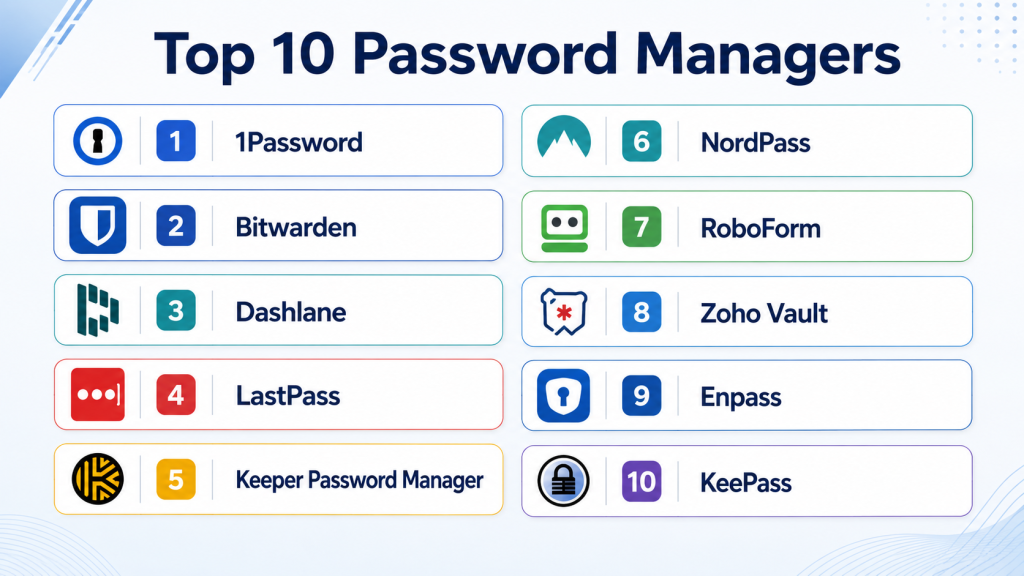
Top 10 Password Managers
1- 1Password
Short description: 1Password is a widely used password manager for individuals, families, teams, and enterprises. It focuses on secure vaults, strong usability, passkeys, business controls, and developer-friendly secrets workflows.
Key Features
- Secure password vaults
- Password and passkey support
- Secure item sharing
- Watchtower password health alerts
- Business admin controls
- Travel Mode
- Developer secrets workflows
Pros
- Excellent user experience across devices
- Strong business and family plans
- Good fit for both non-technical and technical teams
Cons
- Advanced business features may increase cost
- Some enterprise workflows require setup planning
- Self-hosting is not the primary model
Platforms / Deployment
- Web
- Windows
- macOS
- Linux
- iOS
- Android
- Cloud
Security & Compliance
- MFA
- SSO/SAML support
- RBAC
- Audit logs
- Encryption
- Compliance support varies by plan
Integrations & Ecosystem
1Password integrates with browsers, identity providers, developer tools, and business workflows. It is especially strong for organizations that need both employee password management and technical secrets handling.
- Browser extensions
- SSO providers
- Developer tools
- CLI workflows
- SCIM provisioning
- Business app integrations
Support & Community
1Password provides detailed documentation, onboarding resources, migration guidance, business support, and strong community visibility.
2- Bitwarden
Short description: Bitwarden is a popular open-source password manager used by individuals, families, businesses, and technical teams. It is known for affordability, transparency, cross-platform support, and flexible deployment options.
Key Features
- Open-source architecture
- Secure password vaults
- Password sharing collections
- Self-hosting option
- Passkey support
- Organization management
- Developer and API access
Pros
- Strong value for individuals and teams
- Open-source transparency
- Flexible cloud or self-hosted deployment
Cons
- Interface may feel less polished than some premium tools
- Enterprise onboarding may require more configuration
- Advanced reporting depth varies by plan
Platforms / Deployment
- Web
- Windows
- macOS
- Linux
- iOS
- Android
- Cloud
- Self-hosted
Security & Compliance
- MFA
- SSO/SAML support
- RBAC
- Audit logs
- Encryption
- Compliance support varies by plan
Integrations & Ecosystem
Bitwarden integrates with browsers, directories, identity providers, and developer workflows. It is a strong choice for cost-conscious teams and organizations that value open-source tooling.
- Browser extensions
- SSO providers
- Directory services
- CLI tools
- APIs
- Self-hosted infrastructure
Support & Community
Bitwarden has strong open-source community adoption, documentation, support resources, and business support options.
3- Dashlane
Short description: Dashlane is a password manager focused on secure password storage, password health, dark web monitoring, and business credential protection. It is suitable for individuals, families, and organizations seeking a polished user experience.
Key Features
- Secure password vault
- Password health dashboard
- Dark web monitoring
- Secure sharing
- Passkey support
- Admin policies
- SSO support for business plans
Pros
- Clean and simple user experience
- Strong password health visibility
- Good fit for business users needing easy adoption
Cons
- Some advanced business features may require higher plans
- Self-hosting is not a primary option
- Developer secrets management depth is limited
Platforms / Deployment
- Web
- iOS
- Android
- Browser extensions
- Cloud
Security & Compliance
- MFA
- SSO/SAML support
- RBAC
- Audit logs
- Encryption
- Compliance support varies by plan
Integrations & Ecosystem
Dashlane integrates with common browsers, identity providers, business workflows, and admin dashboards. It is practical for organizations that need strong user adoption and centralized password health visibility.
- Browser extensions
- SSO providers
- Directory integrations
- Admin dashboards
- Business applications
- Security reporting workflows
Support & Community
Dashlane provides support resources, business onboarding materials, documentation, and customer support options.
4- LastPass
Short description: LastPass is a long-standing password manager for individuals, families, and businesses. It offers password vaults, secure sharing, admin controls, MFA options, and enterprise password management features.
Key Features
- Secure password vaults
- Password sharing
- Admin policy controls
- Password health reporting
- MFA options
- SSO integrations
- User management
Pros
- Familiar brand with broad adoption
- Business-focused admin features
- Easy access across browsers and devices
Cons
- Security history may concern some buyers
- Some users may prefer alternatives with stronger trust perception
- Enterprise buyers should carefully review current security posture
Platforms / Deployment
- Web
- Windows
- macOS
- Linux
- iOS
- Android
- Cloud
Security & Compliance
- MFA
- SSO/SAML support
- RBAC
- Audit logs
- Encryption
- Compliance support varies by plan
Integrations & Ecosystem
LastPass integrates with browsers, identity providers, business apps, and user provisioning workflows. It remains a familiar option for teams that want standard password management and access controls.
- Browser extensions
- SSO providers
- Directory integrations
- Admin tools
- MFA workflows
- Business applications
Support & Community
LastPass provides documentation, support resources, business onboarding materials, and customer support channels.
5- Keeper Password Manager
Short description: Keeper is a security-focused password manager for individuals, families, businesses, and enterprises. It offers encrypted vaults, secure sharing, admin controls, breach monitoring, and privileged access-related capabilities.
Key Features
- Encrypted password vaults
- Secure sharing
- Breach monitoring
- Admin policy controls
- Secrets management options
- SSO integration
- Role-based access management
Pros
- Strong business security controls
- Good enterprise management features
- Useful add-ons for advanced security needs
Cons
- Add-ons may increase total cost
- Interface may require onboarding for some users
- Advanced capabilities need configuration planning
Platforms / Deployment
- Web
- Windows
- macOS
- Linux
- iOS
- Android
- Cloud
Security & Compliance
- MFA
- SSO/SAML support
- RBAC
- Audit logs
- Encryption
- Compliance support varies by plan
Integrations & Ecosystem
Keeper integrates with browsers, identity providers, directory services, security workflows, and business admin environments. It is suitable for organizations seeking stronger enterprise controls.
- Browser extensions
- SSO providers
- Directory services
- SCIM provisioning
- SIEM integrations
- Secrets management workflows
Support & Community
Keeper provides documentation, enterprise support, onboarding guidance, and security-focused business resources.
6- NordPass
Short description: NordPass is a password manager from the Nord Security ecosystem, designed for individuals, families, and businesses that need secure password storage, autofill, sharing, and breach monitoring.
Key Features
- Password vault
- Password generator
- Secure sharing
- Data breach scanner
- Passkey support
- Business admin controls
- Cross-device sync
Pros
- Simple user experience
- Strong fit for individuals and SMBs
- Works well across common devices and browsers
Cons
- Enterprise feature depth may be lighter than larger IAM-focused tools
- Advanced admin controls vary by plan
- Self-hosting is not a primary model
Platforms / Deployment
- Web
- Windows
- macOS
- Linux
- iOS
- Android
- Cloud
Security & Compliance
- MFA
- Encryption
- Admin controls
- Audit logs vary by plan
- SSO/SAML support varies by plan
Integrations & Ecosystem
NordPass integrates with browsers, desktop apps, mobile platforms, and business management workflows. It is practical for teams that want easy password management without heavy complexity.
- Browser extensions
- Desktop apps
- Mobile apps
- Business admin tools
- Password import tools
- Security monitoring features
Support & Community
NordPass provides documentation, support resources, onboarding help, and user-friendly guidance for personal and business users.
7- RoboForm
Short description: RoboForm is a password manager known for strong form filling, password storage, secure sharing, and cross-platform access. It is suitable for individuals, families, and smaller business teams.
Key Features
- Password vault
- Strong form filling
- Password generator
- Secure sharing
- Cross-platform sync
- Emergency access
- Business user management
Pros
- Strong form-filling capabilities
- Affordable for individuals and small teams
- Easy to use for everyday password management
Cons
- Enterprise security depth may be limited
- Interface may feel traditional compared to newer tools
- Advanced integrations are less extensive
Platforms / Deployment
- Web
- Windows
- macOS
- iOS
- Android
- Browser extensions
- Cloud
Security & Compliance
- MFA support
- Encryption
- Admin controls
- Audit logs vary by plan
- Compliance support is not publicly stated
Integrations & Ecosystem
RoboForm integrates with browsers, mobile apps, desktop environments, and business password workflows. It is strongest for users who value autofill and form completion.
- Browser extensions
- Desktop apps
- Mobile apps
- Business admin console
- Password import tools
- Form-filling workflows
Support & Community
RoboForm provides documentation, customer support, help resources, and long-standing user familiarity.
8- Zoho Vault
Short description: Zoho Vault is a business-focused password manager designed for teams using Zoho or other SaaS applications. It offers secure password storage, sharing, access control, and admin management.
Key Features
- Team password vaults
- Secure sharing
- User access controls
- Password policy enforcement
- Audit trails
- SSO support
- Zoho ecosystem integration
Pros
- Good value for business teams
- Strong fit for Zoho users
- Useful team-sharing controls
Cons
- Interface may feel less premium than some competitors
- Best value often appears within Zoho ecosystem
- Advanced enterprise depth may vary
Platforms / Deployment
- Web
- iOS
- Android
- Browser extensions
- Cloud
Security & Compliance
- MFA
- SSO/SAML support
- RBAC
- Audit logs
- Encryption
- Compliance support varies by plan
Integrations & Ecosystem
Zoho Vault integrates with Zoho applications, identity providers, browsers, and business workflows. It is useful for SMBs and teams that already rely on Zoho’s productivity and business suite.
- Zoho applications
- Browser extensions
- SSO providers
- Directory workflows
- Team management tools
- Business applications
Support & Community
Zoho provides documentation, business support, onboarding resources, and broad ecosystem guidance for teams using Zoho products.
9- Enpass
Short description: Enpass is a password manager focused on offline-first vault storage and flexible sync options. It is suitable for users and teams that prefer local vault control instead of fully vendor-hosted password storage.
Key Features
- Offline vault storage
- Password generator
- Cross-platform apps
- Flexible sync options
- Secure notes
- Biometric unlock support
- Browser autofill
Pros
- Good for users wanting local vault control
- Flexible sync through chosen storage providers
- Works across many platforms
Cons
- Business admin depth is limited
- Enterprise reporting and governance are lighter
- Collaboration features are less advanced than business-first tools
Platforms / Deployment
- Windows
- macOS
- Linux
- iOS
- Android
- Browser extensions
- Local / Hybrid sync
Security & Compliance
- MFA support varies by configuration
- Encryption
- Local vault storage
- Audit logs are limited
- Enterprise compliance support is not publicly stated
Integrations & Ecosystem
Enpass supports browsers, desktop apps, mobile apps, and third-party sync providers. It is best for individuals and small teams that value local control.
- Browser extensions
- Desktop apps
- Mobile apps
- Cloud storage sync
- Biometric unlock
- Password import tools
Support & Community
Enpass provides documentation, help resources, support channels, and user community guidance.
10- KeePass
Short description: KeePass is a free, open-source password manager that stores passwords in encrypted local database files. It is popular with technical users who want full control over storage, plugins, and deployment.
Key Features
- Open-source password database
- Local encrypted vault files
- Plugin ecosystem
- Password generator
- Portable usage options
- Offline-first operation
- Flexible customization
Pros
- Free and open-source
- Strong local control
- Highly customizable for technical users
Cons
- Less user-friendly for non-technical teams
- Sync and sharing require manual setup or plugins
- Enterprise administration is limited
Platforms / Deployment
- Windows
- macOS
- Linux
- Mobile support through compatible apps
- Self-managed
Security & Compliance
- Encryption
- Local vault control
- MFA support depends on plugins or environment
- Audit logging is limited
- Enterprise compliance support is not publicly stated
Integrations & Ecosystem
KeePass has a strong plugin and community ecosystem. It is useful for technical users who want control, offline use, and custom workflows.
- Plugins
- Browser integration through extensions
- Local storage
- Portable workflows
- Compatible mobile apps
- Custom scripts
Support & Community
KeePass relies mainly on open-source community support, documentation, forums, and third-party plugin communities.
Comparison Table
| Tool Name | Best For | Platform Supported | Deployment | Standout Feature | Public Rating |
|---|---|---|---|---|---|
| 1Password | Individuals, families, teams, enterprises | Web, Windows, macOS, Linux, iOS, Android | Cloud | Strong usability and business controls | N/A |
| Bitwarden | Open-source and cost-conscious teams | Web, Windows, macOS, Linux, iOS, Android | Cloud, Self-hosted | Open-source flexibility | N/A |
| Dashlane | Easy password health and business adoption | Web, iOS, Android | Cloud | Password health dashboard | N/A |
| LastPass | Familiar business password management | Web, Windows, macOS, Linux, iOS, Android | Cloud | Broad adoption and sharing controls | N/A |
| Keeper Password Manager | Security-focused business vaults | Web, Windows, macOS, Linux, iOS, Android | Cloud | Enterprise security controls | N/A |
| NordPass | Individuals and SMBs | Web, Windows, macOS, Linux, iOS, Android | Cloud | Simple password management experience | N/A |
| RoboForm | Form filling and personal productivity | Web, Windows, macOS, iOS, Android | Cloud | Strong form filling | N/A |
| Zoho Vault | Business teams and Zoho users | Web, iOS, Android | Cloud | Team password sharing | N/A |
| Enpass | Offline-first personal vaults | Windows, macOS, Linux, iOS, Android | Local, Hybrid sync | Local vault control | N/A |
| KeePass | Technical users and open-source control | Windows, macOS, Linux | Self-managed | Free open-source password database | N/A |
Evaluation & Scoring of Password Managers
| Tool Name | Core | Ease | Integrations | Security | Performance | Support | Value | Weighted Total |
|---|---|---|---|---|---|---|---|---|
| 1Password | 9 | 9 | 9 | 9 | 9 | 9 | 8 | 8.9 |
| Bitwarden | 8 | 8 | 8 | 9 | 8 | 8 | 10 | 8.4 |
| Dashlane | 8 | 9 | 7 | 8 | 8 | 8 | 7 | 7.9 |
| LastPass | 8 | 8 | 8 | 7 | 8 | 8 | 7 | 7.7 |
| Keeper Password Manager | 9 | 8 | 8 | 9 | 8 | 8 | 7 | 8.1 |
| NordPass | 7 | 9 | 7 | 8 | 8 | 8 | 8 | 7.8 |
| RoboForm | 7 | 8 | 6 | 7 | 8 | 7 | 8 | 7.3 |
| Zoho Vault | 8 | 7 | 8 | 8 | 8 | 8 | 9 | 8.0 |
| Enpass | 7 | 7 | 6 | 8 | 8 | 7 | 8 | 7.3 |
| KeePass | 7 | 5 | 7 | 8 | 8 | 6 | 10 | 7.2 |
These scores are comparative and should be interpreted based on user type, business size, security needs, and administration maturity. 1Password and Keeper are strong for business and enterprise use, while Bitwarden is excellent for open-source flexibility and value. Dashlane and NordPass are easy for individuals and SMBs. KeePass and Enpass appeal to users who prefer local control but require more manual management. Zoho Vault is especially practical for teams already using Zoho’s ecosystem.
Which Password Manager Tool Is Right for You?
Solo / Freelancer
Solo users should prioritize simplicity, strong autofill, password generation, passkey support, and secure mobile access. 1Password, Bitwarden, Dashlane, NordPass, Enpass, and KeePass can all work depending on whether the user wants cloud sync, open-source control, or offline storage.
SMB
SMBs should prioritize secure sharing, admin controls, onboarding simplicity, MFA, password health reporting, and affordable pricing. Bitwarden, 1Password, Keeper, Zoho Vault, Dashlane, and NordPass are practical options for small and growing teams.
Mid-Market
Mid-market organizations often need stronger admin policies, user provisioning, SSO, breach monitoring, audit logs, and secure team sharing. 1Password, Keeper, Bitwarden, Dashlane, LastPass, and Zoho Vault can be strong options depending on ecosystem and security needs.
Enterprise
Enterprises should prioritize SSO, SCIM provisioning, RBAC, audit logs, security reporting, access recovery, secrets management, and compliance support. 1Password, Keeper, Bitwarden Enterprise, Dashlane Business, and LastPass Business are common enterprise candidates.
Budget vs Premium
Budget-conscious users may prefer Bitwarden, KeePass, Enpass, or Zoho Vault. Premium password managers often provide better user experience, business controls, enterprise support, breach monitoring, policy management, and integrated security reporting.
Feature Depth vs Ease of Use
1Password, Dashlane, and NordPass are strong for ease of use. Keeper, Bitwarden, and Zoho Vault provide better business management depth. KeePass and Enpass provide more control but require more manual setup and technical comfort.
Integrations & Scalability
Organizations should prioritize SSO, directory sync, SCIM, browser support, mobile apps, admin reporting, SIEM integrations, and secrets management if relevant. Scalability matters when password management becomes part of onboarding, offboarding, audit, and compliance workflows.
Security & Compliance Needs
Regulated organizations should prioritize encryption, MFA, audit logs, RBAC, SSO, secure recovery, breach monitoring, and administrative reporting. Teams should also review vendor security practices, recovery processes, and employee offboarding workflows before rollout.
Frequently Asked Questions FAQs
1. What is a password manager?
A password manager securely stores passwords and other sensitive information in an encrypted vault. It helps users generate strong passwords, autofill logins, and avoid password reuse.
2. Why do businesses need password managers?
Businesses need password managers to reduce password reuse, stop unsafe credential sharing, simplify onboarding, and improve visibility into weak or exposed passwords. They also help teams manage access more securely.
3. Are password managers safe?
Password managers can be very safe when configured properly with strong master passwords, MFA, secure recovery, and careful sharing policies. Buyers should evaluate encryption, admin controls, and vendor security practices.
4. What is zero-knowledge encryption?
Zero-knowledge encryption means the vendor should not be able to read the contents of a user’s vault. Only the user or organization with proper credentials can decrypt stored data.
5. Can password managers support passkeys?
Many modern password managers now support passkeys or are adding passkey workflows. Passkeys help reduce phishing risk and move users toward passwordless authentication.
6. What is password health monitoring?
Password health monitoring identifies weak, reused, old, or compromised passwords. It helps users and admins prioritize which credentials should be changed first.
7. Are browser password managers enough?
Browser password managers can be useful for basic personal use, but dedicated password managers usually provide stronger sharing, admin controls, cross-platform support, breach monitoring, and business features.
8. How hard is it to migrate to a password manager?
Migration is usually manageable if teams plan imports, user training, admin policies, and secure sharing groups. Businesses should run a pilot before company-wide rollout.
9. What integrations should businesses look for?
Businesses should look for SSO, MFA, SCIM, directory sync, browser extensions, mobile apps, admin reporting, SIEM support, and secrets management integrations if needed.
10. How should organizations choose the best password manager?
Organizations should evaluate vault security, usability, admin controls, secure sharing, passkey support, integrations, pricing, support, migration tools, and long-term scalability before choosing a password manager.
Conclusion
Password Managers are essential tools for protecting personal, team, and enterprise credentials in a world where password reuse, phishing, SaaS sprawl, and credential leaks remain serious security risks. The best password manager depends on user type, organization size, budget, security expectations, and preferred deployment model. 1Password is strong for usability and business controls, Bitwarden offers open-source flexibility and strong value, Keeper provides enterprise security depth, and Dashlane and NordPass are user-friendly options for individuals and SMBs. Zoho Vault is practical for teams already using Zoho, while Enpass and KeePass appeal to users who prefer local control. Organizations should shortlist two or three tools, test autofill and sharing workflows, validate MFA and SSO options, review admin controls, and run a pilot with real users before full rollout.

Find Trusted Cardiac Hospitals
Compare heart hospitals by city and services — all in one place.
Explore Hospitals
I am trying to learn more about password managers, and this blog helped me understand how they make online accounts more secure.