Introduction
Privileged Access Management PAM tools help organizations secure, monitor, control, and audit access to high-risk accounts such as administrators, root users, database owners, cloud admins, service accounts, DevOps credentials, and third-party vendor accounts. These accounts often have powerful permissions, so they require stronger controls than normal business user access. PAM matters now because attackers increasingly target privileged credentials to move laterally, steal sensitive data, disable security controls, and take over critical systems. Modern PAM platforms help enforce least privilege, rotate passwords, manage secrets, record privileged sessions, approve just-in-time access, and detect risky behavior across hybrid cloud, SaaS, on-prem, and DevOps environments.
Common Real-world use cases include:
- Securing administrator and root accounts
- Managing privileged passwords and secrets
- Recording and auditing privileged sessions
- Granting just-in-time access for high-risk tasks
- Controlling third-party vendor access to internal systems
Key Evaluation criteria buyers should consider include:
- Privileged password vaulting
- Session monitoring and recording
- Just-in-time access controls
- Secrets management support
- Cloud and DevOps integration
- Endpoint privilege management
- MFA and SSO integration
- Audit logs and compliance reporting
- Risk analytics and behavior monitoring
- Ease of deployment and administration
Best for: Enterprises, security teams, IT operations teams, DevOps teams, cloud administrators, managed service providers, financial institutions, healthcare organizations, government teams, and any organization managing powerful accounts, sensitive infrastructure, or regulated systems.
Not ideal for: Very small teams with limited infrastructure and no privileged account complexity, although even small businesses should still protect admin accounts with MFA, strong password controls, and basic access governance.
Key Trends in Privileged Access Management PAM
- Just-in-time privileged access is replacing standing admin permissions to reduce the attack surface.
- Cloud PAM is becoming essential as privileged access now spans AWS, Azure, Google Cloud, Kubernetes, SaaS platforms, and cloud consoles.
- Secrets management and PAM convergence is growing because DevOps teams need to protect API keys, tokens, certificates, and automation credentials.
- Endpoint privilege management is becoming more important as organizations remove local admin rights from employee devices.
- AI-assisted risk analytics are helping detect unusual privileged behavior, risky access patterns, and potential credential misuse.
- Identity threat detection integration is connecting PAM with broader identity security, SIEM, SOAR, and zero-trust programs.
- Third-party vendor access control is becoming a stronger requirement for businesses working with contractors, MSPs, and external administrators.
- Session recording and command monitoring are now critical for compliance-heavy environments.
- Passwordless and keyless privileged access is gaining attention as organizations reduce reliance on shared privileged passwords.
- PAM-as-a-service models are growing as companies seek faster deployment and lower infrastructure overhead.
How We Selected These Tools Methodology
The tools below were selected using practical privileged access security and enterprise operations criteria including:
- Market adoption and security industry recognition
- Privileged password vaulting and rotation capabilities
- Session monitoring, recording, and auditing depth
- Just-in-time and least-privilege access controls
- Cloud, DevOps, and secrets management support
- Endpoint privilege management capabilities
- Integration with IAM, SSO, MFA, SIEM, ITSM, and cloud platforms
- Scalability for SMB, mid-market, and enterprise environments
- Compliance reporting and audit readiness
- Support maturity, documentation, onboarding, and administrator usability
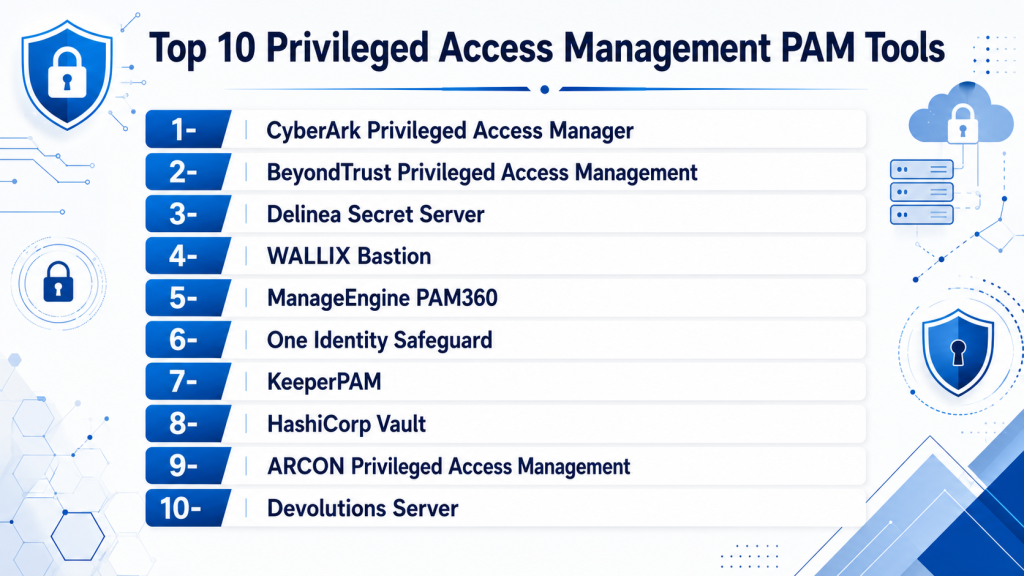
Top 10 Privileged Access Management PAM Tools
1- CyberArk Privileged Access Manager
Short description: CyberArk Privileged Access Manager is one of the most recognized enterprise PAM platforms for securing privileged credentials, sessions, secrets, and high-risk access. It is best suited for organizations with complex infrastructure, compliance requirements, and mature security programs.
Key Features
- Privileged password vaulting
- Credential rotation
- Session isolation and recording
- Just-in-time access controls
- Secrets management integration
- Cloud privilege security
- Threat analytics for privileged activity
Pros
- Strong enterprise PAM depth
- Mature security and compliance capabilities
- Broad ecosystem for privileged identity security
Cons
- Implementation can be complex
- Premium enterprise pricing
- Requires skilled administrators for full value
Platforms / Deployment
- Web
- Cloud
- Self-hosted
- Hybrid
Security & Compliance
- MFA
- SSO/SAML
- RBAC
- Audit logs
- Encryption
- Session recording
- Compliance reporting support
Integrations & Ecosystem
CyberArk integrates with enterprise identity, security operations, cloud, DevOps, and infrastructure platforms. It is especially strong for organizations that need PAM connected to broader identity security programs.
- Microsoft Entra ID
- Okta
- ServiceNow
- SIEM tools
- Cloud platforms
- DevOps and secrets workflows
Support & Community
CyberArk provides enterprise support, professional services, implementation partners, documentation, training, and a mature PAM administrator community.
2- BeyondTrust Privileged Access Management
Short description: BeyondTrust PAM provides privileged password management, endpoint privilege management, remote access security, and session monitoring. It is suitable for enterprises and mid-market organizations seeking broad privileged access coverage.
Key Features
- Privileged password management
- Endpoint privilege management
- Session monitoring and recording
- Secure remote access
- Just-in-time privilege elevation
- Password rotation
- Audit and compliance reporting
Pros
- Strong endpoint privilege management
- Broad PAM product coverage
- Useful for remote vendor access control
Cons
- Multiple modules may increase complexity
- Advanced deployments require planning
- Pricing can vary based on selected capabilities
Platforms / Deployment
- Web
- Windows
- macOS
- Linux
- Cloud
- Self-hosted
- Hybrid
Security & Compliance
- MFA
- SSO/SAML
- RBAC
- Audit logs
- Encryption
- Session recording
- Compliance reporting support
Integrations & Ecosystem
BeyondTrust integrates with directories, IAM tools, SIEM platforms, ITSM tools, cloud environments, and endpoint management systems. It is strong for organizations that need both account-level and endpoint-level privilege control.
- Active Directory
- Microsoft Entra ID
- ServiceNow
- SIEM tools
- Cloud platforms
- Endpoint management tools
Support & Community
BeyondTrust provides enterprise documentation, support resources, implementation assistance, professional services, and an established security administrator community.
3- Delinea Secret Server
Short description: Delinea Secret Server is a PAM platform focused on privileged credential vaulting, password rotation, session monitoring, and access control. It is widely used by mid-market and enterprise organizations that need practical privileged account protection.
Key Features
- Privileged password vaulting
- Automated password rotation
- Session monitoring
- Role-based access controls
- Discovery of privileged accounts
- Workflow approvals
- Audit reporting
Pros
- Practical and approachable PAM workflows
- Strong credential vaulting capabilities
- Good fit for mid-market and enterprise teams
Cons
- Advanced enterprise architecture may need planning
- Some capabilities depend on package selection
- Broader identity security may require additional modules
Platforms / Deployment
- Web
- Cloud
- Self-hosted
- Hybrid
Security & Compliance
- MFA
- SSO/SAML
- RBAC
- Audit logs
- Encryption
- Session monitoring
- Compliance reporting support
Integrations & Ecosystem
Delinea integrates with identity providers, directories, ITSM tools, SIEM systems, cloud platforms, and infrastructure management workflows. It is especially useful for teams that want credential vaulting and workflow-driven privileged access.
- Active Directory
- Microsoft Entra ID
- Okta
- ServiceNow
- SIEM platforms
- Cloud infrastructure
Support & Community
Delinea provides documentation, onboarding resources, enterprise support, training, and implementation guidance for PAM programs.
4- WALLIX Bastion
Short description: WALLIX Bastion is a privileged access management platform focused on securing administrative access, recording sessions, managing privileged credentials, and controlling third-party access. It is suitable for regulated enterprises and industrial environments.
Key Features
- Privileged session management
- Session recording
- Password vaulting
- Access approvals
- Vendor access control
- Audit reporting
- Least-privilege access workflows
Pros
- Strong session monitoring capabilities
- Good fit for regulated and industrial environments
- Useful third-party access controls
Cons
- Smaller global mindshare than some larger PAM vendors
- Advanced deployment requires planning
- Ecosystem depth may vary by region
Platforms / Deployment
- Web
- Self-hosted
- Cloud
- Hybrid
Security & Compliance
- MFA
- SSO/SAML support
- RBAC
- Audit logs
- Encryption
- Session recording
- Compliance reporting support
Integrations & Ecosystem
WALLIX integrates with directories, IAM platforms, ticketing systems, infrastructure tools, and security monitoring workflows. It is useful when privileged session accountability is a top priority.
- Active Directory
- LDAP
- SIEM tools
- ITSM systems
- Infrastructure platforms
- Authentication providers
Support & Community
WALLIX provides enterprise support, technical documentation, implementation assistance, and partner-led deployment resources.
5- ManageEngine PAM360
Short description: ManageEngine PAM360 is a privileged access management platform focused on password vaulting, session monitoring, remote access control, and compliance reporting. It is suitable for SMB, mid-market, and enterprise teams seeking cost-effective PAM.
Key Features
- Privileged password vault
- Session recording
- Remote privileged access
- Password rotation
- Access request workflows
- Compliance reports
- Application-to-application password management
Pros
- Strong value for SMB and mid-market teams
- Broad IT management ecosystem integration
- Practical admin interface
Cons
- Enterprise-scale customization may require tuning
- Advanced analytics may be lighter than premium platforms
- Best value often appears within ManageEngine ecosystem
Platforms / Deployment
- Web
- Windows
- Linux
- Self-hosted
- Hybrid
Security & Compliance
- MFA
- SSO/SAML support
- RBAC
- Audit logs
- Encryption
- Session recording
- Compliance reporting
Integrations & Ecosystem
ManageEngine PAM360 integrates with IT operations, directory services, SIEM tools, helpdesk workflows, and infrastructure management systems. It is practical for teams already using ManageEngine tools.
- Active Directory
- LDAP
- ServiceDesk Plus
- SIEM tools
- SSH and RDP systems
- IT operations platforms
Support & Community
ManageEngine provides documentation, customer support, admin resources, and a large IT operations user community.
6- One Identity Safeguard
Short description: One Identity Safeguard provides privileged password management, session monitoring, access request workflows, and policy controls. It is designed for enterprises that need stronger privileged access governance and audit visibility.
Key Features
- Privileged password management
- Session monitoring and recording
- Access request approvals
- Password rotation
- Policy-based access controls
- Audit trails
- Appliance and virtual deployment options
Pros
- Strong privileged governance features
- Good session recording and approval workflows
- Suitable for compliance-focused organizations
Cons
- Deployment requires planning
- Interface and workflows may need administrator training
- Ecosystem depth depends on environment
Platforms / Deployment
- Web
- Self-hosted
- Hybrid
Security & Compliance
- MFA
- SSO/SAML support
- RBAC
- Audit logs
- Encryption
- Session recording
- Compliance reporting support
Integrations & Ecosystem
One Identity Safeguard integrates with identity governance, directories, authentication providers, SIEM tools, and IT operations workflows. It is useful for organizations using broader One Identity governance tools.
- Active Directory
- LDAP
- One Identity tools
- SIEM platforms
- ITSM tools
- Authentication systems
Support & Community
One Identity provides enterprise documentation, support services, implementation partners, and identity governance expertise.
7- KeeperPAM
Short description: KeeperPAM combines password management, secrets management, remote browser isolation, privileged access controls, and zero-trust access features. It is useful for businesses seeking a modern cloud-friendly PAM approach.
Key Features
- Privileged password vaulting
- Secrets management
- Remote privileged access
- Session recording
- Zero-trust access controls
- Secure credential sharing
- Admin policy management
Pros
- Modern cloud-friendly experience
- Strong connection with password and secrets management
- Suitable for SMB, mid-market, and enterprise teams
Cons
- Advanced enterprise PAM depth may vary by use case
- Some capabilities require additional modules
- Larger deployments require careful policy planning
Platforms / Deployment
- Web
- Windows
- macOS
- Linux
- iOS
- Android
- Cloud
Security & Compliance
- MFA
- SSO/SAML support
- RBAC
- Audit logs
- Encryption
- Session recording support
- Compliance support varies by plan
Integrations & Ecosystem
KeeperPAM integrates with identity providers, directories, developer workflows, cloud services, and business password management environments. It is practical for teams modernizing from password management into PAM.
- Microsoft Entra ID
- Okta
- SSO providers
- SCIM provisioning
- DevOps tools
- Cloud infrastructure
Support & Community
Keeper provides documentation, enterprise support, onboarding guidance, and security-focused customer resources.
8- HashiCorp Vault
Short description: HashiCorp Vault is a secrets management platform widely used by DevOps, cloud, and platform engineering teams. While it is not a traditional full PAM suite, it is highly relevant for managing machine identities, dynamic secrets, tokens, certificates, and infrastructure access.
Key Features
- Secrets management
- Dynamic credentials
- Encryption as a service
- Certificate management
- Kubernetes integration
- Cloud identity workflows
- Policy-based access controls
Pros
- Strong DevOps and cloud-native secrets management
- Excellent automation and API-first architecture
- Useful for infrastructure and machine identity security
Cons
- Not a complete human privileged session management tool
- Requires technical expertise
- Operational complexity can be high
Platforms / Deployment
- Web
- Linux
- Cloud
- Self-hosted
- Hybrid
Security & Compliance
- RBAC
- Audit logs
- Encryption
- Policy-based access controls
- MFA and SSO support vary by deployment
- Compliance support varies by edition
Integrations & Ecosystem
HashiCorp Vault integrates deeply with cloud platforms, Kubernetes, CI/CD tools, infrastructure automation, and developer workflows. It is ideal where privileged secrets must be automated securely.
- Kubernetes
- Terraform
- AWS
- Azure
- Google Cloud
- CI/CD platforms
Support & Community
HashiCorp provides documentation, enterprise support, training, and a large DevOps and platform engineering community.
9- ARCON Privileged Access Management
Short description: ARCON PAM helps organizations manage privileged access, monitor sessions, enforce least privilege, and support compliance across enterprise environments. It is used by security-conscious organizations needing controlled administrator access.
Key Features
- Privileged credential vaulting
- Session monitoring
- Access request workflows
- Password rotation
- Command control
- Audit reports
- Least-privilege policy enforcement
Pros
- Strong compliance-oriented PAM capabilities
- Useful session and command monitoring
- Suitable for regulated industries
Cons
- Smaller global ecosystem than some large vendors
- Deployment complexity depends on environment
- Advanced integrations may require vendor support
Platforms / Deployment
- Web
- Self-hosted
- Hybrid
- Cloud support varies
Security & Compliance
- MFA
- SSO/SAML support
- RBAC
- Audit logs
- Encryption
- Session recording
- Compliance reporting support
Integrations & Ecosystem
ARCON integrates with directories, authentication systems, infrastructure platforms, and security operations tools. It is especially useful in environments where compliance and session accountability are key.
- Active Directory
- LDAP
- SIEM tools
- ITSM systems
- Server infrastructure
- Network devices
Support & Community
ARCON provides enterprise support, implementation assistance, technical documentation, and regional partner support in several markets.
10- Devolutions Server
Short description: Devolutions Server provides privileged account management, password vaulting, secure remote access, session management, and team credential sharing. It is useful for IT teams, MSPs, and organizations managing remote connections and credentials.
Key Features
- Shared password vault
- Privileged account management
- Secure remote access
- Session management
- Role-based permissions
- Audit logs
- Integration with remote desktop workflows
Pros
- Strong fit for IT teams and MSPs
- Good remote access and credential workflow support
- Practical for small and mid-sized organizations
Cons
- Less advanced than large enterprise PAM suites
- Best suited for IT operations use cases
- Advanced compliance needs may require additional tools
Platforms / Deployment
- Web
- Windows
- macOS
- Linux
- Self-hosted
- Cloud
- Hybrid
Security & Compliance
- MFA
- RBAC
- Audit logs
- Encryption
- SSO support varies by deployment
- Compliance support varies by plan
Integrations & Ecosystem
Devolutions Server integrates with remote desktop tools, password management workflows, directories, and IT operations environments. It is practical for teams that manage many privileged connections.
- Remote Desktop Manager
- Active Directory
- LDAP
- Remote access tools
- IT operations workflows
- Credential vaulting systems
Support & Community
Devolutions provides documentation, support resources, community forums, and strong adoption among IT administrators and MSPs.
Comparison Table
| Tool Name | Best For | Platform Supported | Deployment | Standout Feature | Public Rating |
|---|---|---|---|---|---|
| CyberArk Privileged Access Manager | Enterprise privileged identity security | Web | Cloud, Self-hosted, Hybrid | Mature enterprise PAM controls | N/A |
| BeyondTrust Privileged Access Management | Endpoint and remote privileged access | Web, Windows, macOS, Linux | Cloud, Self-hosted, Hybrid | Endpoint privilege management | N/A |
| Delinea Secret Server | Practical credential vaulting | Web | Cloud, Self-hosted, Hybrid | Privileged password vaulting | N/A |
| WALLIX Bastion | Regulated session monitoring | Web | Cloud, Self-hosted, Hybrid | Privileged session recording | N/A |
| ManageEngine PAM360 | SMB and mid-market PAM | Web, Windows, Linux | Self-hosted, Hybrid | Cost-effective privileged access control | N/A |
| One Identity Safeguard | Governance-heavy privileged access | Web | Self-hosted, Hybrid | Access approval workflows | N/A |
| KeeperPAM | Cloud-friendly password and PAM convergence | Web, Windows, macOS, Linux, iOS, Android | Cloud | Modern PAM and secrets workflows | N/A |
| HashiCorp Vault | DevOps secrets management | Web, Linux | Cloud, Self-hosted, Hybrid | Dynamic secrets management | N/A |
| ARCON PAM | Compliance-focused PAM | Web | Cloud, Self-hosted, Hybrid | Command and session controls | N/A |
| Devolutions Server | IT teams and MSPs | Web, Windows, macOS, Linux | Cloud, Self-hosted, Hybrid | Remote access and credential workflows | N/A |
Evaluation & Scoring of Privileged Access Management PAM
| Tool Name | Core | Ease | Integrations | Security | Performance | Support | Value | Weighted Total |
|---|---|---|---|---|---|---|---|---|
| CyberArk Privileged Access Manager | 10 | 7 | 9 | 10 | 9 | 9 | 7 | 8.8 |
| BeyondTrust Privileged Access Management | 9 | 7 | 9 | 9 | 9 | 8 | 7 | 8.3 |
| Delinea Secret Server | 9 | 8 | 8 | 9 | 8 | 8 | 8 | 8.4 |
| WALLIX Bastion | 8 | 7 | 7 | 9 | 8 | 7 | 7 | 7.6 |
| ManageEngine PAM360 | 8 | 8 | 8 | 8 | 8 | 8 | 9 | 8.1 |
| One Identity Safeguard | 8 | 7 | 8 | 9 | 8 | 8 | 7 | 7.8 |
| KeeperPAM | 8 | 8 | 8 | 8 | 8 | 8 | 8 | 8.0 |
| HashiCorp Vault | 8 | 6 | 10 | 9 | 9 | 8 | 8 | 8.2 |
| ARCON PAM | 8 | 7 | 7 | 8 | 8 | 7 | 7 | 7.5 |
| Devolutions Server | 7 | 8 | 7 | 8 | 8 | 8 | 9 | 7.8 |
These scores are comparative and should be interpreted based on infrastructure complexity, privileged account risk, compliance pressure, and internal security maturity. CyberArk, BeyondTrust, and Delinea are strong broad PAM platforms for mature security teams. HashiCorp Vault is stronger for DevOps secrets management than traditional human session control. ManageEngine PAM360 and Devolutions Server can be practical for SMB, mid-market, and IT operations teams. Enterprises should prioritize session recording, just-in-time access, cloud coverage, and audit readiness.
Which Privileged Access Management PAM Tool Is Right for You?
Solo / Freelancer
Solo professionals usually do not need a full PAM suite unless they manage client infrastructure or multiple admin environments. A strong password manager, MFA, secure SSH key practices, and basic vaulting may be enough. Devolutions Server or KeeperPAM can be useful for consultants managing many privileged connections.
SMB
SMBs should prioritize ease of deployment, credential vaulting, MFA, admin access control, and simple audit logs. ManageEngine PAM360, KeeperPAM, Delinea Secret Server, and Devolutions Server are practical options depending on budget and infrastructure complexity.
Mid-Market
Mid-market organizations often need password rotation, access approvals, session recording, remote access control, and compliance reporting. Delinea, BeyondTrust, ManageEngine PAM360, KeeperPAM, and WALLIX can work well depending on security maturity and operating model.
Enterprise
Enterprises should prioritize privileged identity security, just-in-time access, session isolation, cloud PAM, secrets management, endpoint privilege management, and compliance reporting. CyberArk, BeyondTrust, Delinea, One Identity Safeguard, WALLIX, ARCON, and HashiCorp Vault are strong candidates depending on use case.
Budget vs Premium
Budget-conscious teams may prefer ManageEngine PAM360, Devolutions Server, or KeeperPAM. Premium enterprise platforms such as CyberArk, BeyondTrust, and Delinea typically offer deeper privileged access controls, broader integrations, stronger audit workflows, and advanced security analytics.
Feature Depth vs Ease of Use
CyberArk and BeyondTrust provide deep enterprise capabilities but require more planning and expertise. Delinea and ManageEngine are often more approachable. HashiCorp Vault is powerful for technical teams but less suitable as a complete human access governance platform by itself.
Integrations & Scalability
Organizations should prioritize integrations with IAM, SSO, MFA, SIEM, ITSM, DevOps tools, cloud platforms, directories, endpoint tools, and ticketing systems. PAM becomes more valuable when privileged access approvals, logs, and alerts connect to daily security operations.
Security & Compliance Needs
Regulated organizations should prioritize session recording, audit logs, RBAC, MFA, password rotation, just-in-time access, access approvals, command monitoring, and compliance reporting. PAM should provide evidence of who accessed what, when, why, and what actions were performed.
Frequently Asked Questions FAQs
1. What is Privileged Access Management PAM?
Privileged Access Management PAM controls and secures access to high-risk accounts such as administrators, root users, cloud admins, database owners, and service accounts. It helps prevent misuse, credential theft, and unauthorized privileged activity.
2. Why do businesses need PAM tools?
Businesses need PAM tools because privileged accounts can access critical systems and sensitive data. If compromised, these accounts can cause major security, operational, and compliance damage.
3. What is a privileged account?
A privileged account is any account with elevated permissions beyond a normal user. Examples include domain admins, server admins, database admins, cloud admins, service accounts, and emergency access accounts.
4. What is just-in-time privileged access?
Just-in-time access gives users temporary privileged permissions only when needed and removes them after the task is complete. This reduces standing privileges and lowers attack risk.
5. What is privileged session recording?
Privileged session recording captures activity performed during admin sessions. It helps with audits, investigations, compliance evidence, and accountability.
6. Is PAM only for large enterprises?
No. Large enterprises need advanced PAM, but SMBs also benefit from vaulting admin passwords, enforcing MFA, rotating credentials, and tracking privileged access.
7. How is PAM different from IAM?
IAM manages general user identity and access, while PAM focuses on high-risk privileged users, admin accounts, service accounts, secrets, and sensitive infrastructure access.
8. What integrations should PAM buyers look for?
Buyers should look for integrations with SSO, MFA, directories, SIEM, ITSM, cloud platforms, DevOps tools, endpoint systems, and ticketing workflows.
9. What are common PAM implementation mistakes?
Common mistakes include trying to onboard every account at once, ignoring service accounts, skipping user training, failing to define ownership, and not integrating PAM with ticketing or monitoring workflows.
10. How should organizations choose the best PAM tool?
Organizations should evaluate privileged account types, cloud strategy, compliance needs, session recording requirements, secrets management, integrations, ease of administration, and long-term scalability.
Conclusion
Privileged Access Management PAM tools are essential for securing the accounts and credentials that control critical systems, cloud environments, databases, applications, endpoints, and infrastructure. The best PAM platform depends on organization size, privileged account complexity, compliance obligations, DevOps maturity, and cloud adoption. CyberArk, BeyondTrust, and Delinea are strong broad PAM platforms for enterprises and mature security teams, while ManageEngine PAM360, KeeperPAM, and Devolutions Server can be practical for SMB and mid-market environments. WALLIX, One Identity Safeguard, and ARCON are strong choices for compliance-heavy session governance, while HashiCorp Vault is highly valuable for DevOps secrets and machine identity use cases. The practical next step is to shortlist two or three PAM tools, identify the most critical privileged accounts, run a controlled pilot, validate integrations with SSO, MFA, SIEM, ITSM, and cloud systems, and expand gradually with clear ownership and audit processes.

Find Trusted Cardiac Hospitals
Compare heart hospitals by city and services — all in one place.
Explore Hospitals
This comparison was helpful for learning which PAM tools are best for different security and compliance needs.