Introduction
Finite Element Analysis (FEA) software is used by engineers and designers to simulate how products, structures, and materials behave under real-world conditions such as stress, heat, vibration, and fluid interaction. Instead of building physical prototypes, teams can test designs digitally—saving time, cost, and risk.
FEA has become essential as industries move toward faster product cycles, digital twins, and simulation-driven design. With increasing complexity in automotive, aerospace, manufacturing, and construction, modern FEA tools now integrate AI-assisted modeling, cloud-based simulation, and high-performance computing.
Real-world use cases include automotive crash testing simulations, aircraft structural stress analysis, bridge and building safety validation, consumer electronics durability testing, and thermal management in semiconductor design.
When choosing an FEA tool, buyers should evaluate:
- Simulation accuracy and solver robustness
- Multi-physics capabilities (thermal, structural, fluid)
- Ease of use and learning curve
- Integration with CAD/PLM systems
- Scalability and performance (HPC/cloud)
- Automation and AI capabilities
- Visualization and reporting tools
- Industry-specific features
- Cost and licensing flexibility
- Support and community ecosystem
Best for: Mechanical engineers, simulation specialists, product designers, R&D teams, and enterprises in manufacturing, automotive, aerospace, and civil engineering.
Not ideal for: Beginners with no engineering background or teams needing only basic design tools without simulation depth.
Key Trends in Finite Element Analysis (FEA) Software
- AI-assisted simulation setup reduces manual modeling effort and speeds up analysis workflows.
- Cloud-based simulation platforms allow scalable compute without heavy hardware investment.
- Digital twin integration enables real-time monitoring and predictive maintenance.
- Multi-physics convergence combines structural, thermal, fluid, and electromagnetic simulations in one environment.
- GPU acceleration and HPC adoption dramatically improve simulation speed.
- Low-code and automation features simplify repetitive simulation workflows.
- Integration with CAD ecosystems creates seamless design-to-simulation pipelines.
- Industry-specific templates improve usability for automotive, aerospace, and civil sectors.
- Subscription-based pricing models replace traditional perpetual licenses.
How We Selected These Tools (Methodology)
- Evaluated market adoption and industry presence across engineering sectors
- Compared core simulation capabilities and solver accuracy
- Assessed performance and scalability (HPC/cloud readiness)
- Reviewed ease of use and learning curve
- Checked integration capabilities with CAD, PLM, and enterprise tools
- Considered security posture and enterprise readiness
- Analyzed community strength and documentation availability
- Included tools for enterprise, mid-market, and open-source users
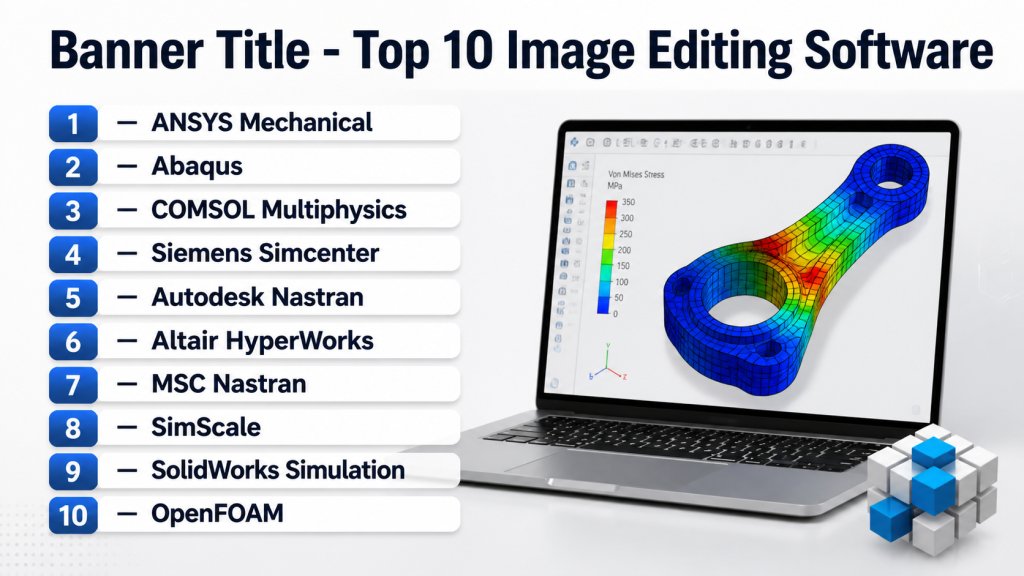
Top 10 Finite Element Analysis (FEA) Tools
1 — ANSYS Mechanical
Short description: A leading enterprise-grade FEA solution known for its accuracy and multi-physics capabilities, widely used in aerospace, automotive, and manufacturing industries.
Key Features
- Advanced structural analysis solver
- Multi-physics simulation integration
- High-performance computing support
- Parametric design optimization
- Digital twin capabilities
- Extensive material libraries
Pros
- Highly accurate and reliable simulations
- Industry-standard for complex engineering problems
Cons
- Steep learning curve
- Expensive licensing
Platforms / Deployment
Windows / Linux
Cloud / Self-hosted
Security & Compliance
SSO, RBAC, encryption supported; other details Not publicly stated
Integrations & Ecosystem
Strong integration with CAD and enterprise systems.
- CAD tools (SolidWorks, CATIA)
- PLM systems
- APIs for customization
- HPC clusters
Support & Community
Strong global support, extensive documentation, and large user community
2 — Abaqus
Short description: A powerful simulation tool widely used for nonlinear and complex material behavior analysis, especially in aerospace and automotive industries.
Key Features
- Nonlinear analysis capabilities
- Advanced material modeling
- Coupled multi-physics simulation
- Explicit and implicit solvers
- Automation scripting
Pros
- Excellent for complex simulations
- Strong research and academic usage
Cons
- Complex interface
- High cost
Platforms / Deployment
Windows / Linux
Self-hosted
Security & Compliance
Not publicly stated
Integrations & Ecosystem
Part of Dassault ecosystem.
- CATIA integration
- SIMULIA platform
- Python scripting
- PLM tools
Support & Community
Strong enterprise support and academic community
3 — COMSOL Multiphysics
Short description: A flexible simulation platform focused on multi-physics modeling with a user-friendly interface and customization capabilities.
Key Features
- Multi-physics modeling
- Application builder for custom apps
- Parametric sweeps
- Visualization tools
- Integration with MATLAB
Pros
- Highly flexible
- Easier to use than competitors
Cons
- Expensive modules
- Performance depends on setup
Platforms / Deployment
Windows / macOS / Linux
Self-hosted
Security & Compliance
Not publicly stated
Integrations & Ecosystem
- MATLAB integration
- Custom app development
- APIs
- External solver support
Support & Community
Good documentation and active community
4 — Siemens Simcenter
Short description: A comprehensive simulation suite offering advanced FEA and system simulation for large enterprises.
Key Features
- Advanced structural analysis
- Multi-disciplinary simulation
- Digital twin integration
- Cloud simulation capabilities
- Data management tools
Pros
- Strong enterprise integration
- Scalable for large projects
Cons
- Complex setup
- High cost
Platforms / Deployment
Windows / Linux
Cloud / Hybrid
Security & Compliance
Not publicly stated
Integrations & Ecosystem
- NX CAD integration
- Teamcenter PLM
- APIs
- Simulation data management
Support & Community
Enterprise-level support and training resources
5 — Autodesk Nastran
Short description: A reliable FEA solver integrated with Autodesk ecosystem, suitable for structural and mechanical simulations.
Key Features
- Linear and nonlinear analysis
- Fatigue analysis
- Modal and thermal analysis
- CAD integration
- Cloud simulation support
Pros
- Good integration with Autodesk tools
- Reliable solver
Cons
- Limited advanced features compared to competitors
- UI can feel dated
Platforms / Deployment
Windows
Cloud / Self-hosted
Security & Compliance
Not publicly stated
Integrations & Ecosystem
- Autodesk Fusion ecosystem
- CAD integrations
- Cloud workflows
- APIs
Support & Community
Good documentation and Autodesk support network
6 — Altair HyperWorks
Short description: A high-performance simulation platform known for optimization and lightweight design capabilities.
Key Features
- Structural and optimization tools
- Multi-physics simulation
- HPC scalability
- AI-assisted design optimization
- Visualization tools
Pros
- Strong optimization features
- Efficient for lightweight design
Cons
- Complex interface
- Learning curve
Platforms / Deployment
Windows / Linux
Cloud / Hybrid
Security & Compliance
Not publicly stated
Integrations & Ecosystem
- CAD integrations
- APIs
- HPC environments
- Altair ecosystem
Support & Community
Active community and enterprise support
7 — MSC Nastran
Short description: A classic FEA solver widely used in aerospace and defense industries for structural analysis.
Key Features
- Structural and dynamic analysis
- Fatigue and vibration analysis
- Nonlinear simulation
- HPC support
- Legacy compatibility
Pros
- Proven reliability
- Strong aerospace adoption
Cons
- Older interface
- Requires expertise
Platforms / Deployment
Windows / Linux
Self-hosted
Security & Compliance
Not publicly stated
Integrations & Ecosystem
- CAD integrations
- PLM tools
- APIs
- Simulation workflows
Support & Community
Established user base and documentation
8 — SimScale
Short description: A cloud-native simulation platform that makes FEA accessible without heavy hardware requirements.
Key Features
- Cloud-based simulation
- Multi-physics support
- Collaboration tools
- Parametric studies
- Browser-based interface
Pros
- No hardware required
- Easy to use
Cons
- Limited advanced capabilities
- Depends on internet
Platforms / Deployment
Web
Cloud
Security & Compliance
Not publicly stated
Integrations & Ecosystem
- CAD imports
- APIs
- Cloud workflows
- Collaboration tools
Support & Community
Growing community and online support
9 — SolidWorks Simulation
Short description: An integrated simulation tool within SolidWorks, ideal for engineers already using the SolidWorks ecosystem.
Key Features
- CAD-integrated simulation
- Linear and nonlinear analysis
- Motion and fatigue analysis
- Design optimization
- Easy setup
Pros
- Easy for beginners
- Seamless CAD integration
Cons
- Limited advanced capabilities
- Performance constraints
Platforms / Deployment
Windows
Self-hosted
Security & Compliance
Not publicly stated
Integrations & Ecosystem
- SolidWorks CAD
- PLM systems
- APIs
- Design tools
Support & Community
Large community and strong documentation
10 — OpenFOAM
Short description: An open-source simulation platform primarily focused on CFD but also supports FEA-related workflows.
Key Features
- Open-source flexibility
- Custom solver development
- HPC support
- Multi-physics capabilities
- Script-based workflows
Pros
- Free and highly customizable
- Strong research usage
Cons
- Requires technical expertise
- No official UI
Platforms / Deployment
Linux / Windows
Self-hosted
Security & Compliance
Varies / N/A
Integrations & Ecosystem
- Custom scripting
- Open-source libraries
- HPC integration
- Community plugins
Support & Community
Strong open-source community
Comparison Table (Top 10)
| Tool Name | Best For | Platforms Supported | Deployment | Standout Feature | Public Rating |
|---|---|---|---|---|---|
| ANSYS Mechanical | Enterprise simulation | Windows, Linux | Hybrid | Multi-physics accuracy | N/A |
| Abaqus | Complex nonlinear analysis | Windows, Linux | Self-hosted | Advanced material modeling | N/A |
| COMSOL Multiphysics | Flexible modeling | Windows, macOS, Linux | Self-hosted | Multi-physics platform | N/A |
| Siemens Simcenter | Enterprise simulation | Windows, Linux | Hybrid | Digital twin integration | N/A |
| Autodesk Nastran | CAD-integrated FEA | Windows | Hybrid | Autodesk ecosystem | N/A |
| Altair HyperWorks | Optimization | Windows, Linux | Hybrid | AI optimization | N/A |
| MSC Nastran | Aerospace simulation | Windows, Linux | Self-hosted | Proven solver | N/A |
| SimScale | Cloud simulation | Web | Cloud | Browser-based simulation | N/A |
| SolidWorks Simulation | CAD users | Windows | Self-hosted | Easy integration | N/A |
| OpenFOAM | Open-source users | Linux, Windows | Self-hosted | Custom solvers | N/A |
Evaluation & Scoring of Finite Element Analysis (FEA)
| Tool | Core | Ease | Integrations | Security | Performance | Support | Value | Weighted Total |
|---|---|---|---|---|---|---|---|---|
| ANSYS | 10 | 6 | 9 | 8 | 10 | 9 | 7 | 8.9 |
| Abaqus | 10 | 5 | 9 | 7 | 10 | 9 | 6 | 8.6 |
| COMSOL | 9 | 8 | 8 | 7 | 8 | 8 | 7 | 8.1 |
| Simcenter | 9 | 6 | 9 | 8 | 9 | 9 | 6 | 8.5 |
| Autodesk Nastran | 8 | 7 | 8 | 7 | 8 | 8 | 7 | 7.9 |
| HyperWorks | 9 | 6 | 8 | 7 | 9 | 8 | 7 | 8.2 |
| MSC Nastran | 9 | 5 | 7 | 7 | 9 | 8 | 6 | 7.8 |
| SimScale | 7 | 9 | 7 | 6 | 7 | 7 | 8 | 7.6 |
| SolidWorks | 7 | 9 | 7 | 6 | 7 | 8 | 8 | 7.7 |
| OpenFOAM | 8 | 4 | 6 | 5 | 9 | 7 | 9 | 7.3 |
How to interpret: Scores are comparative across tools. Higher totals indicate balanced performance across features, usability, and value. Enterprise tools score high in performance, while cloud/open-source tools score higher in accessibility and cost efficiency.
Which Finite Element Analysis (FEA) Tool Is Right for You?
Solo / Freelancer
Choose SimScale or SolidWorks Simulation for ease of use and lower cost.
SMB
Autodesk Nastran or COMSOL offers a good balance of power and usability.
Mid-Market
Altair HyperWorks or COMSOL provide strong capabilities with scalability.
Enterprise
ANSYS, Abaqus, or Siemens Simcenter are best for complex simulations and large-scale deployments.
Budget vs Premium
- Budget: OpenFOAM, SimScale
- Premium: ANSYS, Abaqus
Feature Depth vs Ease of Use
- Deep features: Abaqus, ANSYS
- Easy to use: SolidWorks, SimScale
Integrations & Scalability
- Strong integrations: Siemens, ANSYS
- Flexible workflows: COMSOL
Security & Compliance Needs
Enterprise tools generally provide better security and governance features.
Frequently Asked Questions (FAQs)
1. What is FEA software used for?
FEA software simulates physical behavior of products under real-world conditions. It helps engineers test designs without building physical prototypes, reducing cost and time.
2. Is FEA software difficult to learn?
Yes, most advanced tools have a steep learning curve. However, beginner-friendly options like SolidWorks Simulation and SimScale are easier to start with.
3. How much does FEA software cost?
Pricing varies widely. Enterprise tools are expensive, while cloud-based or open-source options can be more affordable or free.
4. Can FEA tools run on the cloud?
Yes, modern platforms like SimScale offer fully cloud-based simulation, eliminating the need for powerful local hardware.
5. What industries use FEA software?
FEA is widely used in automotive, aerospace, manufacturing, construction, electronics, and energy industries.
6. What is multi-physics simulation?
It combines different physical phenomena like heat, stress, and fluid flow into a single simulation model.
7. Do FEA tools integrate with CAD software?
Yes, most tools integrate with CAD platforms like SolidWorks, CATIA, and NX.
8. Is open-source FEA software reliable?
Tools like OpenFOAM are reliable but require technical expertise and customization.
9. What hardware is required?
High-performance computing systems or cloud infrastructure are often needed for complex simulations.
10. How long does it take to run simulations?
It depends on model complexity. Simple simulations may take minutes, while complex ones can take hours or days.
Conclusion
Finite Element Analysis software plays a critical role in modern engineering by enabling faster, safer, and more cost-effective product development. From enterprise-grade solutions like ANSYS and Abaqus to accessible cloud platforms like SimScale, there is a wide range of tools available depending on your needs and budget.
The best choice depends on your simulation complexity, team expertise, and integration requirements. Enterprise users should prioritize scalability and accuracy, while smaller teams may focus on ease of use and cost efficiency.
To get started, shortlist 2–3 tools, run pilot simulations, and evaluate how well they integrate into your design workflow.

Find Trusted Cardiac Hospitals
Compare heart hospitals by city and services — all in one place.
Explore Hospitals
FEA software tools are explained clearly, and the comparison helps in understanding how simulation, stress analysis, and real-world testing can be done efficiently before actual production.