Introduction
Digital Forensics Tools are specialized software solutions designed to investigate, analyze, and recover digital evidence from computers, mobile devices, and networks. They help organizations detect security incidents, support legal investigations, and ensure compliance with regulations. As cybercrime becomes increasingly sophisticated, these tools provide the capabilities to preserve evidence, identify threats, and perform detailed analyses without compromising data integrity.
Real-world use cases include:
- Investigating data breaches or cyber-attacks
- Recovering deleted, encrypted, or corrupted files
- Performing mobile and endpoint device forensics
- Conducting network traffic analysis
- Supporting compliance audits and legal investigations
Evaluation criteria for Digital Forensics Tools:
- Data acquisition and imaging capabilities
- File recovery and timeline reconstruction
- Network and endpoint forensics
- Mobile device analysis
- Malware and threat analysis
- Reporting and evidence documentation
- Integration with SIEM and incident response tools
- Ease of use and automation capabilities
- Scalability for enterprise environments
- Pricing and overall value
Best for: SOC teams, incident response teams, law enforcement, cybersecurity professionals, and enterprises with high security requirements
Not ideal for: Small organizations with minimal digital assets or those relying entirely on external investigators
Key Trends in Digital Forensics Tools
- AI and machine learning for automated threat detection and anomaly analysis
- Cloud-based forensics for remote and hybrid environments
- Mobile device forensic capabilities for smartphones and tablets
- Integration with SIEM and threat intelligence platforms
- Automated evidence collection and timeline reconstruction
- Endpoint detection integration for faster incident response
- Enhanced reporting with courtroom-ready documentation
- Scalable solutions for enterprise and government organizations
- Forensic readiness and proactive monitoring
- Flexible subscription and licensing models
How We Selected These Tools (Methodology)
- Evaluated market adoption and vendor reputation
- Assessed feature completeness, including endpoint, mobile, and network forensics
- Considered reliability, performance, and evidence integrity
- Reviewed security and compliance capabilities
- Examined integrations with SIEM, SOC, and incident response tools
- Tested suitability for SMB, mid-market, and enterprise environments
- Evaluated usability and learning curve for forensic analysts
- Reviewed automation, AI capabilities, and workflow support
- Considered scalability for multi-system and multi-device investigations
- Evaluated support, documentation, and community resources
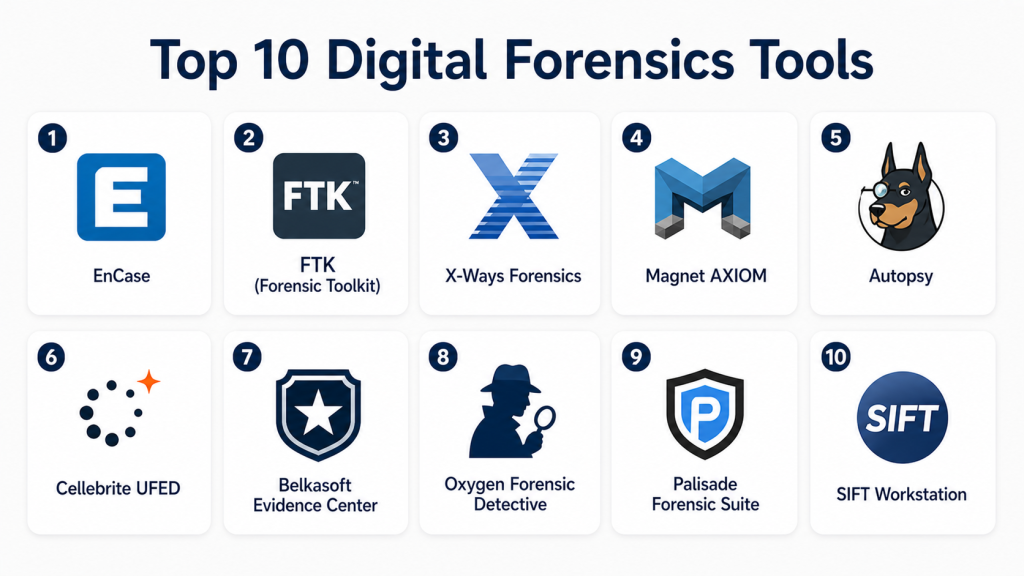
Top 10 Digital Forensics Tools
#1 — EnCase
Short description:
EnCase is an industry-leading digital forensics platform that provides comprehensive endpoint investigation, data acquisition, and evidence analysis capabilities. It’s used by law enforcement, corporate security teams, and incident response analysts.
Key Features
- Disk imaging and acquisition
- File and timeline analysis
- Endpoint forensic analysis
- Reporting and evidence documentation
- Malware and threat analysis
- Integration with SIEM and security tools
Pros
- Widely recognized in law enforcement and enterprise
- Supports complex investigations
Cons
- Licensing can be expensive
- Steeper learning curve for new users
Platforms / Deployment
- Windows
- Cloud / On-premises
Security & Compliance
- Encryption and audit logs
- Not publicly stated
Integrations & Ecosystem
- SIEM and SOC platforms
- API support
- Workflow automation for incident response
Support & Community
Comprehensive training, support, and strong user community
#2 — FTK (Forensic Toolkit)
Short description:
FTK is a powerful forensic analysis suite for data recovery, analysis, and reporting. It enables rapid examination of endpoints, network activity, and storage devices.
Key Features
- Data carving and recovery
- Timeline analysis
- Email and chat investigation
- Integrated decryption support
- Case management and reporting
- Network forensics
Pros
- Efficient data processing
- Strong reporting and case management
Cons
- Requires high system resources
- May be complex for beginners
Platforms / Deployment
- Windows
- On-premises
Security & Compliance
- Audit logging and encrypted storage
- Not publicly stated
Integrations & Ecosystem
- SIEM and EDR integration
- API support for custom workflows
- Evidence export
Support & Community
Documentation, training courses, and enterprise support
#3 — X-Ways Forensics
Short description:
X-Ways Forensics is a lightweight but powerful forensics tool for disk imaging, data analysis, and evidence extraction, preferred by forensic professionals seeking efficiency and flexibility.
Key Features
- Disk cloning and imaging
- File system analysis
- Email and metadata extraction
- Data carving and recovery
- Integrated reporting
- Scripting for automation
Pros
- Lightweight and efficient
- Supports complex file systems
Cons
- Minimal GUI guidance for beginners
- Limited advanced analytics
Platforms / Deployment
- Windows
- On-premises
Security & Compliance
- Encryption and audit logging
- Not publicly stated
Integrations & Ecosystem
- API for custom scripts
- Integration with case management tools
Support & Community
Documentation and forums, limited formal training
#4 — Magnet AXIOM
Short description:
Magnet AXIOM is a forensic platform for endpoint, mobile, and cloud data analysis. It automates evidence collection and integrates investigative workflows for incident response and legal proceedings.
Key Features
- Endpoint and mobile device acquisition
- Cloud service data extraction
- Automated timeline and link analysis
- Case management and reporting
- Malware detection
- Multi-source correlation
Pros
- Supports multi-device and cloud investigations
- Automation reduces manual effort
Cons
- Premium pricing
- Learning curve for advanced features
Platforms / Deployment
- Windows
- Cloud / On-premises
Security & Compliance
- Audit logs and encryption
- Not publicly stated
Integrations & Ecosystem
- SIEM, EDR, and cloud services
- API for custom workflows
Support & Community
Training, documentation, and active user community
#5 — Autopsy
Short description:
Autopsy is an open-source digital forensics platform offering file system analysis, timeline reconstruction, and case management for SMBs and educational institutions.
Key Features
- Disk imaging and analysis
- Timeline reconstruction
- File and metadata extraction
- Case management and reporting
- Modular plugin architecture
- Cross-platform compatibility
Pros
- Open-source and cost-effective
- Modular and extensible
Cons
- Limited enterprise features
- Requires manual configuration
Platforms / Deployment
- Windows / Linux / macOS
- On-premises
Security & Compliance
- Varies / N/A
Integrations & Ecosystem
- Open-source plugins
- Integration with SIEM tools via API
Support & Community
Active community and documentation
#6 — Cellebrite UFED
Short description:
Cellebrite UFED is a mobile forensics platform for extracting, analyzing, and reporting data from smartphones and tablets, widely used by law enforcement and corporate investigators.
Key Features
- Mobile device data extraction
- Cloud data retrieval
- Application and media analysis
- Automated reporting
- Timeline reconstruction
- Malware and anomaly detection
Pros
- Best-in-class mobile forensics
- Supports a wide range of devices
Cons
- High cost
- Limited desktop forensic capabilities
Platforms / Deployment
- Windows
- On-premises
Security & Compliance
- Encryption, audit logging
- Not publicly stated
Integrations & Ecosystem
- SIEM and case management tools
- API for workflow automation
Support & Community
Documentation, training, and law enforcement support
#7 — Belkasoft Evidence Center
Short description:
Belkasoft Evidence Center is a digital forensics tool that analyzes endpoint, mobile, and cloud data for investigations and incident response.
Key Features
- Disk and memory analysis
- Mobile device forensics
- Cloud and social media analysis
- Timeline and link analysis
- Case management and reporting
- Malware analysis
Pros
- Multi-source evidence support
- User-friendly interface
Cons
- Licensing cost
- Advanced features require training
Platforms / Deployment
- Windows
- Cloud / On-premises
Security & Compliance
- Encryption and audit logs
- Not publicly stated
Integrations & Ecosystem
- SIEM and analytics integration
- API for automated workflows
Support & Community
Documentation, training, and enterprise support
#8 — Oxygen Forensic Detective
Short description:
Oxygen Forensic Detective specializes in mobile and cloud forensics, providing deep insights into smartphone and application data for corporate and law enforcement investigations.
Key Features
- Mobile device acquisition and analysis
- Cloud service extraction
- App data decoding
- Timeline reconstruction
- Case management
- Reporting and export
Pros
- Advanced mobile forensic capabilities
- Cloud data support
Cons
- Focused mainly on mobile devices
- Costly for small teams
Platforms / Deployment
- Windows
- Cloud / On-premises
Security & Compliance
- Encryption and audit logs
- Not publicly stated
Integrations & Ecosystem
- SIEM integration
- API for case workflow
Support & Community
Training, documentation, and support
#9 — Palisade Forensic Suite
Short description:
Palisade Forensic Suite is a comprehensive digital forensics platform for endpoint and mobile investigations, focusing on enterprise and law enforcement environments.
Key Features
- Disk imaging and analysis
- Endpoint and mobile data extraction
- Malware and threat analysis
- Timeline reconstruction
- Reporting and documentation
- Case management
Pros
- Enterprise-ready
- Multi-device support
Cons
- Learning curve
- Higher cost for smaller teams
Platforms / Deployment
- Windows
- Cloud / On-premises
Security & Compliance
- Encryption, audit logging
- Not publicly stated
Integrations & Ecosystem
- SIEM and incident response platforms
- API for automated workflows
Support & Community
Enterprise support and documentation
#10 — SIFT Workstation
Short description:
SIFT Workstation is an open-source forensic environment for endpoint and memory analysis, widely used by investigators and SOC teams for evidence examination and incident response.
Key Features
- Memory and disk forensic analysis
- Timeline reconstruction
- Malware analysis
- Evidence documentation
- Open-source plugin support
- Cross-platform capabilities
Pros
- Free and open-source
- Modular and extensible
Cons
- Requires technical expertise
- Limited enterprise integrations
Platforms / Deployment
- Linux / Windows
- On-premises
Security & Compliance
- Varies / N/A
Integrations & Ecosystem
- Open-source plugins and tools
- API support for custom scripts
Support & Community
Active open-source community and documentation
Comparison Table (Top 10)
| Tool Name | Best For | Platform(s) Supported | Deployment | Standout Feature | Public Rating |
|---|---|---|---|---|---|
| Attivo Networks | Enterprise SOC | Windows / Linux | Cloud / Hybrid | Lateral movement detection | N/A |
| TrapX Security | Mid-market to Enterprise | Windows / Linux | Cloud / Hybrid | Dynamic honeypots | N/A |
| Illusive Networks | Enterprise SOC | Windows / Linux | Cloud / Hybrid | Credential and endpoint deception | N/A |
| Cymmetria MazeRunner | Mid-market | Windows / Linux | Cloud / Hybrid | Dynamic attack simulation | N/A |
| Smokescreen Technologies | Mid-market | Windows / Linux | Cloud / Hybrid | Realistic decoy environments | N/A |
| Fidelis Deception | Enterprise SOC | Windows / Linux | Cloud / Hybrid | Network + endpoint deception | N/A |
| Guardicore Centra | Mid-market to Enterprise | Windows / Linux | Cloud / Hybrid | Segmentation + deception | N/A |
| Acalvio ShadowPlex | Enterprise SOC | Windows / Linux | Cloud / Hybrid | Deception as a service | N/A |
| Sophos Deception | SMB to Enterprise | Windows / Linux | Cloud / Hybrid | Sophos ecosystem integration | N/A |
| Rapid7 Deception | Enterprise SOC | Windows / Linux | Cloud / Hybrid | Decoy servers and endpoints | N/A |
Evaluation & Scoring of Deception Technology Tools
| Tool Name | Core (25%) | Ease (15%) | Integrations (15%) | Security (10%) | Performance (10%) | Support (10%) | Value (15%) | Weighted Total |
|---|---|---|---|---|---|---|---|---|
| Attivo Networks | 9 | 8 | 8 | 9 | 8 | 8 | 7 | 8.3 |
| TrapX Security | 9 | 7 | 8 | 9 | 8 | 8 | 7 | 8.2 |
| Illusive Networks | 8 | 8 | 7 | 8 | 8 | 7 | 7 | 7.8 |
| Cymmetria MazeRunner | 8 | 7 | 7 | 8 | 8 | 7 | 7 | 7.7 |
| Smokescreen Technologies | 7 | 8 | 6 | 7 | 7 | 7 | 8 | 7.3 |
| Fidelis Deception | 8 | 7 | 7 | 8 | 8 | 7 | 7 | 7.7 |
| Guardicore Centra | 8 | 7 | 7 | 8 | 8 | 7 | 7 | 7.7 |
| Acalvio ShadowPlex | 8 | 7 | 7 | 8 | 8 | 7 | 7 | 7.7 |
| Sophos Deception | 7 | 8 | 6 | 7 | 7 | 7 | 8 | 7.3 |
| Rapid7 Deception | 8 | 7 | 7 | 8 | 8 | 7 | 7 | 7.7 |
Interpretation: Weighted totals help compare tools across core features, usability, integrations, security, performance, support, and value, allowing organizations to identify the best solution for their environment.
Which Deception Technology Tools Tool Is Right for You?
Solo / Freelancer
Smaller organizations can start with Sophos Deception or Smokescreen Technologies for lightweight deception capabilities without complex deployment.
SMB
TrapX Security, Cymmetria MazeRunner, and Guardicore Centra provide mid-market teams with effective deception deployment and analytics while maintaining usability.
Mid-Market
Attivo Networks, Illusive Networks, and Fidelis Deception offer enterprise-grade visibility, multi-environment coverage, and integration with SIEM and SOC workflows.
Enterprise
Acalvio ShadowPlex, Rapid7 Deception, and Attivo Networks deliver large-scale deployment, advanced analytics, and comprehensive integration for multi-environment enterprise security.
Budget vs Premium
Budget: Sophos Deception, Smokescreen Technologies
Premium: Attivo Networks, TrapX Security, Acalvio ShadowPlex
Feature Depth vs Ease of Use
Depth: Attivo Networks, Illusive Networks, Acalvio ShadowPlex
Ease: Sophos Deception, Smokescreen Technologies
Integrations & Scalability
Enterprise SOC teams benefit most from TrapX Security, Attivo Networks, and Rapid7 Deception due to strong API and SIEM/SOAR integration.
Security & Compliance Needs
Organizations protecting critical infrastructure or sensitive data should prioritize platforms with MFA, encryption, audit logs, and robust reporting.
Frequently Asked Questions (FAQs)
1. What pricing models are used?
Subscription-based, per endpoint, or custom enterprise licensing depending on scale and coverage.
2. How long does deployment take?
SMB deployments can be completed in days; enterprise-scale setups may take weeks.
3. Is technical expertise required?
Yes, SOC teams or IT professionals are typically needed to configure, monitor, and respond to alerts.
4. Can these tools integrate with SIEM or SOAR?
Yes, most offer APIs and built-in connectors for central monitoring and incident response automation.
5. How do deception tools detect threats?
By deploying decoys, fake credentials, and honeypots that lure attackers, revealing malicious activity.
6. Are endpoints covered?
Yes, most tools deploy deception across endpoints, servers, and network infrastructure.
7. Can these detect insider threats?
Yes, suspicious access to decoys and credentials alerts teams to insider activities.
8. Do they provide analytics?
Dashboards show decoy interactions, attacker behavior, and trends for SOC teams.
9. Can they reduce dwell time?
Yes, early detection through deception reduces attacker dwell time and limits potential damage.
10. Are they suitable for small organizations?
Yes, lightweight tools like Sophos Deception or Smokescreen Technologies can deliver basic protection affordably.
Conclusion
Deception Technology Tools provide a proactive defense layer in cybersecurity, enabling organizations to detect threats early, understand attacker behavior, and protect critical assets. Enterprise-grade tools like Attivo Networks, TrapX Security, and Illusive Networks offer advanced analytics and comprehensive coverage, while SMB-focused solutions like Sophos Deception and Smokescreen Technologies provide accessible entry points. Choosing the right tool depends on organizational size, threat exposure, integration needs, and budget. Security teams should shortlist platforms, evaluate demos, and validate integrations and compliance to maximize detection, reduce dwell time, and strengthen incident response capabilities.

Find Trusted Cardiac Hospitals
Compare heart hospitals by city and services — all in one place.
Explore Hospitals
In a real incident, collecting data from many devices can quickly create huge storage and processing needs. Teams should have a clear way to prioritize important evidence and avoid spending too much time analyzing irrelevant data. Good indexing, filtering, and case organization can make investigations much faster.