Introduction
3D modeling tools are software platforms used to create three-dimensional digital objects, scenes, characters, products, buildings, environments, and visual assets. These tools help designers turn ideas into digital models that can be rendered, animated, simulated, manufactured, printed, or used in games and immersive experiences.
They matter because 3D content is now important across product design, architecture, gaming, ecommerce, virtual production, education, healthcare visualization, engineering, and digital twin workflows. Teams use these tools for character modeling, product prototyping, architectural visualization, game asset creation, industrial design, and marketing visuals.
Buyers should evaluate modeling depth, ease of use, rendering workflow, file compatibility, collaboration features, plugin ecosystem, hardware requirements, training resources, licensing flexibility, and security controls.
Best for: 3D artists, designers, animators, architects, engineers, product teams, game developers, studios, educators, and agencies that need professional 3D creation workflows.
Not ideal for: users who only need basic 2D graphics, simple image editing, quick social media visuals, or lightweight mockups where a full 3D platform may feel too complex.
Key Trends in 3D Modeling Tools
- AI-assisted workflows are becoming more useful: Tools are increasingly supporting faster ideation, texture generation, cleanup, scene creation, and asset preparation.
- Real-time visualization is now expected: Designers want instant previews instead of waiting for slow rendering cycles.
- Cloud collaboration is growing: Teams need shared projects, review workflows, version control, and easier access across locations.
- Interoperability is critical: Support for formats such as OBJ, FBX, STL, glTF, USD, STEP, and CAD files helps teams move models between tools.
- Procedural modeling is gaining importance: Node-based and parametric workflows help teams create scalable, reusable, and automated assets.
- Game engines influence 3D workflows: Many teams now optimize models for real-time environments, interactive demos, AR, VR, and simulations.
- Digital twin workflows are expanding: Industrial, construction, and infrastructure teams need 3D models connected to operational data.
- Asset optimization is more important: Lightweight models, clean topology, UV quality, and texture efficiency matter for web, mobile, and immersive use cases.
- Enterprise security expectations are rising: Larger teams need account controls, role-based access, secure storage, auditability, and governance.
- Open-source tools remain highly competitive: Community-driven tools continue to challenge premium platforms with strong features and flexible licensing.
How We Selected These Tools Methodology
The tools in this list were selected using a practical buyer-focused approach:
- Market adoption: Tools widely used by studios, product teams, architects, designers, engineers, and creators were prioritized.
- Feature completeness: We considered modeling, sculpting, rendering, animation, simulation, CAD-style design, and asset preparation.
- Workflow coverage: The list balances creative, technical, architectural, product design, animation, and procedural workflows.
- Performance signals: Tools known for handling serious production workloads, large scenes, or complex assets were given stronger consideration.
- Integration strength: File format support, plugins, scripting, APIs, render engine support, and game engine workflows were reviewed.
- Ease of adoption: Tools with strong learning resources, documentation, community support, and onboarding options were favored.
- Customer fit: The list includes choices for freelancers, SMBs, studios, enterprises, educators, and technical teams.
- Ecosystem maturity: Tools with active communities, extension libraries, training content, and professional pipelines scored higher.
- Security expectations: Account controls, admin features, and enterprise suitability were considered where relevant.
- Value for money: Free, open-source, subscription, and professional licensing models were compared from a buyer perspective.
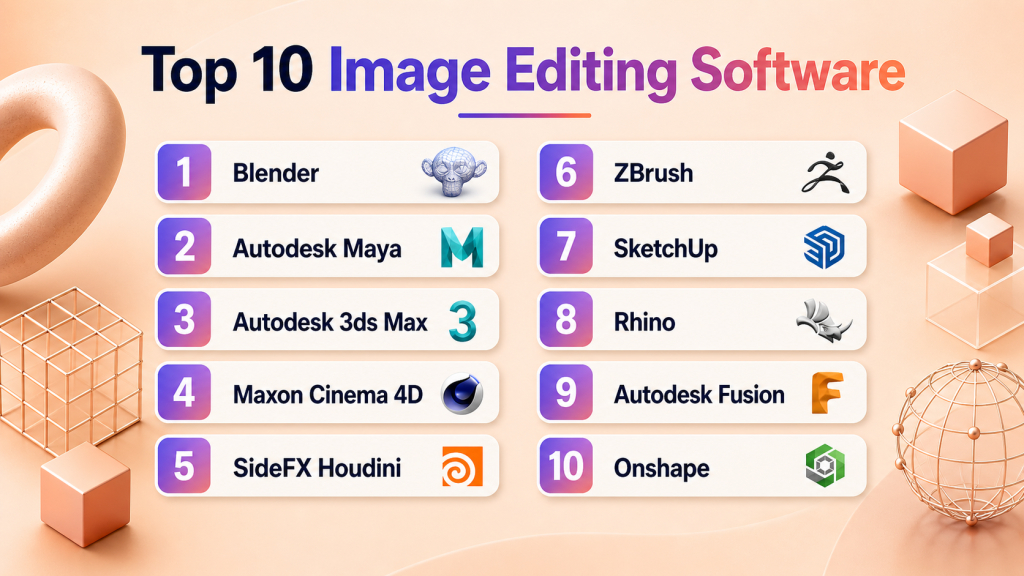
Top 10 3D Modeling Tools
1 — Blender
Short description: Blender is a powerful open-source 3D creation suite for modeling, sculpting, animation, rendering, simulation, and compositing. It is widely used by freelancers, educators, indie studios, artists, and teams that want professional capability without high licensing costs.
Key Features
- Polygon modeling, sculpting, UV editing, rigging, and animation
- Built-in rendering tools for real-time and production-style workflows
- Geometry Nodes for procedural modeling and reusable systems
- Simulation tools for particles, cloth, fluids, and effects
- Large add-on ecosystem for extended workflows
- Broad file format support for asset exchange
- Open-source flexibility with strong customization options
Pros
- Excellent value because it is free and highly capable.
- Strong community, tutorials, plugins, and learning resources.
- Suitable for many workflows, from game assets to animation and visualization.
Cons
- Interface can feel complex for beginners.
- Enterprise-grade support may require third-party services.
- Specialized CAD workflows are better handled by dedicated engineering tools.
Platforms / Deployment
Windows / macOS / Linux
Self-hosted desktop installation
Security & Compliance
Not publicly stated. Local usage can support private workflows depending on the user’s system, storage, and internal security practices.
Integrations & Ecosystem
Blender works well in creative pipelines because it supports many standard 3D formats, plugins, scripting, and export workflows. It can connect with rendering engines, game engines, texture tools, and asset libraries.
- FBX, OBJ, STL, glTF, Alembic, and USD workflows
- Python scripting support
- Game engine export workflows
- Rendering and material add-ons
- Asset library integrations
- Community-built workflow extensions
Support & Community
Blender has a large global community, strong documentation, tutorials, forums, training content, and active add-on development. Formal business support usually comes from consultants, vendors, or internal studio teams.
2 — Autodesk Maya
Short description: Autodesk Maya is a professional 3D modeling, animation, rigging, and visual effects platform. It is best suited for studios and production teams that need advanced character animation, pipeline customization, and high-end asset workflows.
Key Features
- Advanced polygon and NURBS modeling tools
- Strong rigging and character animation capabilities
- Powerful scripting and pipeline customization
- Simulation and effects workflows
- Support for professional rendering pipelines
- Broad plugin and renderer ecosystem
- Strong asset and scene management capabilities
Pros
- Excellent for character animation and studio pipelines.
- Deep customization through scripting and plugins.
- Strong fit for professional animation, games, and visual effects workflows.
Cons
- Steep learning curve for beginners.
- Pricing can be challenging for smaller teams.
- Some modeling workflows may require companion tools or plugins.
Platforms / Deployment
Windows / macOS / Linux
Desktop / Cloud-account managed licensing depending on plan
Security & Compliance
Account administration and user management features may be available depending on the plan. Specific certifications should be validated directly. If not confirmed, use Not publicly stated.
Integrations & Ecosystem
Maya fits well into large creative pipelines through file exchange, renderer support, scripting, and studio customization. It is often used alongside sculpting, texturing, compositing, game engine, and rendering tools.
- FBX, OBJ, Alembic, USD, and other production formats
- Python and MEL scripting
- Renderer plugins
- Game engine workflows
- Asset pipeline integrations
- Autodesk ecosystem compatibility
Support & Community
Maya has extensive documentation, professional training resources, learning content, forums, and a strong production community. Support levels depend on subscription, region, and business plan.
3 — Autodesk 3ds Max
Short description: Autodesk 3ds Max is a professional 3D modeling, rendering, and visualization platform. It is especially popular for architecture, interior design, product visualization, game environments, and hard-surface modeling.
Key Features
- Polygon and spline-based modeling workflows
- Modifier stack for flexible non-destructive editing
- Strong architectural visualization capabilities
- Large plugin ecosystem for rendering and production workflows
- Asset assembly and scene management features
- Good support for hard-surface and environment modeling
- Integration with design and rendering pipelines
Pros
- Strong for architectural visualization and product presentation.
- Mature plugin ecosystem with many professional extensions.
- Efficient modeling workflow for hard-surface and scene-based work.
Cons
- Platform availability is limited compared with some competitors.
- Licensing cost may be high for smaller studios.
- Character animation workflows are usually stronger in Maya.
Platforms / Deployment
Windows
Desktop / Cloud-account managed licensing depending on plan
Security & Compliance
Administrative controls may be available depending on Autodesk plan and account setup. Specific certifications should be verified directly. If uncertain, use Not publicly stated.
Integrations & Ecosystem
3ds Max works well with visualization, rendering, CAD import, and environment design workflows. It is often used by architecture studios, design teams, and game asset creators.
- CAD file import workflows
- FBX, OBJ, Alembic, and related formats
- Rendering engine plugins
- Visualization and material libraries
- Game engine export workflows
- Autodesk ecosystem integrations
Support & Community
3ds Max has strong documentation, tutorials, professional training resources, and a mature visualization community. Support depends on subscription plan and vendor service tier.
4 — Maxon Cinema 4D
Short description: Cinema 4D is a professional 3D modeling, animation, rendering, and motion graphics platform. It is known for its approachable workflow and is widely used by designers, agencies, broadcast teams, and motion graphics artists.
Key Features
- Intuitive modeling and animation workflow
- Strong motion graphics toolset
- Procedural and parametric design options
- Rendering and simulation workflow support
- Useful scene layout and object management tools
- Good integration with creative production workflows
- Plugin ecosystem for effects, rendering, and animation
Pros
- Easier to learn than many advanced 3D platforms.
- Excellent for motion graphics and design-led 3D work.
- Strong fit for creative agencies and visual content teams.
Cons
- Advanced technical pipelines may require additional tools.
- Pricing can be significant for individual users.
- Deep simulation workflows may be better handled by specialized tools.
Platforms / Deployment
Windows / macOS
Desktop / Cloud-account managed licensing depending on plan
Security & Compliance
Enterprise controls may depend on subscription and account setup. Specific compliance certifications are Not publicly stated unless confirmed directly by the buyer.
Integrations & Ecosystem
Cinema 4D fits naturally into creative production workflows. It is commonly used with compositing, rendering, motion design, and visual effects tools.
- Common 3D exchange formats
- Renderer integrations
- Motion graphics workflows
- Creative production tool compatibility
- Plugin ecosystem for animation and effects
- Asset and material workflow support
Support & Community
Cinema 4D has strong documentation, learning materials, tutorials, professional training, and a large motion design community. Support availability depends on plan and region.
5 — SideFX Houdini
Short description: Houdini is a procedural 3D modeling, animation, simulation, and visual effects platform. It is best for technical artists, studios, and teams that need node-based workflows, automation, simulations, and scalable asset creation.
Key Features
- Node-based procedural modeling environment
- Advanced simulation for fluids, smoke, destruction, particles, and effects
- Digital asset creation for reusable production workflows
- Strong terrain, environment, and generative modeling tools
- Pipeline automation and scripting support
- Integration with game engines and visual effects pipelines
- Powerful control for technical artists and pipeline teams
Pros
- Exceptional procedural control and automation.
- Excellent for simulations, environments, and effects-heavy workflows.
- Scales well for complex production pipelines.
Cons
- Steep learning curve for non-technical users.
- Overkill for simple modeling tasks.
- Requires planning and technical knowledge to unlock full value.
Platforms / Deployment
Windows / macOS / Linux
Desktop / Hybrid pipeline deployment depending on studio setup
Security & Compliance
Not publicly stated. Security depends on licensing setup, local environment, pipeline controls, and asset storage practices.
Integrations & Ecosystem
Houdini integrates deeply with visual effects, animation, rendering, simulation, and game development workflows. Its procedural assets can be reused across multiple production environments.
- Game engine integrations
- USD, Alembic, FBX, OBJ, and related formats
- Renderer support
- Python scripting
- Digital asset workflows
- Procedural content pipelines
Support & Community
Houdini has strong official documentation, learning resources, forums, and a dedicated technical community. Its user base is especially active among visual effects artists, technical artists, and procedural designers.
6 — ZBrush
Short description: ZBrush is a digital sculpting and modeling platform used for characters, creatures, collectibles, organic forms, and high-detail assets. It is best for artists who need sculptural freedom and detailed surface creation.
Key Features
- High-resolution digital sculpting workflow
- Advanced brush system for organic modeling
- Detail creation for characters, creatures, and props
- Retopology and mesh refinement workflows
- Useful for concept art and production asset creation
- Support for 3D printing preparation workflows
- Strong role in character and collectible design pipelines
Pros
- Excellent for organic sculpting and high-detail forms.
- Strong fit for character artists and creature designers.
- Flexible artistic workflow for concept and production models.
Cons
- Interface can feel unusual to new users.
- Not ideal as a complete general-purpose 3D pipeline by itself.
- Precision CAD-style modeling is better handled by other tools.
Platforms / Deployment
Windows / macOS
Desktop
Security & Compliance
Not publicly stated. Security depends on local system controls, account setup, and file storage practices.
Integrations & Ecosystem
ZBrush is commonly used as part of a larger 3D production workflow. Artists often combine it with modeling, animation, rendering, retopology, and texturing tools.
- OBJ and FBX workflows
- Sculpting-to-retopology pipelines
- Character art workflows
- 3D printing preparation
- Integration with rendering and texturing tools
- Companion use with Maya, Blender, 3ds Max, and similar platforms
Support & Community
ZBrush has a large professional artist community, many tutorials, training resources, and portfolio-focused learning materials. Support depends on licensing and vendor service availability.
7 — SketchUp
Short description: SketchUp is an accessible 3D modeling tool used for architecture, interiors, construction concepts, landscape planning, and quick spatial modeling. It is best for users who want fast concept design rather than complex animation or sculpting.
Key Features
- Simple and beginner-friendly modeling interface
- Strong architectural and interior design workflow
- Large model library and extension ecosystem
- Web and desktop options depending on plan
- Useful for quick client presentations
- Good support for layout and visualization workflows
- Practical toolset for education and construction concepts
Pros
- Easy to learn and fast for concept modeling.
- Strong fit for architecture, interiors, and layout planning.
- Useful for visual communication with clients and stakeholders.
Cons
- Not ideal for advanced animation or visual effects.
- Organic modeling capabilities are limited.
- Advanced workflows may require extensions or companion tools.
Platforms / Deployment
Web / Windows / macOS
Cloud / Desktop depending on plan
Security & Compliance
Account and cloud features may include administrative controls depending on plan. Specific compliance certifications are Not publicly stated unless confirmed directly.
Integrations & Ecosystem
SketchUp has a useful ecosystem for architecture, design, rendering, and construction workflows. Its model libraries and extensions help users move quickly from idea to presentation.
- 3D model library workflows
- Rendering extensions
- CAD import/export depending on plan
- Layout and presentation workflows
- Architecture and construction plugins
- Common 3D exchange formats
Support & Community
SketchUp has broad documentation, education resources, tutorials, and a large user community. Support options vary by plan and region.
8 — Rhino
Short description: Rhino is a versatile 3D modeling tool known for precision NURBS modeling, surface design, architecture, industrial design, jewelry, and fabrication workflows. It is best for designers who need accurate geometry and flexible modeling control.
Key Features
- NURBS-based precision modeling
- Strong surface modeling capabilities
- Useful for architecture, product design, jewelry, and fabrication
- Grasshopper support for visual programming and parametric design
- Broad file format compatibility
- 3D printing, CNC, and fabrication workflow support
- Flexible modeling environment for technical and creative users
Pros
- Excellent for precise surface modeling.
- Strong computational design ecosystem through Grasshopper.
- Broad use across architecture, product design, and fabrication.
Cons
- Rendering and animation may require companion tools.
- Beginners may need time to learn precision modeling concepts.
- Collaboration features may be less centralized than cloud-native platforms.
Platforms / Deployment
Windows / macOS
Desktop
Security & Compliance
Not publicly stated. Security depends on local deployment, license setup, and storage environment.
Integrations & Ecosystem
Rhino has a strong ecosystem for computational design, CAD exchange, fabrication, and visualization. It is frequently used in architecture, industrial design, and advanced geometry workflows.
- Grasshopper visual programming
- CAD and fabrication file workflows
- Rendering plugins
- 3D printing and CNC workflows
- Architecture and engineering integrations
- Common 3D and CAD exchange formats
Support & Community
Rhino has strong documentation, tutorials, user forums, and a global design community. Grasshopper also has a highly active technical and computational design community.
9 — Autodesk Fusion
Short description: Autodesk Fusion is a cloud-connected 3D design and CAD platform for product design, mechanical modeling, simulation, manufacturing, and collaboration. It is best for product teams, engineers, makers, and startups that need design-to-prototype workflows.
Key Features
- Parametric and direct modeling workflows
- CAD, CAM, simulation, and manufacturing features
- Cloud-connected collaboration and project management
- Mechanical assembly and design iteration support
- Useful for prototyping and fabrication workflows
- Integrated manufacturing and machining capabilities
- File sharing and version-aware collaboration features
Pros
- Strong balance of CAD, collaboration, and manufacturing tools.
- Good fit for product design and engineering teams.
- Useful for makers, startups, and professional design teams.
Cons
- Requires learning CAD concepts for best results.
- Cloud-connected workflows may not suit every security policy.
- Organic sculpting and entertainment workflows are not its main strength.
Platforms / Deployment
Windows / macOS / Web access for some collaboration workflows
Cloud-connected desktop platform
Security & Compliance
Enterprise administration and cloud account controls may be available depending on plan. Specific certifications should be validated directly. If uncertain, use Not publicly stated.
Integrations & Ecosystem
Fusion connects design, engineering, manufacturing, and collaboration workflows. It is useful for teams that move from digital model to prototype, machining, or production planning.
- CAD import/export workflows
- Manufacturing and CAM workflows
- Simulation workflows
- Collaboration and project sharing
- Autodesk ecosystem integrations
- Add-ins and extensions
Support & Community
Fusion has strong documentation, tutorials, maker community resources, and professional support options depending on plan. Its community is active among product designers, engineers, educators, and fabrication users.
10 — Onshape
Short description: Onshape is a cloud-native CAD and 3D modeling platform designed for product development, engineering collaboration, and browser-based design workflows. It is best for distributed teams that need real-time collaboration and built-in version control.
Key Features
- Cloud-native browser-based CAD workflow
- Real-time collaboration and version control
- Parametric modeling and assembly design
- Access from multiple devices without traditional file handling
- Built-in data management approach
- Useful for distributed engineering teams
- Structured design review and collaboration workflows
Pros
- Strong collaboration and version control model.
- Browser-based access reduces local setup complexity.
- Good fit for distributed product design teams.
Cons
- Cloud-first workflow may not fit every security policy.
- Less suitable for sculpting, animation, or visual effects workflows.
- Requires reliable internet access for best experience.
Platforms / Deployment
Web / iOS / Android
Cloud
Security & Compliance
Team and enterprise plans may include administrative controls such as permissions and access management. Specific certifications should be validated directly. If uncertain, use Not publicly stated.
Integrations & Ecosystem
Onshape supports product development workflows through cloud collaboration, CAD exchange, and connected engineering processes. It is useful for teams that want to reduce traditional file management problems.
- CAD import/export workflows
- Product development collaboration
- Version and release management workflows
- Mobile access
- API and app ecosystem depending on plan
- Engineering and manufacturing workflow integrations
Support & Community
Onshape provides documentation, learning resources, onboarding materials, and support options depending on plan. Its community is active among cloud CAD users, educators, and product development teams.
Comparison Table Top 10
| Tool Name | Best For | Platform(s) Supported | Deployment | Standout Feature | Public Rating |
|---|---|---|---|---|---|
| Blender | Freelancers, studios, educators, indie creators | Windows, macOS, Linux | Self-hosted desktop | Free full 3D creation suite | N/A |
| Autodesk Maya | Animation, visual effects, character pipelines | Windows, macOS, Linux | Desktop / Cloud-account managed | Advanced rigging and animation | N/A |
| Autodesk 3ds Max | Architecture, visualization, hard-surface modeling | Windows | Desktop / Cloud-account managed | Modifier-based visualization workflow | N/A |
| Cinema 4D | Motion graphics and creative studios | Windows, macOS | Desktop / Cloud-account managed | Motion design workflow | N/A |
| Houdini | Procedural modeling, simulations, visual effects | Windows, macOS, Linux | Desktop / Hybrid pipeline | Node-based procedural control | N/A |
| ZBrush | Sculpting, characters, creatures, collectibles | Windows, macOS | Desktop | High-detail digital sculpting | N/A |
| SketchUp | Architecture, interiors, concept design | Web, Windows, macOS | Cloud / Desktop | Fast conceptual modeling | N/A |
| Rhino | Industrial design, architecture, fabrication | Windows, macOS | Desktop | NURBS and Grasshopper workflows | N/A |
| Autodesk Fusion | Product design, CAD, prototyping | Windows, macOS, Web collaboration | Cloud-connected desktop | CAD, CAM, and collaboration mix | N/A |
| Onshape | Cloud CAD and distributed engineering teams | Web, iOS, Android | Cloud | Real-time CAD collaboration | N/A |
Evaluation & Scoring of 3D Modeling Tools
| Tool Name | Core 25% | Ease 15% | Integrations 15% | Security 10% | Performance 10% | Support 10% | Value 15% | Weighted Total 0–10 |
|---|---|---|---|---|---|---|---|---|
| Blender | 9 | 7 | 8 | 6 | 8 | 9 | 10 | 8.35 |
| Autodesk Maya | 9 | 6 | 9 | 7 | 8 | 8 | 6 | 7.85 |
| Autodesk 3ds Max | 8 | 7 | 8 | 7 | 8 | 8 | 6 | 7.55 |
| Cinema 4D | 8 | 8 | 8 | 7 | 8 | 8 | 7 | 7.75 |
| Houdini | 9 | 5 | 8 | 6 | 9 | 8 | 7 | 7.75 |
| ZBrush | 9 | 6 | 7 | 6 | 8 | 8 | 7 | 7.45 |
| SketchUp | 7 | 9 | 7 | 7 | 7 | 8 | 8 | 7.55 |
| Rhino | 8 | 7 | 8 | 6 | 8 | 8 | 8 | 7.60 |
| Autodesk Fusion | 8 | 7 | 8 | 7 | 8 | 8 | 8 | 7.75 |
| Onshape | 8 | 8 | 8 | 8 | 8 | 8 | 7 | 7.90 |
The scoring is comparative and should be used as a practical starting point. A higher score does not mean one tool is the best choice for every workflow. Houdini may be the best option for procedural effects, while SketchUp may be better for fast architectural concepts. Blender offers exceptional value, while Maya, Fusion, and Onshape may be stronger fits for specific professional pipelines. Buyers should validate performance, integrations, licensing, security, and training needs through a pilot before making a final decision.
Which 3D Modeling Tool Is Right for You?
Solo / Freelancer
Solo creators should prioritize affordability, learning resources, export flexibility, and portfolio-ready output. Blender is a strong all-around choice because it includes modeling, sculpting, rendering, animation, and compositing in one free platform. It is especially useful for creators who want flexibility without heavy licensing costs.
For architectural freelancers, SketchUp is easier for quick concept modeling and client presentations. For character artists and sculptors, ZBrush is a better fit because it focuses on high-detail organic modeling. For product designers and makers, Autodesk Fusion or Rhino may be more practical because they support precision modeling and fabrication workflows.
SMB
Small and midsize businesses should focus on adoption speed, licensing cost, team collaboration, and workflow fit. Cinema 4D works well for creative agencies and motion design teams because it is approachable and production-friendly. Blender is attractive for budget-conscious studios that are comfortable building internal workflows and training.
Architecture and interior design teams may prefer SketchUp for speed or Rhino for precision. Product design teams should evaluate Fusion and Onshape, especially when collaboration, revision control, and manufacturing workflows are important.
Mid-Market
Mid-market teams usually need stronger pipeline control, repeatable workflows, reliable file exchange, and support options. Maya, 3ds Max, Cinema 4D, and Houdini are strong choices for creative production teams. Rhino, Fusion, and Onshape are stronger for industrial design, engineering, architecture, and product development.
Many mid-market teams may need more than one tool. For example, a studio might use ZBrush for sculpting, Maya for animation, Blender for asset preparation, and a game engine for real-time output. The best setup depends on the production pipeline.
Enterprise
Enterprise buyers should evaluate governance, license management, admin controls, security posture, vendor support, and integration with internal systems. Maya, 3ds Max, and Fusion are often considered for professional design and production environments. Onshape is relevant for cloud-native CAD collaboration and distributed engineering workflows.
Enterprises with advanced procedural content, simulation, or visual effects needs should evaluate Houdini. Teams using open-source tools like Blender should plan internal support, approved add-ons, version standards, and asset governance.
Budget vs Premium
For budget-sensitive teams, Blender offers the strongest value because it is free and highly capable. SketchUp can also be cost-effective for basic architectural and layout workflows depending on plan needs.
Premium tools such as Maya, 3ds Max, Cinema 4D, Houdini, and ZBrush are better justified when their specialized capabilities directly support professional output, client work, production quality, or team efficiency. Buyers should compare license cost against training, productivity, support, and integration value.
Feature Depth vs Ease of Use
If ease of use matters most, SketchUp, Cinema 4D, and Onshape are practical options. They reduce setup friction and help teams start producing useful work quickly.
If feature depth is more important, Maya, Houdini, Blender, ZBrush, and Rhino offer deeper control for specialized workflows. The trade-off is that advanced capability often requires more training and stronger workflow discipline.
Integrations & Scalability
Integration needs depend on where the model goes after creation. Game teams should test real-time export workflows. Product teams should validate CAD compatibility. Architecture teams should check rendering and presentation tools. Studios should test render farms, asset management, naming conventions, and file exchange.
Maya, Houdini, Blender, and 3ds Max are strong in production pipelines. Fusion, Rhino, and Onshape are stronger for design, engineering, and fabrication ecosystems.
Security & Compliance Needs
Security-focused teams should validate SSO, MFA, role-based permissions, audit logs, encryption, admin controls, cloud storage behavior, and vendor compliance documentation directly. Do not assume compliance claims unless they are clearly confirmed.
For sensitive product designs, unreleased assets, or regulated workflows, buyers should involve IT, security, legal, and procurement teams. Desktop tools may offer local control, while cloud tools may offer centralized access management and collaboration governance.
Frequently Asked Questions FAQs
1. What is a 3D modeling tool?
A 3D modeling tool is software used to create digital three-dimensional objects, scenes, and assets. These models can be rendered, animated, printed, manufactured, simulated, or used in interactive environments.
2. What is the best 3D modeling tool overall?
There is no single best tool for everyone. Blender is strong for broad creative work, Maya is strong for animation, Houdini is strong for procedural effects, and Fusion or Onshape is better for product design.
3. Which 3D modeling tool is best for beginners?
SketchUp is very beginner-friendly for architectural concepts and spatial design. Blender is also a strong beginner option for users who want a free tool with broader creative capabilities.
4. Which tool is best for professional animation?
Autodesk Maya is widely used for advanced character animation, rigging, and studio workflows. Cinema 4D is also strong for motion graphics and design-led animation.
5. Which tool is best for sculpting characters?
ZBrush is one of the strongest tools for detailed character sculpting, creatures, collectibles, and organic forms. Blender also includes sculpting features and can be useful for all-in-one workflows.
6. Are free 3D modeling tools good enough for professional work?
Yes, free tools like Blender can support professional-quality output. Teams should still evaluate training, plugins, collaboration, pipeline needs, and support before standardizing on any tool.
7. What pricing models are common for 3D modeling tools?
Common pricing models include free open-source licensing, monthly subscriptions, annual subscriptions, education plans, commercial plans, and enterprise plans. Exact pricing varies by vendor and plan.
8. How long does onboarding usually take?
Simple tools can be learned faster for basic tasks, while advanced tools may take much longer to master. Training time depends on user experience, workflow complexity, and project requirements.
9. What are common mistakes when choosing a 3D modeling tool?
A common mistake is choosing based only on popularity. Teams should test file formats, rendering needs, hardware performance, collaboration, licensing, and integration requirements before deciding.
10. Which tools are best for product design and prototyping?
Autodesk Fusion, Onshape, and Rhino are strong choices for product design and prototyping. Fusion is useful for CAD and manufacturing workflows, while Onshape is strong for cloud collaboration.
11. Which tools are best for architecture and interior design?
SketchUp is useful for fast architectural concepts and interior layouts. Rhino is better for precision and computational design, while 3ds Max is strong for architectural visualization.
12. How important are integrations in 3D modeling software?
Integrations are very important because models often move between design, rendering, animation, game engines, manufacturing, or client review tools. Buyers should test import and export quality before purchasing.
13. Can teams switch 3D modeling tools easily?
Switching is possible, but it can be difficult. File compatibility, plugins, asset libraries, render settings, team training, and workflow habits can all affect migration.
14. What security features should enterprises evaluate?
Enterprises should evaluate SSO, MFA, role-based access, audit logs, encryption, cloud storage controls, vendor documentation, and admin features. If a claim is not clearly verified, treat it as Not publicly stated.
15. What are alternatives to 3D modeling tools?
Alternatives include 2D design tools, CAD-only tools, game engines, product configurators, AR or VR authoring tools, and outsourced 3D design services. The right alternative depends on the required output.
Conclusion
3D modeling tools are essential for creative production, product design, architecture, games, simulation, ecommerce visuals, and immersive digital experiences. The best tool depends on the workflow: Blender is a strong all-around value choice, Maya and 3ds Max fit professional production and visualization, Cinema 4D is excellent for motion graphics, Houdini is ideal for procedural and simulation-heavy work, ZBrush is best for sculpting, while SketchUp, Rhino, Fusion, and Onshape serve architecture, product design, fabrication, and cloud CAD needs.
The practical next steps are simple: shortlist 2–3 tools based on your main use case, run a pilot using real project files, and verify integrations, performance, learning curve, licensing, and security requirements before scaling across your team.

Find Trusted Cardiac Hospitals
Compare heart hospitals by city and services — all in one place.
Explore Hospitals
As models become bigger, files can become slow to open, difficult to share, and expensive to store. Teams should have clear asset naming, version control, file cleanup, and backup practices. This can make the workflow faster and also prevent important assets from getting lost or duplicated.